Developing for the Ant64
Three languages, one API. AntOS applications are native C++ programs linking the same libraries the system uses. AntBASIC is built in and needs nothing installed. Luau is a scripting layer over that same C++ API — a binding, not a substitute. Nothing here is a sandbox you have to escape.
The short version
You can write for the Ant64 in whichever of these suits the job, and mix them freely in one project.
| What it is | You need | Reaches | |
|---|---|---|---|
| C++ | Native applications and libraries, compiled to the machine | A toolchain — cross-compile from a PC, or build on the Ant64 itself | Everything. The full AntOS API, the hardware, the FPGA |
| AntBASIC | A complete BASIC built into the machine, with inline assemblers | Nothing. Turn the machine on and type | The AntOS API, and assembly for the hot parts |
| Luau | Fast, modern scripting — commands, tools, glue | Nothing; scripts live on the machine | The AntOS API, through bindings over the same C++ cores |
And assembly, on both processors, without a toolchain. AntBASIC carries two inline assemblers — ARM64 for DeMon and RISC-V for the FPGA cores — so dropping to native code on either processor is something you can do from the machine itself, with nothing installed. C++ on either side takes inline assembly as usual, and DeMon being Linux means the ordinary assembler and linker are there too.
These are not separate worlds. Every AntOS library is one native core — libantos_fs, libantos_net, libantos_floppy and the rest — with a thin binding on top. A Luau script calling fs.dir() and a C++ program calling into libantos_fs are reaching the same code. Scripting is a convenience layer, and it is not the boundary of what you are allowed to do.
If you have read that the Ant64 is "a Luau scripting machine", that is a misreading of a documentation set that happens to have a lot of Luau pages in it. The C++ API is the primary one; Luau is the friendly face on it.
First: which processor are you writing for?
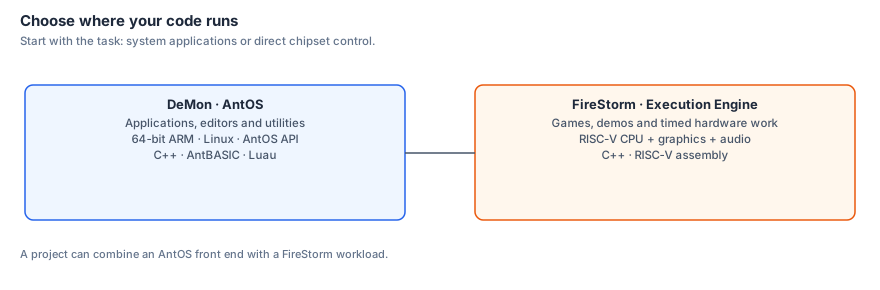
The Ant64 has two, and this is the fork that decides everything else. It is worth being clear about before choosing a language, because "write a program for the Ant64" means two quite different things.
| DeMon — the AntOS side | FireStorm — the FPGA side | |
|---|---|---|
| CPU | 64-bit ARM (Raspberry Pi Compute Module), Linux underneath | Custom RV64GC core — the Execution Engine (EE) — plus eight Ant64 extensions |
| Runs | AntOS — the desktop, the shell, tools, apps, networking, storage | The machine's real-time half: Blaze graphics, Tempest audio, the copper, the blitter |
| You write | Applications, utilities, servers, creative tools, UI | Games, demos, synths — anything that wants the beam and sample-accurate timing |
| Feels like | A modern OS with a real API | A 68000 with a chipset welded to it, in one clock domain |
| Languages | C++, ARM64 assembly, AntBASIC, Luau | C++, RISC-V assembly, AntBASIC's RISC-V assembler |
A demo coder chasing the raster wants FireStorm. Someone writing a sample editor, a network tool or a paint program wants AntOS. Plenty of real projects are both — an AntOS front end driving a FireStorm core — and the two talk to each other by design.
The rest of this page is mostly the AntOS side. FireStorm has its own: FireStorm », graphics », audio ».
C++ — the native API
This is the primary way to write software for AntOS, and it is a full one. Native programs are ordinary 64-bit ARM executables with the whole AntOS API available to them: the filesystem and DBFS, drive letters, the network stack, the UI, audio, the LED string, NFC, the FPGA link, the floppy and flux layer — all of it.
The API comes in two families:
libantos_*— the libraries.libantos_fs,libantos_io,libantos_data,libantos_net,libantos_gui,libantos_floppy, and so on: one native core per library, plain C ABI, documented on theantos_*reference pages. Every one of those pages describes a library you can link, not merely an internal detail.- *`sys_`** — the system surface underneath: storage volumes and letter lookup, tasks, settings, the event log, the device links.
Because AntOS runs on Linux, native code also gets everything that implies — POSIX, threads, sockets, the standard C++ library, and third-party libraries you bring yourself. You are not restricted to the AntOS API; it is an addition to a full system, not a cage around a small one.
There are two ways to build:
- Cross-compile from a PC — an ARM64 toolchain with an AntOS sysroot, driven by CMake, editing over SSH from your usual editor. The fast path for real projects.
- Build on the machine — the Ant64 has a compiler. Slower for big projects, unbeatable for trying something.
Getting started with C++ » · Library reference »
Existing Linux software ports with little work
AntOS runs on Linux, on 64-bit ARM. That is not an implementation detail you have to work around — it is a software base you inherit, and it means the Ant64 does not start from zero the way a new machine normally does.
- Command-line and headless software is essentially a recompile. Compilers, interpreters, servers, converters, encoders, archivers, image and audio tools, emulators, network utilities — if it builds for ARM64 Linux, it builds here. AntOS's console does VT100, so terminal programs behave the way they should.
- Libraries come with it. The standard C and C++ libraries, POSIX, threads, sockets, and whatever third-party libraries you bring. Nothing has to be reimplemented against a bespoke API before you can start.
- GUI software needs its display layer redirected, and that is the one place real work appears. A program expecting X11 or Wayland has to be pointed at AntOS's surface instead — the same task as porting to any embedded Linux target, and much easier for anything already using SDL or a framebuffer.
The honest summary: terminal software is a recompile, graphical software is a port. Both are ordinary work with well-known shapes, rather than the "rewrite everything against a proprietary API" that a new platform usually demands.
Two things follow that are easy to miss. Existing cross-development tooling runs on the machine itself — compilers, debuggers, editors, version control — so the Ant64 can be its own development system rather than needing a PC attached. And an existing Linux emulator or interpreter ported here gains something it did not have: FireStorm underneath it, and a chipset in the same box.
AntBASIC — nothing to install
Every machine that taught people to program had a language waiting when you turned it on. AntBASIC is that: a complete BASIC built into AntOS — line-numbered and tokenised in the BBC / Microsoft tradition, with a program store, variables, PROC/FN, save and load.
It is not a toy laid on top. AntBASIC reaches the AntOS API — files, graphics, sound, input — and carries two inline assemblers: ARM64 for DeMon, RISC-V for the FPGA cores. So a BASIC program can drop straight to native code for its inner loop on either processor, which is exactly the shape of how people wrote games on the machines the Ant64 descends from — and a nice trick besides: a BASIC running on the ARM, assembling code for the FPGA.
Worth knowing that the speed argument has inverted. Because AntBASIC executes on DeMon's CM5 — thousands of times faster than the 8-bit micros BASIC grew up on — even interpreted BASIC here outruns hand-optimised assembly from the 1980s. The assemblers are there because native code is fun and occasionally necessary, not because BASIC is too slow.
This is the answer to "my kid wants to try programming" and to "I want to test an idea in ninety seconds", and it is the same answer.
Assembly — on either processor
Assembly is a first-class option on both sides of the machine, and there are two routes to it.
- From AntBASIC, with nothing installed — the ARM64 assembler for DeMon, the RISC-V one for FireStorm. Type it in and run it.
- From a toolchain — inline assembly in C++, or standalone
.sfiles. DeMon is Linux, so the ordinary ARM64 assembler and linker are simply there; FireStorm builds through the RISC-V toolchain, where the eight Ant64 extensions on top of RV64GC are the reason to be writing assembly in the first place.
Neither route is a special mode you have to unlock. FireStorm » covers the chipset registers and the extensions.
Luau — scripting, commands and glue
Luau is a fast, modern dialect of Lua. On AntOS it is the scripting layer: shell commands, automation, tools, UI glue, anything you want to change and re-run without a build step.
It is worth being precise about what it reaches, because this is the point that gets misread. The AntOS libraries are exposed to Luau through bindings over the very same native cores the C++ API uses — fs, io, db, net, data, gui, imgui, nfc, led, floppy, audio, crypto, and more. A script is not sealed off from the machine. It can list a directory, query the file catalogue with SQL, open a socket, drive the status LEDs, read an NFC card, put a window on the desktop, or read a real floppy at flux level.
Where a script genuinely does hit a limit — a tight inner loop, or something with no binding yet — the answer is not to fight it. Write that part in C++ and expose it. That is what the two-layer design is for.
Luau scripting hub » · The AntOS libraries »
Which should I use?
| If you want to… | Start with |
|---|---|
| Write an application, a tool, a server, a creative program | C++ |
| Write a game or demo that owns the raster and the audio clock | C++ or RISC-V assembly, on FireStorm |
| Hand-tune an inner loop on either processor | Assembly — from a toolchain, or straight from AntBASIC |
| Bring across software that already exists on Linux | Recompile it — a port only if it has a GUI |
| Add a command to the shell, or automate something | Luau |
| Try an idea right now, on the machine, with nothing installed | AntBASIC |
| Teach someone to program | AntBASIC, then Luau |
| Do something the scripting layer can't reach | C++ — and then bind it, so scripts can too |
There is no ladder here you are expected to climb, and no tier that is "the real one" you graduate to. Plenty of good software on this machine will be a C++ core with a Luau front end, or an AntBASIC program with an assembly inner loop.
The workbench is built in
The machine you develop on is set up for the job. The keyboard puts a programmer's toolkit in hardware: where the numeric keypad would sit is a touch panel running a numpad-and-programmer's-calculator (hex / dec / bin / oct, bitwise ops, shifts), and a BBC-style Copy key pulls text off the screen into your command line. The same panel doubles as a firmware-update and live-debug display, so bring-up and debugging have a front-of-box readout with no host attached.
For anyone developing a guest — a personality core, or an enhancement over an existing binary — the top-right jog dial pauses and scrubs the simulated system's speed from hardware, pairing naturally with probe's non-invasive tag breakpoints: pause the guest, read a debug view, step, resume. The panel can even stand in as the guest's original keyboard, supplying the keys the emulated machine had that the Ant64 board lacks.
During prototyping — before the custom keyboard exists — any USB keyboard works, remapped by AntOS to the Ant64 layout; the development board is an off-the-shelf 75% with the Ant64 keycaps fitted.
Nothing is a walled garden
A few things worth stating plainly, because they are what make the difference between a machine you use and a machine you own:
- The whole API is documented and public — the same reference the system itself is built against.
- The Linux software base comes with it, rather than being walled off. Terminal software recompiles; graphical software ports.
- You can go all the way down. C++, then assembly, then the hardware registers. Nothing is hidden behind an abstraction you cannot get past.
- You can drive the machine "incorrectly", which is where techniques come from. See the Ant64 ».
- Your programs are yours. No store, no signing gate, no approval. Put a program on a card, a stick or a cartridge and it runs.
Find out more
- C++ quickstart » — toolchain, first program, linking the AntOS libraries
- AntBASIC » — the built-in language, and its two inline assemblers
- Luau scripting hub » · Script developer quickstart »
- The AntOS libraries » — the reference for all three languages
- AntOS » — the operating system itself
- FireStorm » — the Ant64 chipset (its CPU is the EE) in the FPGA
- Back to the Ant64 »