AntOS
A real-time, scriptable operating system where you can see what's running, change how the system behaves, and experiment freely — whether you're an experienced developer or completely new to computing.
Nothing is hidden. Nothing is fixed.
If you're curious about how computers actually work, AntOS is built for you.
Just want to start typing? The AntOS Quickstart covers the console commands you'll reach for first —
dir,copy,ping,editand friends — plus the one*/+/-argument convention that ties them all together.
A Real-Time, Programmable OS
Built on Linux (on the CM5), AntOS exposes the operating system itself — tasks, queues, timers, events, storage, and even the UI — through a public C++ API. The same API is bound into a Luau scripting environment and reachable from AntBASIC, so you write for this machine in whichever of the three suits the job.
Applications are native C++ programs. Scripting is a convenience layer over the same libraries — not a substitute for them, and not a fence around what you are allowed to touch. How to write software for the Ant64 »
Features
- Pre-emptive real-time multitasking
- Real-time ImGui-based UI layer — desktop overlay with a top menu, settings panel, wiki reader and notifications (see The On-Screen Overlay)
- Structured, database-backed storage — DBFS on SQLite
- Multi-tasking and multi-user design
- Persists across FPGA reload — personality cartridges and bitstream updates do not reboot the OS
- Built-in network services — FTP, Telnet, VideoText, GDB and AI access (see below)
- On-device wiki — DBFS-backed markdown docs with live system values (in development)
- Gossip decentralised network — peer-to-peer friends and messaging (in development)
Unlike traditional operating systems, AntOS is easy to modify, easy to inspect, and designed to be bent in unexpected ways.
If you can't do something weird with it, it's failed.
AntOS Isn't Windows or Linux
AntOS isn't trying to be a general-purpose desktop operating system.
| Traditional OS | AntOS |
|---|---|
| Process forest | Lightweight task model |
| Heavyweight drivers | Close-to-metal, minimal abstraction |
| Background services you didn't ask for | Only what you put there |
| Behaviour frozen at build time | Change anything at runtime — live Luau scripting over the same API your C++ programs use |
| System hidden behind policy layers | System handed directly to you |
| Reboot to update graphics drivers | Reload the FPGA chipset, OS keeps running |
Instead of freezing everything at build time, AntOS publishes its whole API — the C++ one applications are written against — and binds that same API into Luau, so system tools, commands, monitors and UI behaviour can be read and changed live. Nothing is reserved for the system: a program you write reaches exactly what AntOS reaches.
If you want a fixed environment,
Windows or Linux already do that very well.

AntOS is for when you want
the system to be part of the experiment.
Just Ask
Don't know the command? Start a line with ? and ask in plain English.
? games
? what does ping do
? recent files
? what's running
? large files
AntOS answers from the live system — it finds your files, reads program descriptions, checks what tasks are running, searches by tag. For open-ended questions it can hand off to an AI model (when you've configured one and the network is up), grounded in a list of your actual installed programs so the answer fits your machine, not a generic one. The provider plumbing behind that — and the planned tool-use / MCP layer — is the AI subsystem.
The whole natural-language interface is itself just a Luau script. Read it, change it, replace it.
Storage That Answers Questions
DBFS doesn't keep your files in folders pretending to be filing cabinets — it keeps them in a real database (SQLite). That means storage can do things a normal filesystem can't.
Tag a file games, another wip, a dozen music — then ask for every file tagged games, wherever it lives. Metadata, tags and relationships are first-class and queryable. It's the "nothing is hidden" principle applied to your data: the filesystem isn't an opaque block of sectors, it's something you can interrogate. On the hardware side the DBFS lives on a dedicated internal USB drive (D:) with a continuous shadow drive (D!:) on a paired port, so a primary-drive failure doesn't lose user data. The full set of drive letters, port assignments, and shadowing rules is covered in Filesystem & Drive Letters; the hardware side is in DeMon Storage. The same DBFS backing is what powers the on-device wiki — its pages are just markdown files in D:/wiki/, so they're versioned, shadow-backed, and searchable by SQL like any other data.
Because a DBFS is a mountable identity rather than a fixed disk, AntOS is designed to switch which one is active. Tapping a personal NFC card warm-restarts the system into your own DBFS — your setup, your files, your games — and typing Bye returns to the shared main drive. That card is just a URL (dbfs://dave), and the same scheme-dispatch mechanism also points at games and, in future, downloadable content. See NFC — Cards, DBFS Switching & the Game Manifest System for the full model.
Commands Are Just Scripts
There's no fixed list of built-in commands baked into the OS. When you type something AntOS doesn't recognise, it goes looking for a matching Luau script — on your DBFS drive, then in the built-in defaults — and runs it.
Want a new command? Drop a .lua file in scripts/. Want to change how ls works? Edit it. The commands are the scripts, and the scripts are yours.
For a tour of the commands that ship by default — and the shared argument style every one of them follows — see the AntOS Quickstart. Writing your own? The Script Developer Quickstart covers the argument parser, the terminal lifecycle, and the house conventions, and the AntOS libraries index the storage, terminal, network, data, and AI libraries those scripts call.
The Console Is a BASIC, Too
Type a line that starts with a number and AntOS doesn't look for a script — it stores a BASIC program line. The console boots into AntBASIC, a line-numbered, tokenised BASIC in the BBC / Microsoft tradition: Ready., PRINT, FOR … NEXT, GOTO, LIST, RUN, PROC/FN. A leading digit is a program line; a BASIC keyword runs immediately; anything else falls through to the script lookup above. And the classic commands (RUN, LIST, RENUMBER, SAVE) are themselves Luau scripts over a basic library — the engine is a service, the tooling is scripts, same as everything else here.
Here is the quiet joke of running it on modern silicon: because AntBASIC executes on DeMon's CM5 — thousands of times faster than the 8-bit micros BASIC grew up on — even a tokenised, interpreted BASIC program here runs faster than hand-optimised assembly did in the 1980s. AntBASIC even has two built-in assemblers — ARM64 for DeMon and RISC-V for the FPGA cores — but they are there because working in native code is fun and occasionally necessary, not because BASIC is too slow.
The On-Screen Overlay
AntOS draws a live overlay on top of whatever is on screen — the console, floating tool windows, the settings panel, and the wiki reader all share one desktop. A few touches make it feel less like a debug tool and more like a machine you live in:
- A menu that stays out of the way. Slide the pointer to the very top of the screen and a menu bar drops down — a quick way into Settings, the wiki, and (in future) system updates, without remembering a command. Move away and it tucks itself back up. It sits behind your windows, so a window near the top edge is still yours to grab and drag.
- Notifications. When something happens that's worth knowing — a backup finishes, someone connects over FTP, a job completes or fails — a brief message slides in near the top, and a small marker keeps count of anything unread. Open the Alerts list from the menu to read the history. Any part of the system can post one, so the machine tells you what it's doing instead of leaving you to guess.
- Settings you can see and change. The settings panel exposes the knobs that shape how AntOS behaves — network shares, the wiki source, interface animations, developer mode — with the changes taking effect live. It's the "nothing is fixed" principle given a front door.
- Smooth, optional motion. Menus, fades and transitions animate gently; if you'd rather have instant, static widgets (or want every last cycle for something else), one toggle in Settings turns all of it off.
The whole overlay can also be mirrored to a PC over the network (via netImgui), so you can drive the machine's UI from a big screen while the Ant64 does its thing — handy for development, or just for room.
Writing Software for AntOS
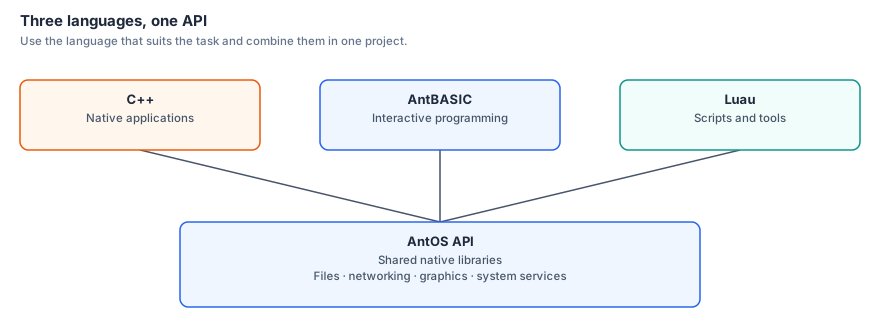
Three languages, one API — and you can mix them in a single project.
| What it is | You need | Reaches | |
|---|---|---|---|
| C++ | Native applications and libraries — the primary way to write for AntOS | A toolchain (cross-compile from a PC, or build on the machine) | Everything. The full AntOS API, Linux underneath it, the hardware, the FPGA |
| AntBASIC | A complete BASIC built into the machine, with ARM64 and RISC-V inline assemblers | Nothing — turn it on and type | The AntOS API, and native code where it matters |
| Luau | Scripting — commands, tools, automation, glue | Nothing | The AntOS API, through bindings over the same native libraries |
Every AntOS library is one native core with a thin binding on top — libantos_fs, libantos_net, libantos_gui, libantos_floppy and the rest. A Luau script calling fs.dir() and a C++ program linking libantos_fs are reaching the same code. There is no "scripting tier" you graduate out of, and no privileged API kept back for the system.
And because AntOS runs on Linux, native code gets everything that implies as well — POSIX, threads, sockets, the standard C++ library, and any third-party library you bring. The AntOS API is an addition to a full system, not a cage around a small one.
That cuts both ways, usefully: existing Linux software ports with little work. Command-line and headless programs are essentially a recompile for 64-bit ARM — compilers, interpreters, servers, converters, encoders, emulators, network tools — and the console does VT100, so they behave properly. Graphical programs need their display layer pointed at AntOS's surface, which is the same job as porting to any embedded Linux target and easier still for anything already on SDL. Terminal software is a recompile; graphical software is a port. Either way, the machine inherits a software base rather than starting from nothing.
How to write software for the Ant64 » · The AntOS libraries »
Three Ways Into a Running System
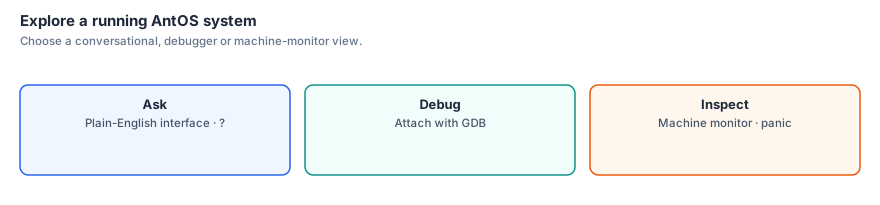
Separately from writing software, AntOS lets you inspect and control what is already running, at whatever level you like:
?— plain English. Ask the natural-language interface what's going on.- GDB — structured debugging. AntOS runs a GDB remote server: attach a debugger from a PC, or from another AntOS machine (it has the client side too), and inspect the live system. Debug one AntOS box from another.
panic— the bytes. A built-in machine-language monitor in the spirit of the 1980s.
When something goes wrong, AntOS doesn't just die and reboot — it drops you into panic, where you can poke around the live machine:
d addr [len]          dump memory in 16-byte rows
db addr b0 b1 ...     poke bytes
dw addr w0 ...        poke 32-bit words
f addr len byte       fill a region
m src dst len         copy memory
s addr len byte       search for a byte
crc addr len          checksum a region
save / load / verify  dump and restore memory regions
ps / tasks / heap     inspect what's running and memory use
A kernel panic isn't a dead end — it hands you the keys to the machine.
Built-in Network Services
The server code ships built in:
- FTP server — copy files over the network
- Telnet server — remote control and echo
- VideoText server — serve information and files, retro-style
- GDB server — attach a debugger from a PC or another AntOS machine
- AI access — scripts can call AI through the
ailibrary, once configured — see the AI subsystem for providers, use-types, and the planned MCP tool-use design - Gossip decentralised network — peer-to-peer messaging (in development)
On DeMon, the network-dependent features come online once networking is up — either wired Gigabit Ethernet or WiFi via the ESP32-C5 (Phreak). That bring-up is in active development.
Where AntOS Runs
AntOS runs on DeMon — the Raspberry Pi CM5 inside the Ant64: a quad-core ARM (Cortex-A72/A76) with gigabytes of RAM, running Linux. Wireless network services run alongside on the ESP32-C5 (Phreak); wired networking is the CM's built-in Gigabit Ethernet.
AntOS has three display surfaces it can render to:
- The main display (via DeMon's HDMI feed into the FPGA + chipset compositor → HDMI/VGA/DP) — only available when the FPGA is configured
- The keyboard touch panel — a portrait multi-touch screen where the numpad would sit (numpad-calculator, debug and firmware readouts, a game second-screen, and per-personality keys), driven directly by DeMon and always available regardless of FPGA state
- Network-attached terminals — VideoText / Telnet / FTP / debug server
When the FPGA is being reconfigured for a different personality (a personality cartridge insertion, a development bitstream flash, a recovery operation) the main display blanks briefly — a fraction of a second for the native chipset, up to ~1 second for a personality bitstream — but the touchscreen continues showing AntOS, so the user never loses visible contact with the system.
This placement is intentional. The Ant64's FireStorm Execution Engine (inside the FPGA) is the application processor — it runs games, demos, music engines, creative tools — at high speed with direct access to the chipset (sprites, blitter, copper, audio). AntOS does not run there: when the FPGA's bitstream is reloaded for a personality cartridge, FireStorm's binary image disappears for a moment. The OS lives somewhere stable.
   ┌─────────────────────────────────────────┐
   │ DeMon (Raspberry Pi CM5 + ESP32-C5)   │
   │                                         │
   │  ┌──────────────────────────────┐       │
   │  │ AntOS — kernel, UI, services │       │
   │  │  · Linux multitasking        │       │
   │  │  · C++ API (libantos_*)      │       │
   │  │  · AntBASIC + Luau over it   │       │
   │  │  · DBFS storage              │       │
   │  │  · Network stack             │       │
   │  │  · Debug server              │       │
   │  │  · NEON-accelerated AI/DSP   │       │
   │  └──────────────────────────────┘       │
   │                                         │
   │  HDMI → FPGA HDMI RX                    │
   │  PCIe → FireStorm chipset registers     │
   │  JTAG → FPGA bitstream                  │
   └─────────────────────────────────────────┘

   ┌─────────────────────────────────────────┐
   │ FireStorm FPGA — CPU + chipset          │
   │                                         │
   │  ┌──────────────────────────────┐       │
   │  │ User application / game      │       │
   │  │ Real-time chipset code       │       │
   │  │ Bare-metal or RTOS guests    │       │
   │  └──────────────────────────────┘       │
   │  Composites AntOS UI as a layer         │
   └─────────────────────────────────────────┘
Why Run AntOS on DeMon, Not on FireStorm?
- The OS persists. The FPGA boots its native Ant64 chipset from its own attached flash in a fraction of a second on power-on — and reloading a personality (cartridge swap, development iteration, recovery) takes up to ~1 second. During those windows the main display blanks (no FPGA chipset = no compositor), but AntOS keeps running on DeMon. As soon as the FPGA comes back up, the AntOS UI returns as a MIPI layer. No filesystem remount, no network reconnect, no application state lost. Resets always return the FPGA to its native chipset from flash; personality state is temporary by design.
- FireStorm is for performance. Games and demos want bare access to the chipset, predictable frame timing, and zero OS interference. AntOS-as-RTOS would compete for FireStorm cycles. With the OS elsewhere, FireStorm can run flat-out.
- The compositor model fits. DeMon feeds the FPGA over HDMI. The OS UI is just a video stream — naturally a display layer, naturally composited over whatever FireStorm is doing.
- NEON acceleration in the OS. The CM5's quad ARM cores (with NEON SIMD) and VideoCore GPU give AntOS real AI and DSP acceleration — speech recognition, image scaling, font rendering, ambient audio analysis — without needing a separate accelerator chip.
Designed Around the Hardware
AntOS exploits the specific hardware available on DeMon:
- Quad-core ARM (Cortex-A72/A76) with NEON SIMD for AI/DSP
- Gigabytes of RAM — plenty of room for application data, the kernel, and FPGA bitstream staging
- VideoCore GPU — available to AntOS for UI rendering and compute
- HDMI feed to FireStorm — UI rendered on DeMon, displayed by the chipset
- PCIe link into FireStorm — direct memory-mapped access to chipset registers for scripting, debugging, and asset upload
For workloads that need more — heavy emulation, large models, complex codecs — DeMon's own quad-core ARM handles them directly; FireStorm can additionally offload to the on-die A25 or to the CM via Xaccel, and personalities reach the same services through the Accelerator compatibility layer.
AntOS doesn't try to pretend the hardware isn't there. It's designed to let you use it deliberately.