C++ Quickstart
How to build your first native application for the Ant64. AntOS applications are
native C++ programs — they run on DeMon's CM5 under Linux (64-bit ARM)
and link the same libantos_* cores the system itself uses.
There is no bespoke SDK to learn before you can start: it is ordinary ARM64 Linux
C++, plus a set of libraries you link when you want them.
This guide covers the toolchain, a first program, and linking an AntOS library. For the bigger picture — the three-language model and why the C++ API is the primary one — see Developing for the Ant64.
This is a starting guide. A few machine-specific values below — the sysroot location, the exact toolchain package, per-library include paths — are marked
‹fill in›; take the authoritative values from the current SDK drop and each library's reference page.
What you're building
A program compiled to an ARM64 Linux ELF that runs on the Ant64 like any other
command. Because AntOS is Linux underneath, your program gets the whole standard
environment for free — POSIX, threads, sockets, the C++ standard library, and any
third-party library you bring — and the AntOS libraries sit on top of that, not
in place of it. You reach files, graphics, sound, input, the FPGA, and the rest by
linking the relevant libantos_* core.
The same binary shape covers everything from a one-file console tool to a full windowed application; you add libraries as the job needs them.
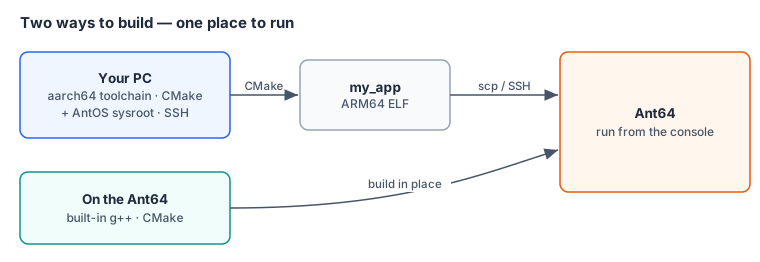
Two ways to build
| Path | What it is | When |
|---|---|---|
| Cross-compile from a PC | An ARM64 toolchain + an AntOS sysroot, driven by CMake, editing over SSH | The fast path for real projects |
| Build on the machine | The Ant64 carries a compiler — clone, g++, run |
Unbeatable for trying something; slower for big builds |
Neither is "the real one." A common shape is to develop over SSH from your usual editor and cross-compile, then occasionally build on the machine when you want to poke at something directly.
Setting up the cross-toolchain
You need two things on your PC: an ARM64 Linux C++ toolchain and the AntOS sysroot (the headers and libraries to link against).
-
Toolchain. AntOS targets standard
aarch64Linux, so the stock GNU ARM64 cross-compiler works — on Debian/Ubuntu that is theg++-aarch64-linux-gnupackage, giving youaarch64-linux-gnu-g++. (An LLVM/Clang cross setup works too; point--target=aarch64-linux-gnuat the same sysroot.) -
Sysroot. Fetch the AntOS sysroot from
‹fill in: SDK location›and unpack it somewhere stable, e.g.~/ant64/sysroot. It carries the system headers and thelibantos_*import libraries, so the cross-compiler resolves both libc and the AntOS API against the versions actually on the machine.
Building on the machine needs none of this — the compiler and the libraries are already installed; skip straight to the program.
Hello, AntOS
Nothing AntOS-specific is required to get a program running — start with plain C++:
// hello.cpp
#include <cstdio>

int main() {
    std::printf("Hello from the Ant64\n");
    return 0;
}
Cross-compile it against the sysroot:
aarch64-linux-gnu-g++ --sysroot=$HOME/ant64/sysroot \
    -O2 hello.cpp -o hello
Copy hello to the machine (see Getting it onto the machine)
and run it from the console. On the machine itself the same build is just
g++ -O2 hello.cpp -o hello.
Linking an AntOS library
The AntOS API is a set of native cores — libantos_fs, libantos_io,
libantos_net, libantos_gui, libantos_data, libantos_floppy, and the rest.
Each is plain C/C++ with a clean public header and no dependency on the script
VM, so a C++ program links it directly. A script calling fs.dir() and a C++
program calling into libantos_fs are reaching the same code — the Luau binding
is a thin shim over the core, not a reimplementation.
To use one, include its header and link its library. The pattern is one header and
one -l per core (libantos_fs → -lantos_fs):
// listdir.cpp
#include <cstdio>
#include <antos/fs.h>          // ‹fill in›: exact header — see the fs reference

int main() {
    for (auto& entry : antos::fs::dir("D:/")) {   // shape only; see the reference
        std::printf("%s\n", entry.name.c_str());
    }
    return 0;
}
aarch64-linux-gnu-g++ --sysroot=$HOME/ant64/sysroot \
-O2 listdir.cpp -o listdir -lantos_fsThe exact header path, namespace, and call signatures for each library live on
its reference page — the antos_* library reference
documents every core you can link. Treat the snippet above as the shape
(include, call, -l), not the literal API.
Building with CMake
For anything past one file, drive it with CMake. A minimal CMakeLists.txt:
cmake_minimum_required(VERSION 3.16)
project(my_app CXX)

set(CMAKE_CXX_STANDARD 20)
set(CMAKE_CXX_STANDARD_REQUIRED ON)

add_executable(my_app src/main.cpp)
target_link_libraries(my_app PRIVATE antos_fs antos_io)   # the cores you use
Cross-compiling, point CMake at the sysroot with a toolchain file
(aarch64.cmake):
set(CMAKE_SYSTEM_NAME Linux)
set(CMAKE_SYSTEM_PROCESSOR aarch64)
set(CMAKE_SYSROOT $ENV{HOME}/ant64/sysroot)
set(CMAKE_C_COMPILER   aarch64-linux-gnu-gcc)
set(CMAKE_CXX_COMPILER aarch64-linux-gnu-g++)
set(CMAKE_FIND_ROOT_PATH_MODE_LIBRARY ONLY)
set(CMAKE_FIND_ROOT_PATH_MODE_INCLUDE ONLY)
cmake -B build -DCMAKE_TOOLCHAIN_FILE=aarch64.cmake
cmake --build buildOn the machine, drop the toolchain file and just cmake -B build && cmake --build build.
Getting it onto the machine
Because AntOS is Linux, the ordinary routes all work:
- Over the network —
scp build/my_app ant64:D:/apps/(or edit-and-build over SSH so the binary is already there). - On a card, stick, or cartridge — copy the binary onto removable storage and run it. Your programs are yours — no store, no signing gate, no approval step.
Put the binary where the console can find it and run it by name, exactly like a built-in command.
Where next
- The AntOS libraries » — the reference for every
libantos_*core you can link (headers, calls, and the Luau/AntBASIC bindings over the same code) - Developing for the Ant64 » — the three-language model, and when to reach for C++, AntBASIC, or Luau
- Library design » — how a core, its header, and its bindings fit together, if you plan to write a library
- Assembly, both processors » — inline ARM64 in C++ on DeMon, and the RISC-V toolchain for FireStorm with the eight EE extensions
- Luau scripting quickstart » — the friendly face on this same API