Ant64 Keyboard
The official Ant64 keyboard — a retro-flavoured full-travel board with grouped function keys, a rich built-in symbol set (block graphics, shapes, card suits, maths, currency), and a set of system keys that drive AntOS, emulation, and the touch panel. The matrix is scanned by Clicky. The touch panel is its companion, supplying what the board deliberately omits.
Note. This reads the layout from the official-image key art; a few legends and roles are marked provisional — correct as needed.
Two layouts, and the development keyboard
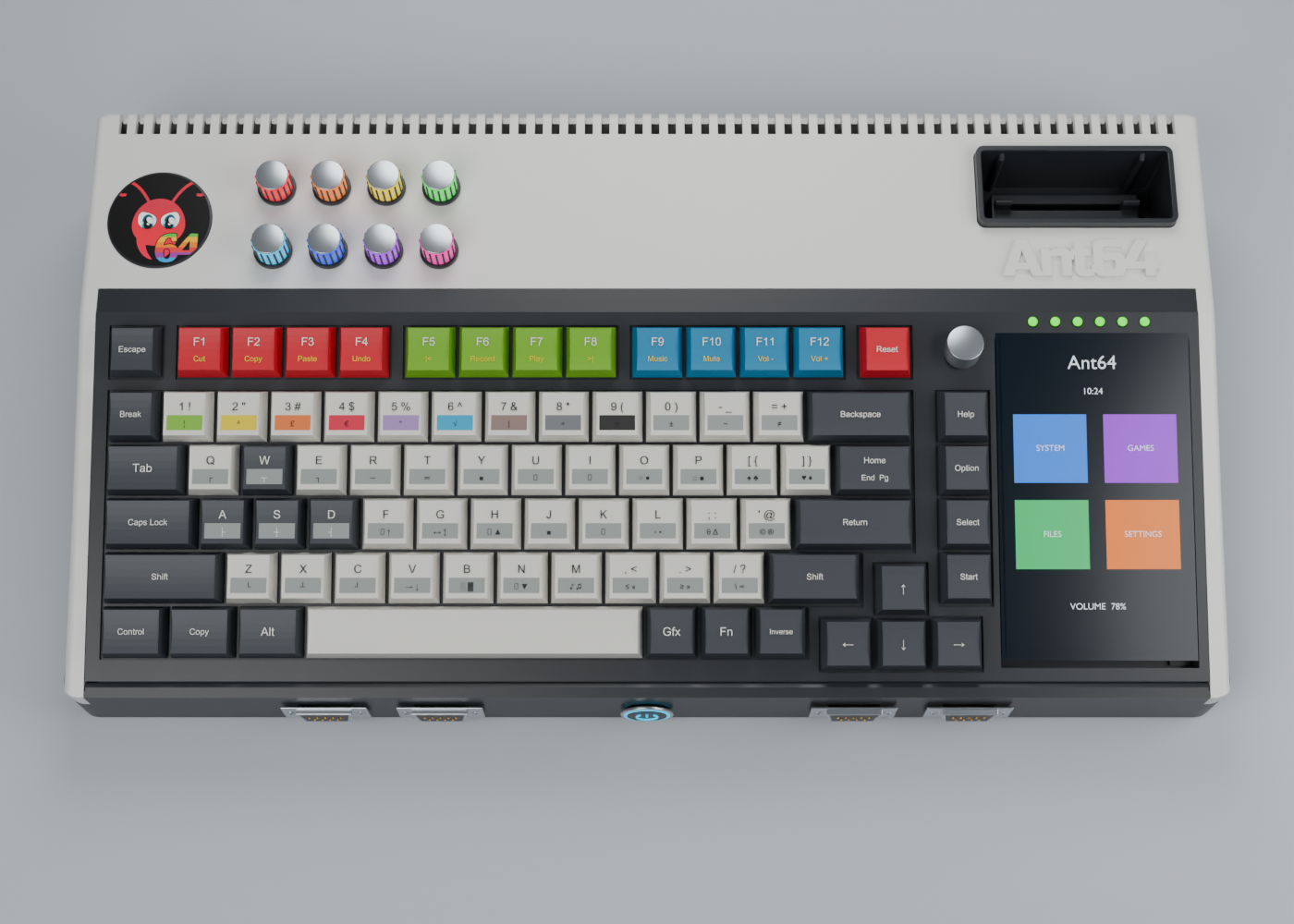
Overhead enclosure concept. Refer to the key art and layout tables for exact key legends.
This is the Ant64 (Clicky) layout — the one the custom keyboard, its matrix scanned by Clicky, will carry. The eZX Spectrum uses a different layout, close to the Spectrum Next, on its own Clicky-scanned board (documented on the eZX side).
Until Clicky is coded and its matrix built, development uses a stopgap: the Ant64 keycaps fitted to an Ajazz AK820 — a 75% ANSI, 81-key, USB-C mechanical board with a top-right CNC knob — read by AntOS as ordinary USB HID. Every Ant64 key has a home on it:
- The right-hand column and Reset land on the AK820's nav column — Reset → Del, Help → Home, Option → PgUp, Select → PgDn, Start → End — and the rest of the keys sit at their natural positions.
- The knob is the dial — top-right on both, so pause / speed maps straight across.
The mapping is an AntOS USB-HID remap profile, not anything specific to the AK820: HID usage codes come in, AntOS maps them to Ant64 logical keys, and everything downstream sees the same events whether they came from Clicky's matrix, the AK820, or any USB keyboard. So any USB keyboard works for development — the AK820-with-Ant64-keycaps is simply the nicest profile (matching legends, and a knob for the dial), while a bare board can use the same map with a printed reference. AntOS holds a small set of these profiles, one active at a time; on the real machine Clicky is the keyboard, so the remap is a prototype/host convenience (external USB keyboards stay supported via DeMon's USB host port regardless).
So early bring-up drives the real Ant64 layout from a USB keyboard, and the Clicky matrix is a later swap behind the same key meanings.
Function keys, grouped by job
The top row is colour-coded by purpose, with Escape and Reset bracketing it:
- F1–F4 (red) — edit: cut · copy · paste · undo.
- F5–F8 (green) — media transport: F5 back · F6 record · F7 play/pause · F8 next — and F5 / F8 give reverse / forward on a long press.
- F9–F12 (blue) — audio: music · mute · volume down · volume up.
The symbol layers
Beyond the base letters and digits, keys carry the extra layers a retro machine wants:
- Shift — the usual shifted punctuation (
! " # $ % ^ & * ( )…). - Gfx — a graphics layer: box- and line-drawing pieces, filled/shaded blocks, shapes (
○ ● □ ■), card suits (♠ ♣ ♥ ♦), arrows, music notes (♫ ♪) — the character set for text-mode art and UIs. Each key carries two Gfx symbols, lower-left and lower-right: Gfx + key types the lower-left, Shift + Gfx + key the lower-right — so one key gives both of a pair (♠/♣,○/●,□/■). - Maths & symbols —
√ π ÷ ± ≠ ≈ ∞ θ Δ °, plus currency£ €, across the number and punctuation keys. - Colours — the number keys are the colour palette: 1–8 the eight colours, 9 black, 0 white — retro colour-key entry.
- Inverse — inverse (reverse-video) entry; Fn — a function modifier.
System keys
| Key | Role |
|---|---|
| Break / Reset | BASIC break; system reset |
| Gfx / Inverse / Fn | graphics layer · inverse video · function modifier |
| Copy | BBC-style copy — with the screen cursor over existing text, each press copies the character under it to the command line and advances to the next: character-by-character, and not via a copy/paste buffer. The BBC BASIC copy-cursor model, fitting AntBASIC's lineage |
| Help | context help |
| Select | cycles the touch panel's mode / layout (usually) — numpad-calculator, debug, game screen, per-personality keys… |
| Option | toggles the AntOS / imgui Accelerator overlay on and off — used mainly when a non-official FPGA image is running, to show or hide the overlay over that guest (usually) |
| Start | action / confirm — activates the selected item: navigate an emulator's (or the OS's) menu with the cursor keys, and Start actions the highlighted entry |
| rotary dial (top-right push-button encoder) | pause and change the speed of any simulated system — push to pause, turn to scrub the run rate. The global emulation-speed control, acting on the stage tick / a personality's run rate |
| Home · End · Up · Dn, arrow cluster | navigation |
Standard Tab, Caps Lock, Control, Alt, Shift ×2, Return, Backspace, Space fill the rest.
What the board omits — and the panel supplies
There is no numeric keypad — that is the touch panel's default layout (a numpad doubling as a programmer's calculator). The panel also supplies the per-personality original-system keys an emulated machine had that this board lacks (a C64's RUN/STOP, RESTORE, C=; a Spectrum's Symbol Shift; machine-specific symbols) — so the board stays clean and the panel fills the gaps per guest. Note the board does carry Help, so an Amiga's Help needs no panel key.
Related
- Clicky — the AVR that scans the matrix · touch panel / CM4-5 I/O — the companion surface · Accelerator — what Option toggles · stage — the tick the dial scrubs