Colony Connection
Colony Connection is a high-speed inter-machine link built into the Ant64, allowing multiple Ant64 computers to be connected together using standard crossover Cat8 patch cables — red by convention, so they're instantly distinguishable from regular network cables.
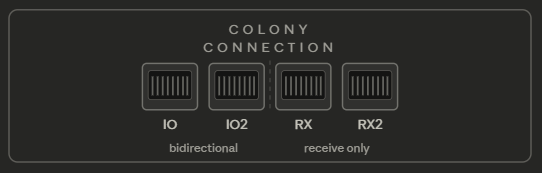
Each Ant64 has four RJ45 ports on the rear panel — IO, IO2, RX, and RX2. The IO and IO2 ports are fully bidirectional, carrying 2 TX and 2 RX lanes each. The RX and RX2 ports are receive-only, provided free of charge by the spare RX lanes from the transceiver bank whose TX lanes drive the main HDMI output (the DP→HDMI bridge path).
The link
Each IO port carries 2 high-speed differential lanes in each direction using the GoWin GW5AST's hardware transceivers, running at up to 7.83Gbps per lane — the highest rate cleanly achievable from the same 135MHz reference clock used by the FPGA's internal DisplayPort HBR2 signaling (the signal the PS176 converts to HDMI for the main display output). A single crossover Cat8 cable between two machines gives approximately 12.5Gbps in each direction simultaneously. Two cables doubles this to ~25Gbps, and also allows two completely independent networks from a single machine.
Because the IO ports are bidirectional and the crossover is handled in the cable, there is no concept of IN or OUT — just plug in a cable between any two IO ports and the link works. Any Cat8 crossover cable from any supplier will work.
Differential pair polarity is handled automatically by the transceiver hardware, so even if a cable has a pair reversed the link will correct itself and operate normally.
Topology
Colony Connection supports two natural topologies:
String — the default for most users. Machines are connected in a line, each to its neighbours, with no need to loop back. Simple to set up, easy to extend by plugging one more cable into the end, and robust — a cable break splits the string into two independent strings rather than taking down the whole network.
Ant64 #1 ──cross──► Ant64 #2 ──cross──► Ant64 #3 ──cross──► Ant64 #4Ring — formed by adding a single cable from the last machine back to the first. This instantly halves the maximum number of hops between any two machines regardless of ring size — data can travel either direction and always takes the shortest route. No configuration is needed, machines detect the new connection automatically.
     ┌──────────────────────────────────────────────────────┐
     │                                                      │
Ant64 #1 ──cross──► Ant64 #2 ──cross──► Ant64 #3 ──cross──► Ant64 #4
As a network grows and latency becomes noticeable on a string, closing it into a ring with one extra cable immediately improves performance — a natural and effortless upgrade path.
Distributed forwarding
There is no dedicated switch or router in a Colony Connection network. Each machine receives all data passing through it and can choose to forward it, filter it, amplify it, or transform it before passing it on. Every machine is simultaneously an endpoint, a repeater, and a router. The network gets more capable as machines are added, not more complex.
Two IO ports
Having two bidirectional IO ports per machine opens up several useful configurations:
- Double speed — connect two cables between the same two machines for ~25Gbps each direction
- Two independent networks — connect each IO port to a different machine or string
- Bridge node — one Ant64 sitting between two separate Colony networks, forwarding selectively between them
RX and RX2 ports
The RX and RX2 ports are receive-only — the TX lanes from that transceiver bank are committed to driving the main HDMI output (the DP→HDMI bridge path through the Parade PS176), leaving the RX lanes free for Colony Connection. These ports are ideal for:
- Peripheral devices — frame grabbers, audio sources, sensor arrays — that inject data into the network but never need to receive from it
- Inter-network broadcast taps — a one-way feed from another Colony network via an active SERDES retimer/splitter
- Read-only monitoring — a machine receiving data from the network without participating in forwarding
Because RX ports have no TX capability, peripherals connected to them are inherently secure — they can inject data but can never read data from the network.
Cable disconnection
If a cable is unplugged from a string, the string splits into two independent segments. If a cable is unplugged from a ring, the ring becomes a string — degraded but still fully functional.
Fault detection is automatic and precise. The GoWin GW5AST's SERDES CDR detects loss of signal within microseconds. When a machine detects that one of its ports has lost signal, it immediately broadcasts its own identity and which port dropped. Because it is always the downstream machine — the one whose incoming cable was pulled — that detects and reports the fault, the broadcast precisely identifies which cable segment is broken. Every other machine in the network that receives the message knows immediately where the problem is.
This makes Colony Connection self-diagnosing — a broken cable announces itself automatically without any manual investigation.
Electrical protection
The Colony Connection ports use standard RJ45 connectors, which means a network cable could accidentally be plugged in. The most dangerous scenario is PoE (Power over Ethernet), where a switch or injector places 48V onto the cable. To protect against this and other hazards, each port uses a layered protection scheme between the connector and the FPGA transceivers:
RJ45 → TVS/ESD array → Common mode choke → AC coupling caps → FPGA transceiver- AC coupling capacitors — block DC voltage entirely, including PoE. Required for SERDES operation regardless, so this protection is essentially free
- TVS/ESD protection arrays — high-speed differential protection devices that clamp voltage spikes and ESD events without affecting signal integrity at 7.83Gbps
- Common mode chokes — reject noise and interference from the cable and assist with EMI compliance
Together these ensure that accidentally connecting a network cable, even from a PoE source, cannot damage the FPGA.
Peripheral devices
Peripheral devices connect to the RX or RX2 ports and inject data into the network without receiving from it. They are inherently simple — a small low-cost FPGA, a single Colony output, and whatever hardware the peripheral actually needs. Configuration is handled via WiFi, Bluetooth, or similar low-speed wireless — which can be driven directly from AntOS over the Ant64's own WiFi connection.
A canonical example is an HDMI frame grabber — a small standalone device with an HDMI receiver IC that captures incoming video from any HDMI source (games console, PC, camera, Blu-ray) and streams it into the network. Every machine in the network can then receive and process that video stream for mixing, recording, or effects processing.
Peripherals that need fast data in both directions can instead connect via a full IO port pair, giving them complete bidirectional Colony bandwidth. Peripherals built around a small FPGA with no display-output requirement have all 8 transceiver lanes available for Colony Connection — up to 4 full bidirectional IO ports, making them potentially the most connected nodes in the entire network. A storage or Gateway peripheral with 4 full IO ports could bridge two separate networks simultaneously while also providing shared NVMe storage to all connected machines.
Connecting two networks — one way
It is possible to connect two separate Colony networks so that one receives data from the other without sending data back. This is achieved by splitting the OUT signal of a machine using an active SERDES retimer/splitter IC — one output continues into its own network as normal, the other feeds into an RX or RX2 port of a machine in the second network.
Ring 2 sees all data from Ring 1. Ring 1 sees nothing from Ring 2.
Note that a passive Y-split cable cannot be used at these speeds — the impedance mismatch would corrupt the signal at both destinations. A small active retimer chip is required.
The shared memory protocol
Colony Connection uses a lightweight hardware packet protocol that is completely invisible to application code. From a developer's perspective, writing to a shared memory address simply makes that value appear in the same address on every other machine in the network automatically. Reading from a shared address reflects whatever any machine has written to it. There are no sockets, no network API, no send or receive calls, no serialisation, no connection management, and no error handling. It is just RAM.
Every word write to a subscribed address range is automatically broadcast as a packet in both directions around the network. Each packet contains four fields:
- Message type — single word write, bulk transfer, init, or other defined types
- Block ID — identifies what kind of data this packet carries
- Machine ID — which machine originated this write
- Address offset + data — where within the block and what value
When a machine receives a packet it checks the Block ID first. If the machine has not subscribed to that Block ID it passes the packet along immediately without processing it — a single clock cycle decision made entirely in hardware. If the machine has subscribed, it writes the data to its local copy of that block at the given offset, then passes the packet along. If the Machine ID matches its own, the packet has completed the circuit and is discarded.
The subscription table is a hardware bitmask in FireStorm — the pass-or-process decision requires no CPU involvement at all.
Ring buffers
Colony Connection uses five dedicated hardware ring buffers in FireStorm, eliminating RAM wait states entirely and allowing packet forwarding to happen at wire speed with no CPU involvement:
- IO TX buffer — outgoing packets travelling in direction 1
- IO RX buffer — incoming packets arriving from direction 1
- IO2 TX buffer — outgoing packets travelling in direction 2
- IO2 RX buffer — incoming packets arriving from direction 2
- Peripheral input buffer — shared between RX and RX2 ports, with simple first-come-first-served arbitration
The four main ring buffers keep the two directions of travel completely independent — a busy or stalled direction cannot affect the other. Incoming packets are written directly into the appropriate RX buffer by the SERDES hardware as they arrive, and outgoing packets are read from the TX buffer and transmitted without waiting for the CPU or DDR3 memory.
Packets carrying this machine's own ID are discarded at the wire before they reach the ring buffer at all — the SERDES hardware checks the Machine ID as the packet arrives and drops it immediately if it matches. This keeps the ring buffers free for packets that actually need processing or forwarding, and means a busy ring does not fill the buffers with packets that would simply be discarded anyway.
The shared peripheral buffer serves both RX and RX2 with a single combined buffer. Since peripherals are the slowest data sources on the network and inject data far less frequently than ring traffic, shared arbitration is perfectly adequate and saves BSRAM resources in FireStorm. The CPU is only involved when a packet is addressed to this machine and needs to be acted upon — everything else is handled entirely in hardware.
Message types
Single word write — the common case. One address offset and one word value. Propagates around the network in microseconds.
Bulk transfer — for larger payloads such as sending a texture, sample bank, or tilemap to all machines. The block ID identifies the destination, the payload follows.
Init — sent when a machine joins or rejoins the network. Existing machines respond with their current block states, allowing the new machine to bootstrap an identical copy of all shared state immediately without any manual configuration.
Block IDs
Block IDs define logical regions of shared memory. A machine subscribes only to the blocks it cares about — a pure audio machine subscribes to audio blocks and ignores everything else. A machine rendering a game world subscribes to game state blocks. A machine collecting player input subscribes to input blocks.
This means packets irrelevant to a machine pass through it at full wire speed with no processing overhead — the hardware ring buffer re-drives them onward without any CPU involvement.
Multiplayer gaming — it's just RAM
Colony Connection transforms multiplayer game development by making the network invisible. A game written for single player on one Ant64 requires only three changes to become multiplayer:
- Define which memory regions are shared
- Subscribe to the relevant block IDs
- Write joypad state to the input block each frame
The game logic itself does not change at all.
In a typical Colony Connection multiplayer setup, one machine runs the authoritative game logic — physics, AI, collision, scoring. It writes the game state to a shared block each frame. Every other machine in the network receives those writes automatically via their subscription, and FireStorm updates its registers, sprites, palettes, and copper lists directly from the incoming data — no CPU involvement needed for the display side.
Player machines write their joypad input to their own input block each frame — a packet of a few bytes. The game server machine sees those input values change in its local memory automatically, exactly as if a local joypad had been read. It never needs to know how many players are connected, where they are in the network, or anything about the Colony Connection protocol.
To put the bandwidth in perspective, consider a Doom-style game:
- Full game state including all monster positions, sector states, item pickups and player data — around 6KB per frame
- A typical compressed delta showing only what changed — around 200–500 bytes per frame
- Available Colony Connection bandwidth per frame at 60Hz — around 26MB on a single cable
The game state fits into approximately 0.002% of the available bandwidth. The number of simultaneous players is limited only by the number of machines in the network, not by the link.
| Traditional LAN | Colony Connection | |
|---|---|---|
| Protocol | TCP/IP or UDP over Ethernet | Invisible — just RAM |
| Latency | 1–5ms typical, variable | Microseconds, fixed |
| Jitter | Yes — OS scheduling, stack overhead | None |
| Host advantage | Yes — host has lower latency | No — symmetric |
| Network code required | Yes — significant complexity | None |
| Setup | IP addresses, drivers, configuration | Plug in a cable |
| Works if OS crashes | No | Yes — hardware level |
Bandwidth in practice
At the Ant64's common native render resolution of 480×270 at 24bpp, each uncompressed framebuffer is approximately 380KB. The Colony Connection transfer window at 60Hz on a single cable provides around 26MB of available bandwidth per frame — enough to carry approximately 68 complete framebuffers simultaneously. Two cables doubles this to ~52MB and ~136 framebuffers.
| Machines | Framebuffer data per frame | % of single cable bandwidth |
|---|---|---|
| 2 | 760KB | ~3% |
| 10 | 3.8MB | ~15% |
| 30 | 11.4MB | ~44% |
| 60 | 22.8MB | ~88% |
Screen sharing is well within budget for most practical network sizes on a single cable, and comfortably within budget on two cables regardless of scale.
Educational use
The bandwidth characteristics make Colony Connection particularly well suited to classroom environments. A teacher's Ant64 can receive the screens of an entire classroom of 30 students simultaneously at full frame rate, completely uncompressed, using around 44% of a single cable's bandwidth — with no compression artefacts, no network lag, and no software overhead.
Crucially, because FireStorm streams the framebuffer independently of the operating system, screen sharing works even if a student's AntOS has crashed or misbehaved. A student cannot hide what is on their screen by closing a window — the hardware captures the output regardless.
The same mechanism works in reverse: a teacher can push their screen to all students simultaneously for demonstrations, again at full frame rate with zero lag.
Future possibilities — Colony Gateway
The Colony Connection architecture naturally lends itself to a dedicated gateway device that could bridge multiple separate networks together while also providing shared NVMe storage to all connected machines — essentially a Colony hub combining switching and storage in a single small FPGA-based unit.
This is a concept rather than a planned product, but the architecture supports it without any changes to the Colony Connection design itself.
How does Colony Connection compare?
The closest competing technologies at this bandwidth — and what they actually cost:
25GbE Ethernet — the nearest comparable standard networking technology:
- A 25GbE NIC is required in every machine — typically £150–300 each
- A 25GbE managed switch is required for more than two machines — entry level models start around £800–1,500, enterprise switches run to £5,000–15,000 or more
- SFP28 cables or optical transceivers add £20–50 per connection
- The software network stack adds latency — TCP/IP overhead, OS involvement, driver complexity
- Total networking cost for a 30-machine classroom: easily £25,000–50,000 in dedicated hardware
Thunderbolt 4 — ~40Gbps but only point-to-point:
- Limited to around 6 devices in a chain
- Intel-specific hardware, not universally available
- Thunderbolt networking adapters £100–200 each
- Not designed for string or ring topology or broadcast use cases
InfiniBand — used in supercomputers and data centres:
- HDR InfiniBand runs at 200Gbps but is extremely expensive
- NIC cards £500–2,000 each
- Switches £10,000–50,000 or more
- Proprietary cables and transceivers at significant cost
- Designed for data centres, not creative or educational environments
Colony Connection:
- Zero additional cost per machine — the ports emerge from transceiver hardware already present for the main HDMI output path
- One 135MHz oscillator shared with the FPGA's internal DP HBR2 signaling (the path that becomes HDMI through the PS176) — a few pence
- Four RJ45 sockets — pennies each
- Standard crossover Cat8 cable — £5–15 from any shop, available everywhere, red by convention
- Hardware level — no network stack, no OS, no drivers, no configuration
- Lower latency than any Ethernet solution — no protocol overhead at all
For a 30-machine classroom, the entire Colony Connection cabling budget is around £150–300 in Cat8 crossover cables. The hardware cost per machine is effectively zero — the capability was already there.
Uses
- Debugging — a direct high-speed link between two machines during development, with no network stack overhead
- Distributed rendering — multiple FireStorm FPGAs collaborating on a shared scene, each contributing layers to a composite output
- Audio chaining — machines passing audio data along the network, each adding synthesis, effects or mixing
- Live performance — multiple Ant64s on stage acting as a single coordinated instrument, with external video sources feeding in via frame grabbers
- Shared memory — one machine's DDR3 accessible to others in the network at wire speed
- Screen sharing — FireStorm framebuffers streamed in real time, uncompressed, at render resolution
- Multiplayer gaming — hardware-level shared memory makes network code unnecessary — it's just RAM
- Education — a teacher monitoring or broadcasting to an entire classroom of Ant64s simultaneously at full frame rate
- Inter-network broadcast — one network observing another's data stream via an active splitter, without affecting either network's normal operation
Cabling
Any standard crossover Cat8 cable — red by convention. Connect IO to IO along the string. To form a ring, connect the last machine back to the first with one additional cable. Peripheral devices connect to the RX or RX2 port of any machine in the network.
Ant64 #1 ──cross──► Ant64 #2 ──cross──► Ant64 #3 ──cross──► Ant64 #4
                                                                   │
                         HDMI grabber ──► RX2                      │
                                              └────────────────────┘
                                         (optional ring cable)