Ant64 Audio System — More information...
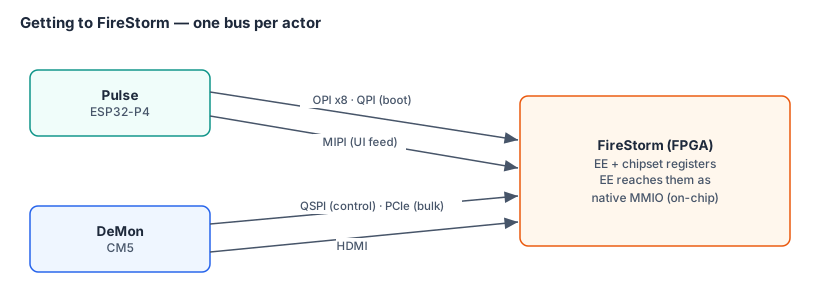
Vision
The Ant64 audio section should match and exceed the specification of the best synthesizers currently available (reference: Waldorf Quantum MK2, Sequential Prophet X), while being capable of authentic analog synthesis emulation from an entirely digital signal path, with an optional analog output/character stage. All DSP runs in the FireStorm using fixed-point arithmetic exclusively — no floating point anywhere in the signal path.
Competitive Reference — State of the Art (2025/26)
| Synth | Voices | Osc/voice | Synthesis types | Filters/voice | Analog? |
|---|---|---|---|---|---|
| Waldorf Quantum MK2 | 16 | 3 (×5 algos) | WT, VA, Granular, Resonator, Kernel/FM | 2× analog 24/12dB LP + digital SVF | Hybrid |
| Sequential Prophet X | 16 | 4 (2 VA + 2 sample) | VA + sample | Stereo analog LP | Hybrid |
| Sequential Prophet-10 | 10 | 2 | VA (subtractive) | Analog LP | Full analog |
| Moog One | 8/16 | 3 | VA (subtractive) | Analog LP/HP/Notch | Full analog |
| Access Virus TI2 | 80 | 3 | VA + WT + FM | Digital multimode | Full digital |
| Waldorf Kyra (FPGA) | 128 | 10 | VA + WT | Digital 12/24dB LP/BP/HP | Full digital |
The Kyra is the key benchmark — a commercially shipped pure-FPGA synth proving 128 voices with 10 oscillators each is achievable in real hardware. Ant64 FireStorm targets this as a minimum, not a ceiling.
Ant64 targets (system-wide):
Audio is generated on three hosts and summed at one mixer, so these targets are the system total, not the FireStorm chipset alone:
- FireStorm chipset — 128 voices minimum for VA and FM (matching Kyra, far exceeding all others) and 256 for sample playback / simpler FM. 128 is guaranteed at 200 MHz; 256 needs timing closure at 250 MHz.
- Pulse (AMY) — ~30–180 further voices in software, patch-dependent (≈36 for a 5-oscillator analogue voice, ≈30 for a 6-operator DX7, up to ~180 for simple voices), costing Pulse CPU rather than chipset cycles.
- DeMon — 9 SID voices (Triple SID, L/C/R) plus SAM speech, streamed in alongside.
- Five-plus synthesis paradigms — the chipset's Analog / Sample / FM, plus AMY's additive, wavetable, and Karplus–Strong (with Juno-106 and DX7 patch sets) — all available simultaneously and mixable per patch.
- Fixed-point FPGA DSP throughout, optional analog output character stage.
In practice that is well over 150 simultaneous voices across genuinely different engines — and past 400 when the chipset is running sample voices — comfortably ahead of any shipped synthesizer, the Kyra included.
Three Synthesis Paradigms
The Ant64 treats synthesis as three equal, first-class paradigms — not one engine with bolt-on extras. Any voice slot can run any engine. Patches can layer all three simultaneously.
┌─────────────────┐  ┌─────────────────┐   ┌─────────────────┐
│   PARADIGM 1    │  │   PARADIGM 2    │   │   PARADIGM 3    │
│                 │  │                 │   │                 │
│  ANALOG STYLE   │  │ DIGITAL SAMPLE  │   │   YAMAHA / FM   │
│  (VA / Subtr.)  │  │   (S&S / PCM)   │   │  (OP-based)     │
│                 │  │                 │   │                 │
│ Juno · Moog     │  │ Korg M1 · JD800 │   │ DX7 · TX81Z     │
│ Prophet · 303   │  │ ROMpler · S&S   │   │ OPL · OPN       │
│ M-86 · Hoover   │  │ Piano · Strings │   │ FM bass · EP    │
│ 128 voices      │  │ 256 voices      │   │ 128 voices      │
└────────┬────────┘  └────────┬────────┘   └────────┬────────┘
         └───────────────────►▼◄────────────────────┘
                      Voice Mix Bus (S32)
                   Global FX Chain · Output Stage
These three are the chipset paradigms, hardware-rendered in FireStorm. Pulse's AMY engine adds further paradigms in software — additive, wavetable, and Karplus–Strong physical modelling, plus its own Juno-106 and DX7 patch sets — and those voices, along with DeMon's SID voices, sum into the same mix bus. The "three paradigms" describes the chipset; the system as a whole offers more.
Architecture Overview
┌──────────────────────────┐    ┌──────────────────────────┐
│      Pulse  ESP32-P4     │    │      DeMon  CM5        │
│  AMY synth engine        │    │  Triple SID (9 voices)   │
│  MIDI · sequencer ·      │    │  SAM speech synth        │
│  patch / param control · │    │  (also AntOS host)       │
│  voice allocation · jogs │    │                          │
└─────────────┬────────────┘    └─────────────┬────────────┘
    OPI (control writes)  +           HDMI + PCIe
    MIPI (AMY audio + UI)             (SID + SAM audio + UI)
              │                              │
┌─────────────▼──────────────────────────────▼────────────┐
│                  FireStorm (GoWin 138k)                  │
│                                                          │
│  Chipset DSP pipeline — 128–256 voices                   │
│  (one time-multiplexed pipeline serves all voices)       │
│  + FireStorm EE application audio                        │
│                                                          │
│  ┌────────────────────────────────────────────────────┐ │
│  │  Voice Mix Bus (S36) — Tempest voices summed with   │ │
│  │  Pulse AMY · DeMon SID · DeMon SAM · EE app audio   │ │
│  └─────────────────────────┬──────────────────────────┘ │
│                            │                             │
│  ┌─────────────────────────▼──────────────────────────┐ │
│  │  Global FX chain (Reverb · EQ · Compressor)        │ │
│  └─────────────────────────┬──────────────────────────┘ │
└────────────────────────────┼─────────────────────────────┘
                             │ Stereo S24 PCM → WM8960/62 codec
             ┌───────────────▼─────────────────┐
             │  Optional Analog Stage          │
             │  (character · saturation · VCF) │
             └───────────────┬─────────────────┘
                             │ Speakers · headphones · aux line · HDMI audio  (optical & clean line out via [Audio Expansion Header](#audio-expansion-header))

  Audio in: codec ADC → FireStorm capture → sampler / granular / analysis,
            and routable to Pulse for AMY's audio-input oscillator.
Audio Sources — FireStorm, Pulse, and DeMon
The diagram above centres on FireStorm because it owns the mixer and the codec — but the Ant64 generates audio on three processors at once. Everything is summed at the Tempest mixer and only the final stereo mix reaches the codec, so to the listener it behaves as one instrument; the sources are distinct, and each contributes something the others can't.
   FireStorm chipset engine ─┐   128+ hardware voices (sample · FM · granular · PM)
   Pulse  — AMY + trackers ──┤   software synthesis on a 400 MHz ESP32-P4
   DeMon  — Triple SID ──────┼─► FireStorm Voice Mix Bus ─► Global FX ─► WM8960/62 codec
   DeMon  — SAM (speech) ────┤   9 SID voices (L/C/R) + formant TTS
   FireStorm EE app audio ───┘
The chipset engine (the rest of this document) is the primary generator. The two ESP32-P4 supervisors add a second and third synthesis path that run on their own CPUs and stream finished audio to FireStorm over the MIPI bulk-data link — so none of it costs chipset voice slots.
Pulse — AMY software synthesis
AMY is a full multi-paradigm synthesis engine that runs natively on Pulse's 400 MHz ESP32-P4 core, accelerated by its PIE SIMD extensions — far more than a single synth voice. It is built from individual oscillators (≈180 at once) grouped into voices and managed by polyphonic, multitimbral synths, and it covers most of what a dedicated workstation does:
- Subtractive / analogue — ships a Juno-106 patch set, with resonant LP/BP/HP filters per oscillator
- FM — ships a DX7 patch set and the full DX7 6-operator algorithms (plus build-your-own)
- Additive — explicit build-your-own-partials mode, each partial with its own envelope; plus the interpolated-partials piano voice
- Wavetable (16,384-sample packs with interpolation) and Karplus–Strong physical modelling
- A full PCM sampler — 67 built-in samples, runtime sample loading, WAV-from-disk playback, looping, and live resampling of its own output or the audio input
- Audio input as an oscillator — the system audio input, captured at the codec by FireStorm and routed to Pulse, can be filtered, enveloped, and effected through AMY like any voice (live effects, vocoder-style treatments, resampling)
- Flexible modulation — the ControlCoefficients matrix routes up to nine sources (note, velocity, two EGs, a modulator osc, pitch-bend, two external/CV inputs, constant) onto amplitude, frequency, filter, duty, or pan; any oscillator can modulate any other
- Two multi-breakpoint envelope generators per oscillator, per-synth EQ, echo/reverb effects, and a sample-accurate sequencer — the engine the Pulse Sequencer is built on
- MIDI processing — the MIDI engine Pulse needs: 16 channels mapped to synths, note / velocity / pitch-bend, program-change patch select, configurable CC→parameter mapping (the MIDI-Learn mechanism), drum note→preset, All Notes Off (Pulse firmware adds the physical ports and the routing to chipset and SID voices)
Pulse renders AMY voices into its 32 MB PSRAM and streams the audio to FireStorm, whose mixer treats it as another stereo voice source. AMY voices cost Pulse CPU, not chipset slots — the paths are independent, so a partials-heavy AMY patch and a full chipset voice count run simultaneously (a typical AMY voice is a few percent of the HP core). The same path carries Pulse's other software audio — tracker / MOD engines and classic synth emulators (see Amiga MOD Player). Full breakdown: Pulse — AMY.
DeMon — Triple SID engine
DeMon runs three MOS 6581/8580 SID emulations in software on its CM5, panned Left / Centre / Right for a wide stereo image — 9 SID voices total, streamed to the Tempest mixer. The SID engine is a shared resource: it lives in DeMon firmware but is drivable by AntOS, by the FireStorm EE (chipset mailbox + IRQ), or by Pulse (over the SPI link), with voices dynamically allocated. That makes it good for:
- Retro SFX without burning chipset slots — games fire SID blips, lasers, and alerts while the 128 Tempest voices stay committed to music or samples
- Authentic SID music —
.sidfiles play directly (AntOS is a C64 music player out of the box), and the sequencer can route MIDI tracks to SID timbres - OS sounds and accessibility cues on the AntOS side
Because it runs on DeMon, the SID engine keeps playing even while the FPGA reloads a personality — system audio is never interrupted. Full detail: DeMon Triple SID.
DeMon — SAM speech synthesis
DeMon also hosts SAM, a formant text-to-speech synthesiser (in software on the CM5), streamed to the Tempest mixer the same way. It provides voice prompts, spoken accessibility feedback, and dialogue. Pulse can dispatch text or phoneme events to SAM over the SPI link, so the sequencer can drive vocoder-style spoken leads and dialogue tracks in time with the music. Full detail: DeMon SAM.
FireStorm Clock Architecture & Voice Budget
Clock Domains
The GoWin GW5AST-138 is fabricated on TSMC 22nm ULP process. It contains several independent clock domains fed from on-chip PLLs:
| Domain | Clock | Source | Notes |
|---|---|---|---|
| BSRAM | 380MHz | Hard silicon spec | Dedicated hard memory blocks — not constrained by fabric routing |
| Fabric | ~200MHz (target) | PLL → synthesis result | Programmable LUT/FF logic — speed depends on critical path |
| DSP blocks | ~300MHz+ | Hard silicon | Dedicated multiply-accumulate blocks, independent of fabric |
| Pixel clock | 74.25MHz (720p) · 148.5MHz (1080p) | PLL | HDMI timing generation |
| Audio clock | 12.288MHz (derived) | PLL | 48kHz × 256 = standard I²S master clock |
The fabric clock is not a fixed silicon spec — it is the maximum frequency at which the synthesised logic meets timing after place-and-route. A deeply pipelined design with short combinational paths achieves a higher fabric clock than one with long unbroken logic chains.
Fabric Clock Estimation — Derived from BSRAM
The BSRAM:fabric clock ratio on comparable FPGAs:
| Device | Process | BSRAM | Fabric (complex design) | Ratio |
|---|---|---|---|---|
| Xilinx Artix-7 | 28nm | ~600MHz | 250–350MHz | 1.7–2.4× |
| Intel Cyclone 10 GX | 20nm | ~600MHz | 200–350MHz | 1.7–3× |
| GoWin GW2A | 55nm | ~200MHz | ~150MHz | ~1.3× |
| GoWin GW5AST (this device) | 22nm | 380MHz | ~200–250MHz | ~1.5–1.9× |
For a complex pipelined design combining an audio DSP engine and a 2D rasterizer, a ratio of 1.5–1.9× is typical. This gives a fabric clock estimate of:
  Conservative target:  200MHz  (ratio 1.9×)
  Optimistic target:    250MHz  (ratio 1.5× — achievable with careful timing closure)
200MHz is used as the design target throughout this document. All voice counts and performance figures are stated at 200MHz. 250MHz figures are noted where relevant as the optimistic case.
A key property of the 380MHz BSRAM is that at 200MHz fabric:
  1 fabric clock period  =  5.0ns
  1 BSRAM clock period   =  2.63ns

  BSRAM cycles per fabric cycle:  5.0 / 2.63 = 1.9×
A BSRAM read issued at one fabric clock edge returns its result before the next fabric clock edge. BSRAM reads in the audio DSP pipeline are effectively zero-stall — the tanh lookup table, wavetable samples, BLEP correction table, and BBD delay taps are all available within a single fabric pipeline stage.
Cycle Budget — 200MHz at 48kHz
  Fabric clock:            200,000,000 Hz
  Audio sample rate:            48,000 Hz
  Cycles per sample period:      4,167 cycles

  Allocation:
  ┌────────────────────────────────────────┬───────────────────┐
  │  Voice pipeline (all engines)          │  ~3,700 cycles    │
  │  Post-mix global effects               │    ~385 cycles    │
  │  Control / state management            │     ~82 cycles    │
  │                                        │                   │
  │  TOTAL                                 │   4,167 cycles    │
  └────────────────────────────────────────┴───────────────────┘

  Rasterizer: runs on SEPARATE fabric resources simultaneously.
  Does not consume any of the above 4,167 cycles.

  Pulse (AMY) and DeMon (Triple SID + SAM): run on their own ESP32-P4 CPUs,
  not this pipeline. Their voices are additive and cost 0 of these 4,167 cycles.
The 4,167-cycle budget is the FireStorm chipset pipeline alone. Just like the rasteriser, the supervisors generate audio on separate processors — so Pulse's AMY voices and DeMon's 9 SID voices add to the system's polyphony without spending any of FireStorm's cycle budget.
Voice Pipeline — Cycle Cost Per Voice
The audio engine is time-multiplexed: one physical DSP pipeline is shared across all voices. Each voice is processed in sequence within a single sample period. The pipeline is fully pipelined — a new voice enters each clock cycle, independent of other voices (no inter-voice data dependency).
VA Voice (2 oscillators, ladder filter 4-pole, SVF, BBD, VCA, 2 envelopes, 2 LFOs)
  Stage                                  Cycles   Notes
  ─────────────────────────────────────────────────────────────────
  Load voice state from BSRAM                1    380MHz BSRAM — returns within 1 fabric cycle
  Phase accumulator × 2 oscillators          2    Parallel
  Wavetable reads × 2 (BSRAM)                2    Parallel, BLEP table also read here
  Oscillator mix                             1
  Ladder pole 1 (multiply + tanh + sum)      3    tanh → BSRAM LUT, 1 cycle read
  Ladder pole 2                              3    Sequentially dependent on pole 1
  Ladder pole 3                              3    Sequentially dependent on pole 2
  Ladder pole 4                              3    Sequentially dependent on pole 3
  SVF (2 integrators, parallel)              3
  BBD delay tap read + wet/dry mix           1    BSRAM, zero-stall
  VCA                                        1
  Envelope ADSR update                       2
  LFO update                                 1    Can overlap with envelope
  Write state back to BSRAM + BBD write      1    Pipelined, no stall
  Mix bus accumulate                         1
  ─────────────────────────────────────────────────────────────────
  TOTAL                                     29 cycles per VA voice
The four ladder poles are the critical serialised path — each pole's output feeds the next pole's input within the same sample, so they cannot be parallelised. This is the physics of the ladder filter topology and applies to any correct implementation. The tanh nonlinearity is a BSRAM lookup at 380MHz — it adds only 1 cycle, not a multi-cycle stall as it would be with a computed approximation.
FM Voice (6-operator, DX7-compatible algorithms with partial branch parallelism)
  Stage                                  Cycles   Notes
  ─────────────────────────────────────────────────────────────────
  Phase accumulator × 6 operators           12    2 cycles each
  Sine LUT × 6 (BSRAM)                       6    1 cycle each, pipelined
  Modulation apply + level × 6              12    2 cycles each
  Parallel branch reduction (algorithm)      6    Some algorithms allow 2 ops simultaneously
  Output routing + carrier sum               3
  Envelope per operator × 6                  6    Overlap with pipeline stages above
  ─────────────────────────────────────────────────────────────────
  TOTAL (with ~30% parallelism saving)     ~28 cycles per 6-op FM voice
DX7 algorithms with parallel carrier branches (e.g. algorithms 1, 2, 5, 6) allow two operators to be computed simultaneously, reducing effective cycle count. The 28-cycle figure reflects this average across all 32 algorithms.
Sample Voice (S&S playback with linear interpolation)
  Stage                                  Cycles   Notes
  ─────────────────────────────────────────────────────────────────
  Sample read × 2 (for interpolation)        2    BSRAM or SRAM depending on sample size
  Linear interpolation (multiply + add)      2
  Loop boundary check + wrap                 1
  Stereo pan matrix (2 multiplies)           2
  VCA                                        1
  ─────────────────────────────────────────────────────────────────
  TOTAL                                      7 cycles per sample voice
Supervisor Voices — Pulse AMY & DeMon SID (separate CPUs)
The cycle costs above are for the FireStorm chipset pipeline only. The two ESP32-P4 supervisors generate additional voices on their own CPUs and stream the finished audio to the mixer, so they cost zero of FireStorm's 4,167-cycle budget:
- Pulse — AMY voices. Cost is measured in Pulse's 400 MHz HP-core CPU time, not
pipeline cycles. AMY voices are built from oscillators (180 available by default,
raisable via
amy_config), so polyphony depends on the patch's oscillator count and synthesis paradigm. As a concrete example, from that 180-oscillator pool: a 5-oscillator Juno-style analogue voice gives ~36-voice polyphony; a 6-operator DX7 FM voice ~30; simple 1–2 oscillator voices 90–180. A typical voice costs a few percent of the HP core, with PIE-accelerated additive / partials patches the most expensive and sample / subtractive / FM patches considerably cheaper. Pulse keeps headroom for the sequencer, MIDI, and UI, and the P4's second core (or a higheramy_configcap) extends the count further — all of it independent of the chipset's voice budget. - DeMon — Triple SID. A fixed 9 SID voices (3 × 6581/8580 panned L/C/R), in software on DeMon's CM5 — also independent of the chipset budget.
- DeMon — SAM adds speech as a streamed source rather than a polyphonic voice engine.
Because all three hosts sum at the Tempest mixer, the system-wide simultaneous voice count is the chipset total plus AMY's patch-dependent voices plus the 9 SID voices — not the chipset figure alone.
Voice Count Derivation
Available cycles for voice pipeline: ~3,700 (leaving ~467 for effects + control)
| Engine | Cycles/voice | Voices at 200MHz | Voices at 250MHz |
|---|---|---|---|
| VA (full: 2 osc, ladder+SVF, BBD) | 29 | 128 | 192 |
| VA (optimised timing closure) | 29 | 192 | 256 |
| FM 6-operator | 28 | 128 | 192 |
| FM 4-operator | ~19 | 192 | 256 |
| Sample playback | 7 | 512 | 512 |
128 VA voices is the conservative, guaranteed target at 200MHz — matching the Waldorf Kyra, the only comparable shipped FPGA synthesiser, but with a far more complex per-voice signal chain (nonlinear ladder + SVF + BBD vs the Kyra's simpler digital filter). 192 VA voices is achievable with careful timing closure and pipeline optimisation at 200MHz, and 256 at 250MHz.
The Kyra achieved 128 voices × 10 oscillators on a Xilinx Artix-7 (28nm) with a simpler filter architecture. The FireStorm runs on 22nm silicon with a faster BSRAM and a deeper per-voice chain. The comparison is favourable.
Mixed-Engine Voice Allocation
When multiple engines run simultaneously, the cycle budget is shared:
  At 200MHz (3,700 cycle voice budget):

  128 VA (29×128 = 3,712) ............. full budget — VA only
   96 VA + 48 FM (2,784 + 1,344)  ..... 4,128 — slightly over, needs optimisation
   96 VA + 32 FM + 64 sample .......... 2,784 + 896 + 448 = 4,128 — same
   64 VA + 64 FM + 64 sample .......... 1,856 + 1,792 + 448 = 4,096 — comfortable

  At 250MHz (4,800 cycle voice budget):

  192 VA ................................ 5,568 — exceeds, use 160 VA at 250MHz
  128 VA + 64 FM + 64 sample .......... 3,712 + 1,792 + 448 = 5,952 — use 128+48+64
  128 VA + 48 FM + 64 sample .......... 3,712 + 1,344 + 448 = 5,504 — comfortable
The voice allocator in the workstation app manages the cycle budget dynamically. Patches declare their engine type; the allocator enforces the total cycle budget and notifies the musician if a configuration exceeds capacity.
Practical default targets (stated in marketing/spec sheet):
| Spec | Value | Basis |
|---|---|---|
| VA voices | 128 | Guaranteed at 200MHz, conservative |
| FM voices (6-op) | 128 | Guaranteed at 200MHz |
| Sample voices | 512 | Comfortable at 200MHz |
| Mixed simultaneous | up to 192 | Depends on engine mix — allocator managed |
| At optimised 250MHz | up to 256 | All engines, with timing closure |
| Pulse AMY voices | ~30–180 (patch-dependent) | On Pulse's CPU — additive to the chipset |
| DeMon SID voices | 9 | Fixed (3×3) — additive to the chipset |
Every figure above except the last two is a chipset-pipeline count. On top of them, Pulse contributes AMY voices (patch-dependent, costed in Pulse's CPU) and DeMon a fixed 9 SID voices — both additive, since they sum into the mixer from separate processors. So the system-wide simultaneous total is the chipset figure plus the supervisor voices, not the chipset figure alone. See Supervisor Voices for the per-voice cost basis.
Post-Mix Global Effects — Cycle Budget
Global effects run after all voice outputs are summed to a stereo bus. They are not per-voice — the cycle cost is the same regardless of voice count.
  Effect                                    Cycles    Notes
  ──────────────────────────────────────────────────────────────────
  FDN Reverb (8×8 feedback delay network,
    8 delay lines, full matrix multiply)       300    Largest single effect
  4-band parametric EQ (biquad × 4)             40    Stereo — 2 channels × 4 × 5 muls
  Stereo compressor / limiter                   30
  STFT analysis hop amortised                   15    512-pt FFT ÷ 512 samples = ~15/sample
  Mix bus saturation (soft clip)                 5
  ──────────────────────────────────────────────────────────────────
  TOTAL                                        390 cycles   (9.4% of 4,167 sample budget)
The effects budget is trivially small relative to the total. The reverb, EQ, and compressor together consume fewer cycles than processing two VA voices.
Rasterizer Performance
The rasteriser runs on completely independent fabric — orthogonal to the audio DSP pipeline. It consumes none of the 4,167-cycle audio sample budget. Full rasteriser performance figures (triangles/frame, cycle costs, spectrogram render timing) are documented in the Display Architecture reference.
BSRAM Capacity Allocation
GoWin GW5AST-138 total BSRAM: 6,120 Kbits = ~765KB
| Use | Size | Notes |
|---|---|---|
| Voice state (256 VA voices × 63 bytes) | 16KB | Phases, filter states, envelopes, LFOs |
| Wavetable (256pt × 16-bit) | 512B | One cycle per waveform — multiple stored |
| BLEP correction table (1024 × 16-bit) | 2KB | Anti-aliasing correction per oscillator |
| tanh lookup (4096 × 36-bit) | 18KB | Nonlinear ladder saturation |
| Sine LUT for FM (4096 × 16-bit) | 8KB | FM operator sine generation |
| Font atlas (128 glyphs × 16×16 × 1-bit) | 4KB | ImGui text rendering |
| Colour LUT for spectrogram (256 × 3B) | 768B | Viridis / Inferno / etc. — swap at runtime |
| Scratch / intermediate | ~30KB | Pipeline staging, STFT twiddle factors |
| Total used | ~79KB | 10% of available BSRAM |
BSRAM usage is light — 90% is available for additional tables, larger LUTs, expanded wavetable sets, or future features. The BBD delay lines are intentionally kept in DDR3 rather than BSRAM, because 128 voices × 25ms stereo delay = 13.8MB, which far exceeds both the ~765KB BSRAM ceiling and the ~4.5MB SRAM bus. DDR3 handles this cleanly with no bus contention.
Patches and the Extras Pool
The voice topology described below is the general per-voice DSP. The specific configurations that produce classic sounds — TB-303 acid, 909 kits, M-86 Hoover, Juno pads, Prophet brass, DX7 patches, Minimoog leads — are reference patches against this topology, plus a small extras pool of opt-in character circuits (currently: accent-RC accumulator, mismatched-ladder mode). The voice topology stays lean and general; the extras pool grows as new character circuits prove their worth. The patch model, data format, lifecycle, reference library, and the new combinations those patches make possible are documented in patches.md.
Per-Voice Engine
Each voice runs time-multiplexed on a shared fixed-point DSP pipeline in FireStorm. At 200MHz with 128 VA voices, each voice gets approximately 29 pipeline stages per sample period — all within the 4,167-cycle budget at 48kHz.
Oscillator Block (3 per voice)
Each oscillator independently selects its synthesis algorithm:
1. Virtual Analog (VA) — subtractive, Juno/Prophet/Moog territory
- Phase accumulator:
U32tuning word (gives ~0.01 cent resolution at 48 kHz) - Waveforms: sawtooth, PWM-sawtooth (Alpha Juno style — essential for M-86/hoover), pulse, triangle, sine, square, sub-octave
- BLEP anti-aliasing via pre-computed correction table in BRAM
- Hard sync between oscillators
- Cross-modulation (oscillator 1 FM-ing oscillator 2)
2. Wavetable — PPG/Waldorf territory
- 128-step wavetables, up to 128 tables per bank
- Smooth interpolation between table positions (bilinear, S24 fixed-point)
- Position sweepable by LFO, envelope, mod matrix, or MIDI note
- Custom wavetable upload from AntOS via DBFS
3. FM — Yamaha DX7 and beyond
- Up to 6 operators per oscillator slot (configurable algorithm routing)
S24.8fixed-point for operator levels- All classic DX7 algorithms plus free routing mode
- Operator envelopes: 4-stage (matches DX7 rate/level model)
4. Granular
- Circular sample buffer (up to 4 seconds at 48 kHz, stored in FPGA BRAM or external SRAM)
- Per-grain: position scatter, pitch scatter, duration, envelope shape, pan
- Grain density: 1–200 grains/second
- Live input granularisation supported
5. Physical Modeling
- Karplus-Strong string model (delay line in BRAM + one-pole LP damping filter)
- Waveguide wind/reed model
- Suitable for plucked strings, bowed strings, blown tubes
6. Additive
- 64 partials per voice, each with independent amplitude/frequency envelope
- IFFT resynthesis path (optional, higher latency)
Filter Block (2 per voice)
Two fully independent filter units per voice, series or parallel routing:
Filter 1 — Nonlinear Ladder (Moog/Roland character)
- Huovilainen model: 4× cascaded one-pole LP stages with nonlinear tanh feedback
- tanh implemented as 12-bit addressed BRAM lookup table (pre-computed,
S1.15format) - Modes: 24 dB/oct LP · 12 dB/oct LP · 18 dB/oct LP
- Full resonance to self-oscillation
- Input:
S24, internal state:S32with careful scaling to prevent overflow
Filter 2 — State Variable Filter (SVF)
- Simultaneous LP / HP / BP / Notch outputs selectable per voice
- 12 or 24 dB/oct
- Suitable for formant filtering, comb filter mode, phaser stages
- Topology: Chamberlin two-integrator loop,
S32fixed-point
Filter routing
- Serial: F1 → F2 (4-pole into SVF — very flexible)
- Parallel: F1 + F2 mixed (phase cancellation effects possible)
- F2 only, F1 only
Envelope Generators (4 per voice)
Independent assignment to any modulation destination:
- ENV1 — standard ADSR with optional hold segment
- ENV2 — ADSR (typically filter)
- ENV3 — ADSR (free assign)
- ENV4 — Multi-stage loopable (up to 8 segments, Waldorf-style)
Each envelope is exponential (not linear) for musical response. Implemented as a multiply-accumulate with a per-segment decay constant. Rate responds to keyboard tracking (higher notes = faster envelopes, like real analog).
LFO Block (4 per voice + 2 global)
Per-voice LFOs (4):
- Waveforms: sine, triangle, sawtooth, reverse saw, square, sample & hold, smoothed S&H
- Rate: 0.01 Hz – 20 kHz (audio-rate modulation supported)
- Sync: free, tempo-sync, note-triggered, key-sync
- Delay + fade-in time
Global LFOs (2):
- Same spec but shared across all voices (authentic to Juno/JP-8 behaviour)
- Can be switched to per-voice for richer polymodulation
Modulation Matrix
64 slots, each: Source → Destination × Amount
Sources include: ENV1-4, LFO1-6, velocity, aftertouch (mono + poly), mod wheel, pitch bend, key tracking, note number, random (per-note), MIDI CC 0–127, oscillator output (audio-rate mod)
Destinations include: all oscillator parameters (pitch, PW, wavetable pos, FM ratio/index), both filter cutoffs, both resonances, all envelope rates/levels, all LFO rates/depths, VCA level, pan, effect parameters
This exceeds the Quantum's modulation depth and matches a mid-size Eurorack system in routing flexibility.
Amplitude (VCA)
- One VCA per voice:
sample × envelope_level, singleS32multiply - Velocity scaling: linear or exponential curve, configurable per patch
- Pan position: per-voice stereo placement (constant power)
Paradigm 2 — Digital Sample Engine (S&S / PCM + Live Sampling)
Inspired by the Korg M1, Roland JD-800/JV series, and the S&S (Sample and Synthesis) approach of the late 1980s–90s. The DAC chip's audio input extends this far beyond a traditional ROMpler — the Ant64 can sample both ahead of time and in real time.
This is a significant competitive differentiator. The Sequential Prophet X has no live audio input at all — samples must be loaded via USB. The Waldorf Quantum MK2 had live input but has been discontinued (April 2025). No current production synth at any price combines live real-time sampling with the full synthesis architecture described here.
Voice budget: up to 256 simultaneous voices — sample playback is computationally cheaper than VA (no nonlinear filter), so the pipeline can run more simultaneously.
Sample Sources — Four Modes
Mode A — Pre-loaded Samples (traditional S&S)
- Samples stored in DBFS as BLOBs, loaded to SRAM on patch activate
- Sample format: 16-bit signed PCM, mono or stereo, 44.1/48 kHz
- Velocity layers: up to 8 per note zone
- Full keyboard mapping: different sample per key range
- Import from SD card, USB, or AntOS file manager
- Use case: piano, strings, brass, choir, drum kits — realistic acoustic instruments
Mode B — Real-Time Live Sampling
- Audio input → ADC on DAC chip → DMA ring buffer in SRAM
- Capture on demand: press record, play a note/chord/phrase — captured immediately
- Auto-loop detection: FireStorm DSP finds zero-crossings for clean loop points
- Latency from capture to playable: < 5ms (one DMA buffer period)
- Use case: sample a guitar chord, a vocal phrase, an external synth — play it instantly across the keyboard at any pitch
Mode C — Resample the Synth Output
- Route the Ant64's own mixed output back through the ADC input
- Capture a complex layered patch as a single sample
- Then play that sample back through a new synthesis layer on top
- Classic technique: Quantum's "self-recording", Ensoniq workflow
- Use case: freeze a complex evolving pad as a static sample, layer it with VA leads; capture a granular texture and play it chromatically; reduce polyphony load by freezing background layers
Mode D — Live Granular (streaming granular)
- Audio input streams directly into the granular engine without pre-recording
- No buffer delay: granular parameters applied to live input in real time
- Grain position jitter, pitch scatter, density, envelope all modulatable live
- Use case: real-time granular processing of a vocalist, guitarist, or any audio source — turns the Ant64 into a live granular effects processor as well as a synthesizer
Sample Oscillator (all modes)
- Phase accumulator reads through sample buffer (interpolated, U32 pointer)
- Pitch shifting: ±48 semitones from root pitch with fine-tune
- Loop modes: no loop · forward loop · ping-pong · release loop
- Loop crossfade: short crossfade window at loop point removes clicks (FireStorm DSP)
- Stereo samples: both channels preserved through stereo voice path
Sample Filter (SVF)
- Chamberlin two-integrator SVF: LP / HP / BP / Notch, 12 or 24 dB/oct
- Lighter compute than nonlinear ladder — enables 256 voice budget
- ENV2 → filter cutoff for classic S&S brightness shaping
Envelopes (2 per voice, ADSR)
- ENV1 → VCA (volume) — exponential, keyboard-tracked rates
- ENV2 → filter cutoff
Granular Engine (all sample sources)
- Grain size: 1ms – 500ms
- Grain density: 1 – 200 grains/second
- Position scatter: random offset from playhead position (creates texture)
- Pitch scatter: random pitch variation per grain (±24 semitones)
- Pan scatter: random stereo position per grain
- Grain envelope: Gaussian, trapezoidal, or rectangular window
- Reverse grains: per-grain random reversal flag
Layering with Other Paradigms
Any voice slot can layer a sample engine voice under or over a VA or FM voice. A patch can combine: FM electric piano (P3) + VA analog pad (P1) + live granular texture from mic input (P2 Mode D) — all playing simultaneously, all going through the shared filter and effects chain. No current hardware synth does all three at once.
Paradigm 3 — FM / Operator Engine (Yamaha Style)
Full frequency modulation synthesis in the DX7 / TX81Z tradition. An FM voice is built from operators — each operator is a simple unit: a sine wave oscillator with its own ADSR envelope and output level. Operators modulate each other according to an algorithm (a routing diagram), producing complex, harmonically rich timbres from simple building blocks.
Voice budget: up to 128 simultaneous voices at 6 operators per voice.
What an Operator Is
  ┌───────────────────────────────────┐
  │           OPERATOR                │
  │                                   │
  │  Frequency ratio (coarse + fine)  │
  │  ──► Phase accumulator (U32)      │
  │  ──► Sine lookup (BRAM, 1024pt)   │
  │  ──► × Output level (TL, 0–99)    │
  │  ──► × ADSR envelope              │
  │  ──► × Velocity scaling           │
  │  ──► × Key rate scaling           │
  │  ──► Output (modulates or sums)   │
  └───────────────────────────────────┘
Each operator produces a sine wave (or alternative waveform — see below) at a ratio of the base pitch, shaped by its own envelope and level. Carriers sum to audio output. Modulators feed their output into the phase of another operator, adding harmonics.
Operator Count and Waveforms
| Mode | Operators/voice | Voices | Reference |
|---|---|---|---|
| 2-op | 2 | 256 | OPL2 (AdLib) |
| 4-op | 4 | 192 | TX81Z, OPN |
| 6-op | 6 | 128 | DX7, DX5 |
| 8-op | 8 | 96 | Beyond DX7 — Ant64 exclusive |
Waveforms per operator — the TX81Z already extended DX7's sine-only operators to 8 waveforms. Ant64 supports 16 per operator, stored as 1024-point tables in BRAM:
| # | Waveform | Character |
|---|---|---|
| 0 | Sine | Classic FM, pure |
| 1 | Half sine | Brighter, more even harmonics |
| 2 | Absolute sine | Full-wave rectified, buzzy |
| 3 | Quarter sine (pulse) | Hollow, wooden |
| 4 | Sawtooth | Harsh, bright |
| 5 | Square | Hollow, 303-like when FM modulated |
| 6 | Triangle | Soft, flute-like |
| 7–15 | Custom wavetable | User-defined, uploaded via AntOS |
Mixing waveforms across operators gives far more timbral variety than DX7's sine-only approach — closer to the Vector synthesis of the Prophet VS.
FM Algorithms
An algorithm defines which operators are carriers (summed to output) and which are modulators (fed into another operator's phase). Ant64 supports:
- All 32 DX7 algorithms (fully compatible — DX7 patch import supported)
- All 8 TX81Z/DX11 4-op algorithms
- Free routing mode — any operator can modulate any other, including self-feedback, parallel chains, stacked towers — a full modular FM signal graph per voice
Per-Operator ADSR
Each operator has an independent 4-stage envelope controlling its output level:
- Attack rate, Decay rate, Sustain level, Release rate
- Exponential curves (matches DX7 behaviour — rate, not time)
- Keyboard rate scaling: higher notes use faster envelope rates (natural instrument feel)
- Velocity sensitivity per operator: velocity can boost modulator depth for dynamic timbre
This is the key musical insight of FM — modulator envelope depth controls brightness. A fast modulator attack with slow decay gives a percussive click + evolving tone. Slow modulator attack gives a swelling, building timbre. This is what makes DX7 electric pianos, bells, marimbas, and basses so expressive.
Fixed-Point FM Implementation
FM synthesis is entirely integer arithmetic — perfect for fixed-point FPGA:
// Per operator per sample:
phase_acc += frequency_word;          // U32 add — wraps naturally
mod_input = previous_operator_out;   // S16 from modulating operator
index = (phase_acc >> 22) + (mod_input >> feedback_shift);  // 10-bit table address
output = sine_lut[index & 0x3FF];    // BRAM lookup → S16
output = (output * envelope_level) >> 15;  // S16 × U15 → S16
The entire 6-operator voice runs in ~60 multiplies and ~60 BRAM lookups per sample cycle. At a 200MHz fabric clock with 48kHz audio, that's 4,167 cycles per sample period — shared across all voices in a time-multiplexed pipeline. At ~28 cycles per 6-op FM voice, 128 simultaneous FM voices fit within the cycle budget with headroom for post-mix effects. See the Clock Architecture & Voice Budget section for full derivation.
DX7 Patch Compatibility
The FM engine is designed to be DX7 sysex-compatible — DX7 .syx patch banks can be
imported via AntOS and converted to Ant64 FM patch format. This gives instant access to
the vast library of DX7 patches: electric pianos, basses, bells, mallets, brass, strings.
Global Effects Chain (post-mix)
Running after all 128–256 voices are summed:
BBD Chorus (M-86 / Juno authentic)
- Circular delay buffer: 2048 samples (~42 ms at 48 kHz)
- Two modulated read taps (one per stereo channel)
- Modulation LFO: triangle, rate/depth configurable
- Mode I (subtle) and Mode II (deep) matching Alpha Juno BBD character
- Sub-sample linear interpolation to prevent zipper noise
- Additional modes: ensemble (3 taps), flanger (short delay + feedback), rotary
Reverb
- Algorithmic: Schroeder/FDN hybrid (8 delay lines in BRAM)
- Types: room, hall, plate, spring (spring particularly useful for guitar/analog character)
- Pre-delay: 0–250 ms
Delay
- Stereo delay, up to 2 seconds
- Tap tempo sync, ping-pong mode
- High-frequency damping per feedback tap (analog tape character)
Distortion / Saturation
- Soft clip (tanh lookup) and hard clip stages
- Bitcrusher (sample rate reduction + bit depth reduction)
- Useful for lo-fi / rave character on individual voices or globally
Real-Time Sound FX Engine
The Ant64 is a home computer as well as a synthesizer. Games, demos, AntOS system events, and applications all need real-time sound effects — not music, but responsive, low-latency audio events triggered by code. The SFX engine is a dedicated subsystem within FireStorm, separate from the music voice pool, providing guaranteed voice availability for non-musical audio regardless of what the music engine is doing. For retro-flavoured effects there is a second option that costs no Tempest voices at all: DeMon's Triple SID engine can be triggered by FireStorm EE code for blips, lasers, and alerts, leaving the chipset SFX pool free.
SFX Voice Pool
A reserved partition of FireStorm voices dedicated to SFX — not shared with music voices. Default allocation: 32 SFX voices (drawn from the total FireStorm budget, leaving 96–224 for music depending on model). Configurable at boot — a game might want 48 SFX voices; a pure music application might release them all to music.
  FireStorm total voice budget (200MHz, 48kHz):
  ┌─────────────────────────────┬──────────────────────────────┐
  │  Music voices (default)     │  SFX voices (default)        │
  │  96 VA + 48 FM + 64 sample  │  32 voices (any engine type) │
  │  = 208 music voices         │  = reserved, always available│
  └─────────────────────────────┴──────────────────────────────┘
  Partition is configurable — SFX pool size set at application launch.
SFX voices use the same DSP engines (VA, sample, FM) as music voices — any synthesis type is available for sound effects, not just sample playback. The distinction is ownership and priority: music voices are managed by the sequencer and workstation app; SFX voices are managed by the SFX API.
Priority System
When all 32 SFX voices are in use and a new SFX is triggered, the priority system decides which voice to steal:
| Priority level | Description | Stealing behaviour |
|---|---|---|
| Critical | System sounds, UI feedback | Never stolen — reserved slots |
| High | Important game events (player death, explosion) | Steals from Low first |
| Normal | General SFX (footsteps, impacts, pickups) | Default level |
| Low | Ambient, background, non-essential | Stolen first |
Oldest-first stealing within a priority level — the voice that has been playing longest is the one that gets cut when a new higher-priority sound needs a slot.
Procedural SFX Generation (SFXR-style)
SFX do not need to be pre-recorded samples. Procedural generation from parameterised waveforms covers the entire vocabulary of classic game and system audio — and does it in a few bytes of patch data rather than kilobytes of sample data.
Inspired by DrPetter's SFXR (2007) — the tool that established the vocabulary of indie game audio — the Ant64 SFX engine generates sounds from a compact parameter set evaluated in real time on FireStorm:
  SFX Patch (compact binary, ~32 bytes):
  ┌─────────────────────────────────────────────────────────────┐
  │  Waveform type:    square / saw / sine / noise / triangle   │
  │  Base frequency:   Hz (or note)                             │
  │  Frequency sweep:  Hz/sec (positive = rising, neg = falling)│
  │  Frequency delta:  acceleration on sweep (exponential feel) │
  │                                                             │
  │  Amplitude envelope:                                        │
  │    Attack:   ms                                             │
  │    Sustain:  ms                                             │
  │    Punch:    0–1 (instant volume spike at note on)          │
  │    Decay:    ms                                             │
  │                                                             │
  │  Duty cycle (square wave):  0–1, with sweep                 │
  │  Vibrato:   rate + depth                                    │
  │  Arpeggiate: frequency multiplier + speed (chip tune jumps) │
  │                                                             │
  │  Low-pass filter: cutoff + resonance + cutoff sweep         │
  │  High-pass filter: cutoff + sweep                           │
  │                                                             │
  │  Phaser: offset + sweep + feedback                          │
  │  Retro noise: bit depth + sample rate reduction             │
  └─────────────────────────────────────────────────────────────┘
Built-in SFX archetypes (one-touch generation, randomisable):
| Archetype | Parameters tuned for | Example |
|---|---|---|
| Coin / pickup | Rising square freq sweep, short decay | Mario coin, item collect |
| Laser / shoot | Falling saw sweep, fast decay | Retro shoot-em-up shot |
| Explosion | Noise + low-pass, long decay, punch | Any explosion |
| Jump | Rising freq sweep, medium decay | Platform game jump |
| Power-up | Arpeggiated rising sequence | Level complete, item upgrade |
| Hit / hurt | Noise burst, short, pitch drop | Damage received |
| Select / blip | Short square tone, fast attack/decay | Menu navigation |
| Zap | Noise + frequency wobble, medium decay | Electric / magic effect |
| Rumble | Sub-bass noise, long sustain | Earthquake, engine |
| Ping | Sine, slow decay | Sonar, notification |
| Alert | Two-tone alternating, repeating | Alarm, warning |
| Ambient hum | Sine + slight vibrato, sustained | Engine, machinery |
Each archetype has randomisable parameters — press RANDOMISE to get a variant in
the same family. This is the SFXR workflow: generate, audition, adjust, accept.
SFX API (AntOS Scripting Bindings + FireStorm Execution Engine C++ API)
From AntOS scripts / games (DeMon):
-- Play a named SFX from the library
sfx.play("coin_pickup")

-- Play with parameter overrides
sfx.play("laser", { pitch = 880, sweep = -200, volume = 0.8 })

-- Play a procedurally generated SFX from a patch struct
sfx.play_patch(my_patch)

-- Trigger at a specific FireStorm voice (bypass priority system)
sfx.play_voice(14, "explosion")

-- Play with spatial position (stereo pan derived from position)
sfx.play_spatial("footstep", { x = 0.3, distance = 1.0 })

-- Stop all SFX of a given name
sfx.stop("ambient_hum")

-- Set global SFX volume (independent of music volume)
sfx.set_volume(0.7)
From FireStorm EE C++ (games / bare-metal applications):
// Immediate trigger — lowest latency path, direct QSPI write to FireStorm
SFX::play("coin_pickup");

// Parameterised
SFX::play("laser", SFXParams{ .pitch = 880.0f, .sweep = -200.0f });

// Procedural patch
SFXPatch patch = SFXPresets::explosion();
patch.decay_ms = 800;
SFX::play(patch);

// Spatial (2D game — x position maps to stereo pan)
SFX::play_spatial("footstep", Vec2{player.x, player.y});
The FireStorm EE path writes directly to FireStorm voice registers via QSPI — the lowest possible latency, no OS involvement. The DeMon path goes through AntOS IPC but is still sub-millisecond for a register write sequence.
SFX Library in DBFS
SFX patches are stored in DBFS as 32-byte compact binary structs — the same storage system used for music patches. A full library of 256 SFX patches occupies 8KB. The library ships with a default set covering the archetypes above and is fully replaceable by the user.
  DBFS SFX entry (~32 bytes):
  ├─ name:       char[16]   "coin_pickup\0"
  ├─ waveform:   uint8      WAVE_SQUARE
  ├─ base_freq:  float32    523.25 (C5)
  ├─ envelope:   4× float32 attack/sustain/punch/decay
  ├─ sweep:      float32    freq sweep rate
  ├─ filter:     4× float32 lp_cutoff/lp_res/hp_cutoff/sweep
  ├─ arp:        2× float32 multiplier/speed
  └─ flags:      uint8      retro_noise | phaser | vibrato
Optional Analog Output Stage
A small analog board between the DAC and the line output can add genuine analog character without compromising digital precision:
Option A — Passive (simplest):
- Output transformer for warmth and harmonic saturation
- No active components in signal path
Option B — Active character stage:
- Op-amp saturation stage (TL072 or similar, run warm)
- Single-pole analog LP filter for gentle HF rolloff (removes any DAC artifacts)
- Drives to line level (phono out) and internal speakers
Option C — Analog VCF (maximum authenticity):
- CEM3320 / SSI2144 (modern reissue of the Prophet-5 filter chip) or
- Discrete transistor ladder (Moog style)
- DAC output → analog VCF → line out
- Controlled via a dedicated CV output (DAC-driven CV from FireStorm)
- This gives a genuine analog filter stage identical to a Prophet-5 or Minimoog
- Can be bypassed digitally for clean output
Option C is the most ambitious but gives the Ant64 something the Waldorf Quantum doesn't have: a real, classic analog filter chip in the signal path.
Audio Expansion Header
The WM8960 codec on the main board is best understood as the I/O codec — it owns the ADC (for live audio in to AMY, the sampler, and analysis), the headphone driver, and the 1 W Class-D internal speaker driver. A consumer-grade codec is the right fit for those input and playback duties, but it leaves the clean line-out path bottlenecked at ~98 dB DR — well below the FireStorm mix bus's S4.31 (~186 dB) internal precision.
The Audio Expansion Header is a small internal connector that carries a second I²S stereo output (from FireStorm to a DAC), an I3C control bus, optical S/PDIF out, a separate I²S input bus from Pulse to an optional ADC, and up to three Pulse UARTs for optional MIDI DIN ports (In + Out on one UART, plus three further TX lines for up to three software-driven MIDI Thru jacks) — all on a single tiny daughterboard. The board ships with the daughterboard populated by default; users (or factory configurations) can swap it for a premium part. The board ships with the daughterboard populated by default; users (or factory configurations) can swap it for a premium part. The main-board codec — its headphones, speakers, audio-in, and the optional analog character stage — is completely unaffected; only the clean line-out path runs through the daughterboard.
Connector — 2×12 (24-pin) IDC
| Pin | Signal | Pin | Signal |
|---|---|---|---|
| 1 | +3.3 V (analog) | 2 | +5 V (TOSLINK Tx, opamp rail, MIDI opto) |
| 3 | DAC_MCLK (from FireStorm) | 4 | GND (MCLK return) |
| 5 | DAC_BCLK | 6 | DAC_LRCLK |
| 7 | DAC_SDATA_OUT | 8 | SPDIF_OUT |
| 9 | I3C_SCL (from Pulse) | 10 | I3C_SDA (from Pulse) |
| 11 | ADC_MCLK (from Pulse) | 12 | GND (MCLK return) |
| 13 | ADC_BCLK (from Pulse) | 14 | ADC_LRCLK (from Pulse) |
| 15 | ADC_SDATA_IN (to Pulse) | 16 | GND |
| 17 | UART1_TX (from Pulse → MIDI Out) | 18 | UART1_RX (to Pulse ← MIDI In) |
| 19 | GND | 20 | UART2_TX (from Pulse → MIDI Thru 1, software-filterable) |
| 21 | UART3_TX (MIDI Thru 2 — provisional) | 22 | UART4_TX (MIDI Thru 3 — provisional) |
| 23 | GND | 24 | (reserved / spare) |
The audio path splits cleanly into two independent I²S buses on the same connector. The output bus (pins 3–7) is driven from FireStorm and feeds the on-board DAC; the input bus (pins 11–15) is driven from Pulse as I²S master and feeds an optional ADC chip on the daughterboard. Each MCLK has its own GND return adjacent on the ribbon (pins 3-4 and 11-12) — the highest-jitter-sensitive signals. The two buses are otherwise fully independent: different clock domains, different masters, sample rates can differ if ever needed. Pins 17–18 are a Pulse UART for MIDI DIN In/Out (the opto-isolator and current sources come off the +5 V rail on pin 2). Pin 20 is a second Pulse UART TX dedicated to MIDI Thru, so Pulse can filter, channelise, or remap the Thru path in software rather than hard-wiring it through an inverter. Pins 21 and 22 carry two further Pulse UART TX lines as provision for daughterboards that want to expose 2 or 3 independently programmable MIDI Thru jacks — effectively building a small hardware MIDI router into the daughterboard. The default Studio I/O daughterboard populates only Thru 1; the extra lines are reserved on the header so no main-board revision is needed when a future studio-router or third-party daughterboard wants to use them. Daughterboards that don't fit DIN MIDI simply leave the UART pins unconnected (or repurpose them for any other serial accessory); daughterboards without an ADC likewise leave pins 11–15 unconnected — no cost on cheap boards.
FPGA pin cost
The header consumes 5 FPGA GPIO — four I²S out (DAC_MCLK / DAC_BCLK / DAC_LRCLK / DAC_SDATA_OUT) plus SPDIF_OUT. None of the ADC, I3C, or UART signals touch the FPGA: Pulse provides four dedicated I²S pins for the ADC bus (ADC_MCLK / ADC_BCLK / ADC_LRCLK as master outputs, plus ADC_SDATA_IN as the RX line), the I3C pair, and a UART pair, so all of the input-side traffic is end-to-end Pulse-owned. Audio captured by an ADC on the daughterboard reaches Pulse directly — and through it, AMY's audio-input oscillator, the sampler, and live-resampling — without a FireStorm round-trip. The I3C control bus similarly comes from Pulse's I3C controller (I²C-legacy mode for non-I3C parts), so both DAC and ADC register setup sit alongside Pulse's MIDI, sequencer, and AMY control. The UART supplies the optional MIDI DIN ports on the daughterboard (galvanically isolated optocoupler on RX, current-limited driver on TX).
In total the header consumes 5 FPGA GPIO and 11 Pulse GPIO (4 ADC I²S + 2 I3C + 5 UART lines: TX/RX for MIDI In + Out, plus three further TX lines for MIDI Thru 1 / 2 / 3). Pulse has 5 UART peripherals; this allocation uses four of them. The fifth (UART5) is dedicated to the Pulse↔DeMon peer UART link — a 5 Mbit/s asynchronous, GDMA-driven channel (the ESP32-P4's datasheet maximum) that complements the bidirectional SPI between the two supervisors. GDMA keeps the link CPU-light at that rate; neither supervisor pays interrupt overhead for byte-level traffic. When the fitted daughterboard does not populate an ADC, the four Pulse I²S pins simply idle; likewise any unused UART TX lines if a daughterboard populates fewer than three Thru ports. No cost beyond their allocation.
Default daughterboard — TI PCM5102A
Standard population is the PCM5102A (TI Burr-Brown):
- 24-bit / 192 kHz, ~112 dB DR — ~14 dB cleaner than the WM8960's line out
- Integrated 2.1 V_RMS line driver — no SE-conversion opamp required
- Hardware-strap configured (format, de-emphasis, etc.) — no I3C register setup needed, and no ID EEPROM is populated; the absence of EEPROM is itself the "this is the standard cheap card" signal to the supervisor
- Cost ~£1.50–£2 in volume, ROHS, mature; every Linux/Pi audio stack has working drivers
- The daughterboard reduces to: PCM5102A + LPF caps + ID EEPROM + connector
That puts a clean ~112 dB DR line out on every shipped Ant64, better than the headline codec, without anyone having to populate a single optional component.
Daughterboard identification — optional ID EEPROM
Daughterboards beyond the default carry a small 24Cxx-class I²C EEPROM (pence-cost, fixed address on the I3C bus, ~32 bytes is plenty) holding the chip-type tag, board revision, and a default register set. Pulse probes that address at boot: if the EEPROM responds, it reads the tag and loads the matching driver; if nothing responds, the board is the default cheap card and Pulse uses the default PCM5102A driver path. The default board therefore has no EEPROM to pay for, and any custom daughterboard auto-identifies without any firmware change.
EEPROM descriptor layout
When an EEPROM is populated, it acts as a small capability descriptor the firmware reads at boot — not just a chip-type tag, but a complete picture of what the daughterboard exposes, so Pulse and AntOS can bring up exactly the peripherals it has and adapt the UI accordingly. 32 bytes is enough for the full schema with room left for forward expansion; a standard 24C01 (128 bytes) or 24C02 (256 bytes) easily holds it.
| Offset | Bytes | Field | Description |
|---|---|---|---|
| 0–3 | 4 | Magic | "AntE" — Ant64 Audio Expansion identifier; absence (or wrong magic) is treated the same as no EEPROM |
| 4 | 1 | Format version | Schema version; currently 0x01 |
| 5 | 1 | Board revision | Daughterboard rev 0x00–0xFF, vendor-defined |
| 6–7 | 2 | DAC chip tag | Enum: 0 = PCM5102A, 1 = ES9038Q2M, 2 = CS43198, 3 = AK4493EQ, … |
| 8 | 1 | ADC chip tag | Enum: 0 = none, 1 = PCM1808, 2 = AK5552, 3 = CS5381, … |
| 9 | 1 | MIDI In ports | 0 or 1 |
| 10 | 1 | MIDI Out ports | 0 or 1 |
| 11 | 1 | MIDI Thru ports | 0, 1, 2, or 3 |
| 12 | 1 | Optical Tx populated | 0 = no TOSLINK fitted, 1 = TOSLINK Tx present |
| 13–15 | 3 | Feature flags | Bit-packed: headphone-amp populated, balanced output, low-jitter MCLK fitted, opto-isolated MIDI, character stage, … |
| 16–23 | 8 | Driver hints | Optional initialisation data the firmware can use directly (skipped if the firmware already has built-in defaults for the chip-type tag) |
| 24–29 | 6 | Reserved | Forward-compatible; zero on current boards |
| 30–31 | 2 | CRC-16 | Over bytes 0–29; descriptor with bad CRC is treated as no EEPROM |
How the firmware uses it. Pulse reads the descriptor at boot, validates Magic + CRC, then:
- Selects the DAC driver matching the chip-type tag, applying the 8-byte driver hints if the firmware doesn't have built-in defaults for that chip
- Brings up only the UART peripherals the board actually uses — UART1 if MIDI In or Out is set, UART2/3/4 according to the Thru count, leaving the rest idle for debug or future use
- Initialises the ADC bus only when a non-zero ADC chip tag is present, leaving the four ADC I²S pins idle otherwise
- Tells AntOS what to draw — the MIDI routing matrix in the workstation app shows
exactly the ports the daughterboard exposes (1 In + 1 Out + 3 Thrus, or
0/1/0for a sequencer-only board, etc.) rather than greyed-out placeholders for hardware that isn't there
This is what makes the daughterboard ecosystem genuinely firmware-update-free: a
third-party board with a novel combination — say 1 MIDI In and 3 MIDI Thrus, no audio
output at all — just writes its descriptor as (DAC=none, ADC=none, In=1, Out=0, Thru=3)
and Pulse handles it without any code change. The "default cheap card" remains the case
of no EEPROM at all — Pulse falls back to (DAC=PCM5102A hardware-strap, ADC=0, In=0, Out=0, Thru=0) and sends I²S out the DAC bus with no register setup needed.
Upgrade path — factory and third-party daughterboards
Because the audio path is plain I²S and the control side is I3C with I²C-legacy fallback, the header is effectively DAC-agnostic — any audio DAC of the last 20 years can be designed onto a matching daughterboard. Worked examples:
- Sabre upgrade — ES9038Q2M (~129 dB DR) with an SE-conversion opamp (OPA1656 / OPA1612) on the daughterboard; the modern audiophile pick.
- Cirrus high-end — CS43198 (~130 dB DR), low-power, integrated headphone driver so the daughterboard can expose a premium headphone jack alongside the line out.
- AKM flavour — AK4493EQ (~123 dB DR), the Apogee / Universal Audio sound.
- Character boards — output transformer, analog VCF, balanced TRS, dedicated headphone-amp variants. Different daughterboards, same connector.
- Studio I/O — premium DAC plus a dedicated stereo ADC (PCM1808 / CS5343 / AK5552), and a full 5-pin DIN MIDI In / Out / Thru populated off three UART lines — clean line in and out plus traditional MIDI on a single daughterboard. MIDI Thru is implemented in software on its own dedicated Pulse UART, so the Thru path can filter, channelise, or remap on the fly. The header reserves two further Pulse UART TX lines (pins 21, 22) for a future Studio Router variant that exposes 2 or 3 programmable Thru jacks. This is the factory daughterboard for the Ant64C.
- Studio Router (future variant, header-compatible) — same DAC/ADC as Studio I/O plus three programmable DIN MIDI Thru jacks, each on its own Pulse UART with independent filtering, channelisation, transposition, and CC remapping. Replaces a separate £300–400 MIDI processor box for multi-rack hardware studios.
Each variant ships with its own ID EEPROM contents; the supervisor handles the driver load transparently.
Optical S/PDIF out — on the daughterboard
The optical output now lives on the daughterboard rather than the main board. The SPDIF_OUT pin drives a TOSLINK transmitter (TOTX1351 or equivalent, 3.3 V CMOS); the default PCM5102A daughterboard can include the Tx. Optical input is not on this header — the FPGA pin budget didn't stretch — but the audio-input path is covered by the I²S ADC line below, which is in most ways the better option anyway (no FPGA hop, direct to Pulse and AMY).
I²S ADC in — direct to Pulse (optional)
The ADC is optional on the daughterboard. When fitted, it gets a full, dedicated I²S bus to Pulse — Pulse is the I²S master, providing ADC_MCLK, ADC_BCLK, and ADC_LRCLK, and reads samples back on ADC_SDATA_IN. The ADC's sample rate, word width, and clock source are therefore independent of the FireStorm output side — they need not even match. Suitable chips include PCM1808 (~99 dB DR, cheap, simple), CS5343 (~92 dB), or AK5552 / CS5381 (~115 dB) at the premium tier. Pulse exposes the audio to AMY's audio-input oscillator, the sampler (live resampling into PCM presets), and its wider audio engine — so a single daughterboard can be a clean line input and a clean line output. This path is independent of the WM8960's ADC, which captures at the codec on the main board and routes via FireStorm; the daughterboard ADC is a direct line to Pulse at whatever quality the chosen chip provides. Daughterboards that don't populate an ADC leave the four ADC pins unconnected — no cost on the cheap boards.
Signal-chain placement
                                  ┌─► WM8960 codec ─► Optional Analog Stage ─► speakers,
                                  │   (+ ADC ←─ audio in)                       headphones,
                                  │                                             aux line
  FireStorm mix → Global FX bus ──┤
                                  │                ┌─► (default) PCM5102A ──► clean line out
                                  │   Expansion    │   (premium) ES9038Q2M
                                  └─► header  ────►│              CS43198
                                                   │              AK4493 ...
                                                   │
                                                   ├─► TOSLINK Tx ──► optical out
                                                   │
                                                   └─◄ I²S ADC ◄── line / mic in (optional)
                                                       (Pulse is I²S master → AMY · sampler)
The two output paths are fed from the same mix. The codec path keeps the integrated character stage (saturation / VCF / transformer) — it's the voice of the instrument. The expansion path bypasses character processing — it's the reference line out. Both present simultaneously; the user picks the output that suits the application.
Per-model defaults
| Model | Default daughterboard | Includes |
|---|---|---|
| Ant64S | PCM5102A standard | DAC only — no ADC, no DIN MIDI; user-upgradeable |
| Ant64 | PCM5102A standard | DAC only — no ADC, no DIN MIDI; user-upgradeable |
| Ant64C | Studio I/O | Premium DAC (ES9038Q2M / CS43198) + low-jitter MCLK + ADC + DIN MIDI In/Out/Thru; factory-fitted |
The Ant64C's identity as the "studio" model is now carried by its daughterboard rather than by main-board connectors. Any Ant64 or Ant64S can be upgraded to the same capability by fitting a Studio I/O daughterboard.
The Ant64C shipping a premium daughterboard from the factory turns the audio expansion into a real product-tier differentiator — not "a header you can plug something into," but "this model ships with the studio-grade output."
Environmental / Acoustic Post-Processing
Any audio source on the Ant64 — music voices, SFX, MOD player, live input, speech synthesis — can be routed through an environmental processing preset that simulates the acoustic character of a physical space or transmission medium. Underwater, cavern, large hall, metal pipe, telephone, outer space — the processing transforms the dry sound into something that belongs in that environment.
This is distinct from the global FX chain (which applies to the music mix). Environmental processing operates as insert or send buses on individual voices or voice groups, and as a global environment applied to the entire output mix. Multiple environments can run simultaneously — SFX voices in one space, music voices in another.
Implementation on FireStorm
Each environment preset is a configuration of existing FireStorm DSP blocks — no new hardware is needed. The blocks are already present: FDN reverb, parametric EQ, ladder filter, BBD chorus, distortion/saturation, delay, bitcrusher. An environment is a named set of parameters applied to these blocks.
  Any audio source
        │
        ├──→  [EQ curve]           ← shape the frequency response
        │
        ├──→  [Modulation]         ← pitch wobble / tremolo / chorus
        │
        ├──→  [FDN Reverb]         ← room size, decay, diffusion, damping
        │
        ├──→  [Delay]              ← pre-delay, echo, flutter
        │
        ├──→  [Noise floor]        ← add ambient background noise
        │
        └──→  Processed output
All blocks are in the existing FireStorm DSP pipeline — applying an environment preset is a register write from the FireStorm EE or AntOS, taking effect within one sample period. Crossfading between environments (smooth transition as a character moves from a room into a corridor) is a linear parameter interpolation over a configurable number of bars or seconds.
Environment Presets
Underwater
The defining acoustic characteristics of underwater audio: dramatic high-frequency absorption (water absorbs high frequencies rapidly), pressure-induced pitch variation, soft low-frequency resonance, and the physical sensation of sound transmitted through a dense medium.
  Processing chain:
  ├─ Low-pass filter:  aggressive, -24dB/oct at 600–900Hz
  │                   cutoff slowly wobbles ±50Hz at 0.3Hz (pressure variation)
  ├─ Resonance:        mild peak at 400Hz (water column resonance character)
  ├─ Chorus:          2-tap, slow rate (0.2Hz), moderate depth — water diffusion
  ├─ Pitch modulation: ±4 cents at 0.15Hz (density-of-medium effect)
  ├─ Reverb:          medium decay (1.2s), high diffusion, heavily damped highs
  │                   pre-delay 8ms — sound travels slower in water (relative feel)
  ├─ Volume:          -4dB overall — water absorbs energy
  └─ Optional:        broadband noise floor at -48dB — bubbles, water movement
Distinctive and immediately recognisable. Works on any source: muffled underwater music, distant underwater explosions, speech that sounds like it's heard through a pool wall.
Cavern / Cave
Stone surfaces reflect sound with moderate HF absorption. Long reverb tails, strong early reflections from close walls, low-frequency resonance in the cave body, potential flutter echo between parallel surfaces.
  Processing chain:
  ├─ EQ:              -3dB shelf above 6kHz (stone absorbs some high frequencies)
  │                   +2dB at 200–400Hz (room resonance / low-frequency build)
  ├─ Early reflections: 4–6 discrete delays at 15–60ms, -6 to -18dB
  │                     simulating close stone walls
  ├─ Reverb:          long decay (2.5–4s), medium diffusion, stone character
  │                   decay time varies with cavern size preset
  ├─ Flutter echo:    optional — delay at ~80ms with feedback 0.5–0.7 for
  │                   parallel wall flutter (narrow canyon feel)
  ├─ Pre-delay:       20–40ms (distance to nearest wall)
  └─ Sub-bass boost:  +3dB below 80Hz — caves resonate at low frequencies
Variants: small cave (tighter reflections, shorter decay), large cavern (longer pre-delay, 4–6s decay), ice cave (brighter reflections, less HF absorption), lava tube (more low-end, slight distortion character).
Large Hall / Cathedral
The classic reverberant space. Long pre-delay (distance to first reflection), very long decay, high diffusion, wide stereo spread. The sound of music meant to fill a large resonant space.
  Processing chain:
  ├─ EQ:              gentle air boost (+2dB at 10kHz) — hall brightness
  │                   slight low-mid cut (-1.5dB at 300Hz) — reduce muddiness
  ├─ Pre-delay:       40–80ms (distance to first wall in a large hall)
  ├─ Reverb:          very long decay (3–8s), very high diffusion
  │                   early reflections at 40–120ms
  ├─ Stereo spread:   maximum — reverb tail fills the full stereo field
  └─ Late reverb:     gradual HF rolloff in tail (air absorption over distance)
Small Room / Studio
Close, intimate acoustic space. Short reverb, audible early reflections, relatively dry compared to hall. The sound of a padded room or recording booth.
  Processing chain:
  ├─ EQ:              slight boxiness (+1dB at 400Hz — close wall resonance)
  ├─ Early reflections: 4 reflections at 8–25ms, -4 to -10dB
  ├─ Reverb:          short decay (0.3–0.8s), low diffusion
  └─ Pre-delay:       2–8ms
Metal Pipe / Tunnel
Resonant cylindrical geometry creates strong modal resonances — specific frequencies ring loudly while others are suppressed. Flutter echo between parallel surfaces. The distinctive metallic coloration of sounds heard through a pipe or ventilation shaft.
  Processing chain:
  ├─ Resonant EQ:     sharp peaks at pipe resonant frequencies
  │                   f_n = n × c / (2L) where L = pipe length, c = 344m/s
  │                   Example: 5m pipe → resonances at 34Hz, 68Hz, 103Hz...
  │                   Implemented as 4–6 narrow bandpass peaks in EQ
  ├─ HF cut:          -18dB above 3kHz (pipe walls absorb high frequencies)
  ├─ Flutter echo:    delay at ~30ms (pipe diameter), feedback 0.6–0.75
  │                   creates the metallic ringing character
  ├─ Reverb:          short, low diffusion (cylindrical geometry = coherent echo)
  └─ Distortion:      mild saturation (metallic surface coloration)
Telephone / Radio Transmission
Bandpass filtering to match the frequency response of telephone audio (300–3400Hz) or AM radio. Adds noise, mild compression, slight saturation. Immediately recognisable as "heard over a communication channel."
  Telephone:
  ├─ Bandpass:        300Hz–3,400Hz (ITU-T G.711 telephone band)
  ├─ Distortion:      mild saturation (analogue circuit character)
  ├─ Noise:           white noise at -50dB (line noise)
  ├─ Compression:     heavy (3:1, fast attack) — telephone dynamic range limiting
  └─ Volume:          -2dB overall

  AM Radio:
  ├─ Bandpass:        100Hz–5,000Hz (AM broadcast bandwidth)
  ├─ Noise:           pink noise at -40dB + occasional crackle bursts
  ├─ Distortion:      moderate saturation (AM demodulator character)
  └─ Slight flutter:  0.5Hz pitch modulation at ±2 cents (carrier instability)

  Walkie-talkie / CB:
  ├─ Bandpass:        400Hz–2,800Hz (narrower than telephone)
  ├─ Hard clipping:   aggressive — squelch character
  ├─ White noise:     -35dB (radio static)
  └─ Gate:            noise gate opens on signal (squelch simulation)
Outer Space (Sci-Fi Convention)
Physically, space is silent — no medium to carry sound. The sci-fi convention is a large, reverberant, pristine space with very slow decay and no air absorption. The sound of something massive happening in a vacuum, as heard by the audience rather than physics.
  Processing chain:
  ├─ EQ:              flat — no air absorption, all frequencies preserved equally
  ├─ Reverb:          very long decay (6–15s), very high diffusion
  │                   no HF rolloff in the tail (no air = no absorption)
  ├─ Pre-delay:       100–200ms (great distance, vastness of space)
  ├─ Stereo:          extreme width — a 180° spatial impression
  ├─ Pitch shift:     very slight down (-5 cents) — gravitational scale suggestion
  └─ No noise floor:  space is completely silent between events
Variants: close explosion (short pre-delay, massive low-end boost), distant signal (more pre-delay, high-frequency roll-off simulating transmission distance).
Custom Environment
All environment parameters are exposed via the workstation app and AntOS API. Any combination of EQ, reverb, delay, modulation, noise, distortion, and filter settings can be saved as a named custom environment preset in DBFS. Environments are small parameter structs (~128 bytes) and shareable over the gossip network.
Routing Architecture
  FireStorm audio sources:
  ┌────────────────────────────────────────────────────────────┐
  │  Music voices (VA, FM, Sample, 303)                        │
  │  SFX voices (procedural, sample-based)                     │
  │  MOD player channels                                       │
  │  Live audio input (ADC)                                    │
  │  SAM speech synthesis (from DeMon via HDMI/PCIe)            │
  └──────────────────────┬─────────────────────────────────────┘
                         │
              ┌──────────▼──────────────────────────┐
              │  Environment Bus Router             │
              │                                     │
              │  Per-voice or per-group assignment: │
              │  ├─ Music → Environment A           │
              │  ├─ SFX   → Environment B           │
              │  ├─ Voice 1–8 → Environment C       │
              │  └─ ADC input → Environment D       │
              └──────────┬──────────────────────────┘
                         │
         ┌───────────────┼───────────────┐
         ▼               ▼               ▼
  [Env A: Hall]   [Env B: Cavern]  [Env C: Underwater]
         │               │               │
         └───────────────┴───────────────┘
                         │
                  [Master mix bus]
                         │
                  [Global FX chain]
                         │
                  [WM8960/WM8962 output]
Up to 4 simultaneous environments at full polyphony — constrained only by the FireStorm cycle budget. Each active environment is a separate FDN reverb instance plus EQ and modulation chain. At 200MHz fabric, 4 × 390 cycles (effects budget) = 1,560 cycles, leaving 2,607 cycles for voice DSP — still comfortable at 64–96 VA voices per environment.
API
FireStorm EE C++ (workstation app, bare-metal):
// Apply environment to a voice group
Audio::setEnvironment(GROUP_SFX,   ENV_CAVERN);
Audio::setEnvironment(GROUP_MUSIC, ENV_HALL);
Audio::setEnvironment(GROUP_ADC,   ENV_UNDERWATER);

// Crossfade to a new environment over 2 seconds
Audio::crossfadeEnvironment(GROUP_MUSIC, ENV_TUNNEL, 2.0f);

// Custom environment from a preset struct
EnvironmentPreset my_env = EnvironmentPresets::cavern_large();
my_env.reverb_decay_s = 5.0f;
Audio::setCustomEnvironment(GROUP_SFX, my_env);
AntOS scripting bindings:
-- Set environment for a voice group
audio.set_env("sfx", "cavern")
audio.set_env("music", "hall")

-- Smooth crossfade
audio.crossfade_env("music", "underwater", 3.0)

-- Load custom environment from DBFS
local env = dbfs.load_env("my_cave_preset")
audio.set_custom_env("all", env)
The TB-303 is a special case that warrants its own dedicated engine mode rather than being shoehorned into the general voice architecture. What makes it distinctive is not just the filter — it is the complete interaction between the oscillator, the dual envelope system, the accent circuit, the slide/portamento, and the step sequencer. Get any one of these wrong and it stops sounding like acid.
Why the 303 is Hard to Clone
Most 303 clones fail because they treat it as "sawtooth + 18dB filter." The real story:
- The filter is actually 4-pole but with interacting (non-buffered) poles, giving an effective ~18 dB/oct rolloff with a distinctive resonance character and an unusual 10 Hz peak in the resonance feedback circuit (Tim Stinchcombe's 2009 analysis)
- There are two independent envelope generators — not one
- The accent circuit is an RC-based sweep that accumulates across consecutive accented notes — this is what gives the "increasingly distressed animal cry" when accents repeat
- The slide uses a fixed time (not fixed rate) — so the pitch change slows down as the interval shrinks
- The square wave is derived from the sawtooth via single-transistor waveshaping, giving it a subtly different character to a clean square wave
- Overdrive of the output is intrinsic to the acid sound — the filter output into a slightly clipping output stage adds harmonics essential to the genre
That analysis is what motivates the extras pool — the two stateful behaviours that the general voice can't naturally produce (the accent-RC accumulator and the mismatched first pole) live there, and any patch can engage them. The TB-303 itself is simply the reference patch that does.
TB-303 Reference Patch
The TB-303 is a reference patch against the general voice topology plus the extras pool — not a dedicated engine in its own right. The full data-model specification (plus 14 other reference patches and the new combinations they make possible) is in patches.md; summarised here:
- Single voice slot, monophonic, last-note priority with fixed-time slide
- Osc 1: VA sawtooth (or wavetable-derived square for the 303-flavoured square)
- Filter F1: Huovilainen ladder, LP-18 mode
- ENV1 (VEG): sharp attack, fixed long decay (~200 ms), routed to VCA
- ENV2 (MEG): sharp attack, variable decay (forced to minimum on accented notes), routed to filter cutoff via the modmatrix
- Extras engaged from the extras pool: accent-RC accumulator (targets cutoff + VCA) and mismatched-ladder mode
- Output: soft-clip (tanh) saturation — the current implementation routes the acid-character clipping through the filter feedback tanh; a dedicated output-stage saturation extra is under evaluation
Because the TB-303 patch is a general voice with two extras engaged, multiple TB-303 voices run concurrently for multi-track acid setups (bass + lead + chord stab) without any special engine-allocation logic — the voice allocator handles it like any other patch. The fixed-point implementation of the two extras is in patches.md. The Pulse sequencer that drives the patch is documented in 303 Step Sequencer below.
303 Step Sequencer
The sequencer is as much part of the 303 sound as the synth itself. The workstation app drives the TB-303 patch via the Pulse sequencer:
- Up to 256 steps per pattern — 16 is the authentic 303 default (and the right size for proper acid programming), but the sequencer imposes no hard limit; longer patterns work for modern, extended, or polyrhythmic acid lines
- Per-step: pitch (3 octave range), gate length (normal / extended), slide, accent
- Tempo sync to MIDI clock or internal BPM
- Pattern storage in DBFS as compact binary (~1 byte per step + a small header)
- Live step entry mode (authentic 303-style programming)
- Pattern chain and randomise modes
Reference Sounds / Targets
| Sound | Origin | Key requirements |
|---|---|---|
| TB-303 acid bass | Roland TB-303 | Diode ladder + dual ENV + accent accumulation + slide + output overdrive |
| M-86 / Hoover | Alpha Juno patch #86 "What The?" | PWM-sawtooth, fast LFO on PWM, BBD chorus, dropping pitch env |
| Juno pad | Juno-60 / 106 | Sawtooth + sub, 4-pole LP, BBD chorus |
| Prophet brass | Prophet-5 | 2× saw, LP filter with env attack, slight detune |
| DX7 bass/piano | Yamaha DX7 | 6-op FM, algorithm 5 (piano), algorithm 14 (bass) |
| Minimoog lead | Minimoog Model D | 3× oscillator unison, ladder filter self-osc |
| Wavetable sweep | PPG Wave / Waldorf | WT position swept by envelope, resonant LP |
| Karplus string | Physical modeling | Short exciter noise burst, delay line damping |
| Granular cloud | Any granular | Live input, position scatter, long grains |
Fixed-Point Arithmetic Summary
All signal-path arithmetic uses fixed-point. No floating-point units instantiated in FireStorm.
| Block | Format | Notes |
|---|---|---|
| Phase accumulator | U32 |
Natural overflow = waveform wrap |
| Audio samples | S24 |
144 dB dynamic range, well beyond DAC |
| Mix bus accumulation | S32 |
Headroom for 128+ voices summed without saturation |
| Filter state variables | S32 |
Prevents overflow in resonant feedback path |
| Filter tanh | S1.15 lookup |
12-bit address, BRAM, pre-computed |
| Envelope levels | U24 |
Exponential segments via multiply-accumulate |
| LFO | S16 |
Sub-audio, no precision issue |
| FM operator levels | S24.8 |
Extra fractional bits for smooth FM ratios |
| Wavetable samples | S16 |
Storage; interpolated to S24 in DSP path |
| Modulation amounts | S16 |
Signed, allows bipolar modulation |
Integration with AntOS
- Pulse ESP32-P4: receives MIDI, runs audio sequencing, jog dial input, joypad input, sequencer / MIDI dispatch and event scheduling; sends register writes and SAM trigger events over SPI to FireStorm over OPI (control plane); streams bulk data including rendered speech PCM to FireStorm over the MIPI bulk transfer link; bidirectional SPI link to DeMon (master + slave channels each side) plus a 5 Mbit/s asynchronous GDMA-driven UART to DeMon (additional peer link). Note: Pulse has no audio codec — audio I/O is handled directly by FireStorm
- DeMon (Raspberry Pi CM5 + ESP32-C5): system supervisor; JTAG to FireStorm for debug/programming; PCIe to FireStorm for boot and control; SPI slave to FireStorm EE; 5 Mbit/s asynchronous GDMA-driven UART to Pulse (additional peer link alongside SPI); SPI master to Pulse
- FireStorm (FPGA): pure sample-rate DSP, register-mapped voice parameters, no OS; contains the FireStorm EE execution engine alongside audio DSP and rasterizer; WM8960/WM8962 audio codec — handles 2× internal stereo speakers, phono (line) out, headphones, HDMI audio embed, and stereo audio input for live sampling. Optical S/PDIF and a clean dedicated line out now live on the Audio Expansion Header daughterboard.
- FireStorm EE (RV64GC + 7 extensions, bare metal task): the Music Workstation App — a full native C++ application compiled for the FireStorm EE. No OS. Direct hardware access. Dear ImGui UI rendered to FireStorm. Controls all voice parameters, patch management, sequencer, and the visual editing pages (A, D, W, H, S, R, E, F, M). This is the primary user-facing application — think of it as the instrument's firmware.
- AntOS (on DeMon): system OS — shell, networking, file management, debug server/client, MIDI routing config, gossip P2P. All audio system libraries are exposed with AntOS scripting bindings so scripts can query and control any aspect of Tempest — voice parameters, patch loading, sequencer state, FFT data feeds. AntOS is not responsible for real-time audio; that belongs entirely to the FireStorm EE and FireStorm.
- DBFS: patches stored as compact binary structs (~256 bytes per patch), banks as BLOB
- USB MIDI: handled by Pulse, exposed to AntOS as a virtual MIDI port
Exceeding the Waldorf Quantum MK2 — and Everything Else
Note: The Waldorf Quantum MK2 was discontinued in April 2025. No current production synthesizer combines the full feature set described below. The Ant64 is targeting a space that currently has no occupant.
| Feature | Quantum MK2 †disc. | Prophet X | Virus TI2 | Waldorf Kyra | Ant64 Target |
|---|---|---|---|---|---|
| Max voices | 16 | 16 | 80 | 128 | 128–256 |
| Synthesis paradigms | 1 hybrid | 1 hybrid | 1 VA+WT | 1 VA+WT | 3 (VA · Sample · FM) |
| FM engine | Kernel only | No | Yes | No | Full 8-op, free routing |
| Full S&S sample engine | Granular only | Yes (150GB lib) | No | No | Yes + user samples |
| DX7 sysex import | No | No | No | No | Yes |
| Live audio input | Yes | No | No | No | Yes |
| Real-time sampling | Yes (limited) | No | No | No | Yes — 4 modes |
| Resample own output | Yes | No | No | No | Yes |
| Live granular input | Yes (limited) | No | No | No | Yes — streaming |
| TB-303 acid patch (proper accent + overdrive) | No | No | No | No | Yes — extras pool |
| M-86 / Hoover authentic | No | No | No | No | Yes |
| Real analog filter option | Hybrid on-board | Yes (analog LP) | No | No | Optional SSI2144 |
| RGB performance UI | No | No | No | No | 8× RGB jog dials |
| Open / hackable DSP | No | No | No | No | Yes — FPGA bitstream |
| Still in production | No | Yes | Yes | Yes | Yes — Ant64S/Ant64/Ant64C |
| Price | ~€4,800 | ~€3,800 | ~€3,000 | ~€1,800 | Multiple tiers |
The Ant64 column reflects the FireStorm chipset synth alone. The two ESP32-P4 supervisors widen the gap further: Pulse's AMY engine adds additive, wavetable, and Karplus–Strong paradigms (with Juno-106 and DX7 patch sets) on its own CPU, and DeMon adds 9 SID voices plus SAM speech — all summed at the same mixer, none of it counting against the chipset voice budget.
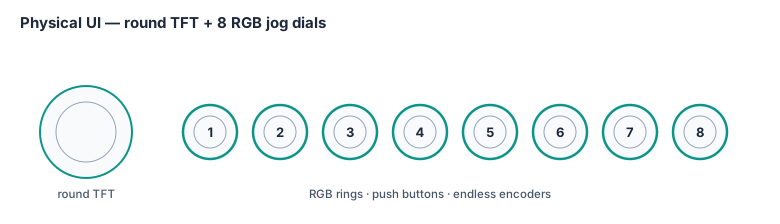
Physical UI — 8 Jog Dials (Pulse ESP32-P4)
Eight endless rotary encoders with integrated push buttons are connected directly to Pulse. Each dial optionally has an RGB LED (e.g. WS2812B/SK6812) driven via a single DMA-backed data line from Pulse — all 8 LEDs chained, full strip refresh in ~30µs, updated at 60 Hz.
Input Model (per dial)
Each dial provides three distinct physical inputs:
| Input | Action |
|---|---|
| Rotate | Increment / decrement current parameter (relative, no jump-on-pickup) |
| Push | Context action: confirm / reset to default / toggle mode |
| Push + Rotate | Fine adjust (smaller step size) or alternate parameter |
With one dial designated as Shift (hold push, turn others), effective logical control count is 24 without adding hardware.
Parameter Page System
8 dials cannot cover the full synth engine in one view. A paged system is used, with the current page indicated by dial LED colour. Turning any dial while on a page instantly updates that parameter in the FireStorm voice registers via Pulse.
| Page | LED Colour | Dial assignments |
|---|---|---|
| OSC | Amber | Osc1 pitch, Osc1 PW/WT pos, Osc2 pitch, Osc2 detune, Osc mix, Sub level, Noise level, Sync/mode |
| FILTER | Blue | Cutoff, Resonance, Filter type, Env amount, Env polarity, Key tracking, Drive, Filter routing |
| ENV | Green | Attack, Decay, Sustain, Release, ENV2 Attack, ENV2 Decay, ENV2 Sustain, ENV2 Release |
| LFO | Purple | LFO1 rate, LFO1 depth, LFO1 waveform, LFO1 dest, LFO2 rate, LFO2 depth, LFO2 waveform, LFO2 dest |
| FX | Cyan | Chorus rate, Chorus depth, Chorus mode, Reverb size, Reverb mix, Delay time, Delay feedback, Master FX mix |
| MOD | White | Mod slot select, Source, Destination, Amount, ×4 quick-assign slots |
| 303 | Red | Cutoff, Resonance, Env mod, Decay, Accent, Slide time, Waveform (push=toggle), Tempo |
| PATCH | Magenta | Patch select, Bank select, Save, Compare, Voice count, Unison detune, Bend range, Portamento |
Page is selected by a dedicated page button (or double-tap any dial push), or via AntOS UI.
RGB LED Behaviour
Colour = Parameter Value (on active page)
Hue sweeps across the current parameter's range as the dial is turned:
Low value  ──────────────────────────────  High value
  Blue → Cyan → Green → Yellow → Orange → Red
Brightness = how far from default. At default value: dim. At extreme: full brightness. This means a quick glance shows the "shape" of a patch across all 8 parameters.
Breathing = Live Modulation
If a parameter is being modulated by an LFO or envelope, its LED breathes — pulsing in brightness at the modulation rate. Immediately shows what is moving without any display. At audio-rate modulation (FM), LED glows solid at modulation depth colour.
Page Colour Identity
When switching pages all 8 dials briefly flash their new page colour then settle into value-hue mode. You always know which page you are on from the tint of the LEDs.
303 Mode — Sequencer Feedback
In 303 mode the LEDs reflect the live sequencer state:
| Dial | RGB behaviour |
|---|---|
| Cutoff (1) | Flashes briefly on each MEG envelope trigger |
| Resonance (2) | Brightness tracks resonance value continuously |
| Env Mod (3) | Pulses on each note gate |
| Decay (4) | Glow duration tracks current decay time visually |
| Accent (5) | Builds in brightness across consecutive accented steps — mirrors the RC accent accumulation in hardware. Resets when accent chain breaks. |
| Slide (6) | Glows cyan during active portamento slide |
| Waveform (7) | Amber = sawtooth, Blue = square |
| Tempo (8) | Pulses white on every beat (16th note flash, brighter on beat 1) |
The accent dial building in brightness across repeated accents makes the accumulation circuit visible — an immediate diagnostic and a striking performance visual.
Shift / Modifier State
- Dial whose button is held as Shift: glows white
- Dials with available shift-functions: glow their page colour at reduced brightness
- Dials with no shift-function: go dark
Limit Warning
When a parameter reaches its minimum or maximum, the dial flashes white once — a tactile+visual "end stop" replacing any on-screen message.
Voice Activity (optional poly view)
In a dedicated "voice view" mode (hold page button), the 8 dials represent 8 of the 32 voice slots: lit = voice currently sounding, brightness = amplitude, colour = synthesis engine type (VA=amber, WT=blue, FM=yellow, granular=green, 303=red).
WS2812B / SK6812 Implementation on Pulse ESP32-P4
Pulse GPIO (1 pin) ──► WS2812B chain ──► LED0 ──► LED1 ──► ... ──► LED7- ESP32-P4 RMT peripheral generates the WS2812 protocol natively (RMT is designed for exactly this kind of asymmetric pulse-train output)
- DMA transfers 8× 24-bit GRB values (192 bits) per frame — negligible CPU overhead
- Refresh rate: 60 Hz (16.7ms frame time, well within WS2812B timing)
- Total data per frame: 24 bytes
- Power: ~20mA per LED at full white × 8 = 160mA max; run at 30-50% brightness for ~50-80mA total — easily supplied from the Pulse board regulator
Pulse maintains a uint8_t led_grb[8][3] buffer. The synth engine and sequencer write
into this buffer; a 60 Hz timer DMA-blasts it to the LED chain. No blocking, no polling.
MIDI Connectivity
The Ant64 has the full professional MIDI connectivity stack — both traditional and modern. The physical ports and routing run on Pulse ESP32-P4; the MIDI event processing — channel-to-synth mapping, program change, velocity, pitch-bend, and CC-to-parameter mapping — is handled by AMY's MIDI engine.
DIN MIDI (5-pin)
- MIDI In — receive notes, CC, program change, sysex, clock from any hardware device
- MIDI Out — transmit from internal sequencer to external hardware synths, drum machines, rack modules, vintage gear — anything made since 1983
- MIDI Thru — hardwired pass-through of MIDI In signal, no latency, no CPU involvement
DIN MIDI lives on a daughterboard fitted to the Audio Expansion Header — specifically the Studio I/O variant, which the Ant64C (Creative Edition) ships with from the factory. Cheaper daughterboards (and the Ant64S / Ant64 defaults) leave the DIN connectors off; the same Ant64 or Ant64S can be upgraded by fitting a Studio I/O daughterboard. The Ant64S and Ant64's stock configurations have USB MIDI only. Having all three DIN ports on the Ant64C makes it a first-class citizen in a traditional hardware MIDI studio — no adaptors needed for vintage gear.
MIDI Thru is increasingly rare on modern synths. The Waldorf Quantum MK2 had no DIN MIDI at all. The Ant64C restores the full traditional MIDI port set.
Wiring — reference circuit (daughterboard side)
MIDI is a 5 mA current loop at 31.25 kbaud, asymmetric: the transmitter supplies +5 V through a 220 Ω resistor (and drives the UART signal line through a second 220 Ω); the receiver opto-isolates the loop so the sender and receiver share no ground. On the DIN-5 connector, pin 4 is the current source, pin 5 the current sink, and pin 2 is the cable shield (grounded only at the transmitter end per the spec). Pins 1 and 3 are unused.
MIDI Out / MIDI Thru output stage
                +5 V
                 │
                 ├──── 220 Ω ────────────► DIN-5 pin 4
                 │
   UART_TX ──────┴──── 220 Ω ────────────► DIN-5 pin 5

                                            DIN-5 pin 2 ── no connection at TX end
                                                            (shield not grounded here)
MIDI In stage (galvanically opto-isolated, per MIDI 1.0)
                                          6N138 optocoupler
                                          ┌─────────────────┐
                                          │                 │  Pin 8 ── +5 V
   DIN-5 pin 4 ─── 220 Ω ────┬── A (2) ───┤                 │  Pin 7 ── NC
                             │            │                 │  Pin 5 ── GND
                          1N914 (clamp)   │                 │  Pin 6 ── (open collector)
                             │            │                 │            │
   DIN-5 pin 5 ──────────────┴── K (3) ───┤                 │            ├──► UART_RX
                                          │                 │            │
   DIN-5 pin 2 ── no connection at RX end └─────────────────┘        ~1 kΩ pull-up
                  (shield grounded only at TX)                            │
                                                                         +5 V
The spec-canonical part is the 6N138 Darlington optocoupler (shown). A faster modern alternative is the H11L1 (6-pin DIP with a built-in Schmitt-trigger output — no external pull-up required), which handles SysEx and dense MIDI streams more cleanly and is the recommended part for new designs. The 1N914 across the input LED clamps reverse polarity from miswired cables.
MIDI Thru — software-driven on a dedicated Pulse UART (up to three Thrus)
The daughterboard implements MIDI Thru in software rather than hardware: every MIDI byte received on the In port is re-transmitted by Pulse out a dedicated UART TX (header pin 20 for Thru 1, with pins 21 and 22 reserved on the header for Thru 2 and Thru 3 on future studio-router daughterboards). Each Thru TX drives its DIN-5 jack through the same 220 Ω / +5 V output stage as MIDI Out. The cost is roughly 1 ms of UART-buffer latency per Thru (negligible against sequencer quantisation and musical timing), in exchange for per-Thru programmable control of each stream:
- Filtering — drop selected channels, message types, or SysEx blocks
- Channelisation — remap channels on the fly (force everything to channel 1, etc.)
- Remapping — transpose notes, translate CCs, split keyboards, or merge in Pulse-generated MIDI alongside the incoming stream
- Conditional pass-through — gate the Thru output on tempo, song position, or any AntOS / Pulse state
For setups that need µs-level Thru latency, the spec-canonical hardware Thru (a 74HC14 Schmitt inverter buffering the post-opto signal into a second 220 Ω / +5 V output stage) remains a valid third-party daughterboard option — but the Studio I/O daughterboard does not fit it, since the software path gives up so little timing and offers so much more in return.
USB MIDI
- USB MIDI host — connect class-compliant MIDI controllers / keyboards (no driver needed at the controller end on any OS). The port is host-only; there is no USB MIDI device / slave mode.
- Simultaneously acts as MIDI host — can connect USB MIDI controllers directly (keyboards, pad controllers, wind controllers) without a computer in the chain
- MIDI over USB alongside DIN simultaneously — computer DAW + hardware rack at the same time
- AntOS exposes USB MIDI as a virtual port accessible from scripts and the workstation app
MIDI Feature Set (Pulse firmware)
- Full 16-channel receive and transmit
- MIDI clock master and slave — sync internal sequencer to external gear or DAW
- MIDI Machine Control (MMC) — transport control from DAW
- Sysex passthrough and sysex-based patch dump/restore
- MPE (MIDI Polyphonic Expression) receive — per-note pitch bend, pressure, slide from MPE controllers (Roli Seaboard, Linnstrument, Expressive E Osmose)
- MIDI Learn on all synth parameters — any knob/slider on any controller can map to any Ant64 parameter in real time
Pulse Sequencer
The Pulse ESP32-P4 runs a polyphonic multi-track sequencer alongside the MIDI and voice allocation engine. This is not a simple arpeggiator — it is a full composition tool. Its timing core is AMY's sample-accurate sequencer (48 PPQ, tempo-locked, clocked off the audio samples) — Pulse needed a sequencer system and AMY supplies it; the track types and features below are the Pulse application layer built on that engine.
Architecture
  Pulse Sequencer
  ├─ 16 tracks (any combination of types below)
  ├─ Up to 256 steps per pattern, variable step length (matches extended MOD / XM / IT pattern lengths; 16 / 32 / 64 are common settings, not limits)
  ├─ Pattern chain → Song mode (patterns → arrangement)
  ├─ MIDI clock sync (master or slave)
  └─ All output routed to:
       ├─ Internal FireStorm voice engine (any paradigm)
       ├─ DIN MIDI Out (control external hardware)
       └─ USB MIDI Out (control DAW / computer)
Track Types
| Track | Description |
|---|---|
| Melodic | Polyphonic pitch sequence, velocity, gate length per step |
| Drum/Rhythm | 16-slot per-step pattern, each slot → different MIDI note / voice |
| 303 Acid | 303-style step sequencer (pitch, gate, slide, accent per step) driving the TB-303 reference patch |
| Chord | Step-based chord sequence with voicing control |
| CC Automation | Records and plays back MIDI CC curves — automate any parameter |
| Arpeggiator | MIDI note input → arpeggiated output, multiple modes |
| Euclidean | Mathematical rhythm generation (hits, steps, rotation, offset) |
Sequencer Features
- Real-time recording — play notes live, capture to sequencer
- Step entry — program steps one at a time, 303-style
- Probability per step — 0–100% chance of triggering (generative / evolving patterns)
- Parameter locks — per-step value overrides for any synth parameter (Elektron-style)
- Swing / shuffle — adjustable timing offset on even steps
- Polyrhythm — each track can have independent step count and time division
- Pattern chain — order patterns into a song arrangement
- Live pattern switching — seamless pattern change on bar boundary
- MIDI thru routing — incoming MIDI notes merged with sequencer output on MIDI Out
303 Acid Track
Full per-step pitch, gate type (normal / extended), slide flag, accent flag — authentic Roland-style programming workflow driving the TB-303 reference patch. Multiple 303 tracks can run simultaneously (full acid setup: bass line + lead line + chord stab from one box) since each consumes one ordinary voice slot with the extras engaged.
Amiga MOD Player (Pulse) + MOD Editor (FireStorm EE)
The MOD system follows the same editor/player split as the live coder: the player runs bare-metal on Pulse; the editor is a page in the workstation app on the FireStorm EE FireStorm EE. The DeMon's role is limited to the IPC API that routes edited pattern data from the FireStorm EE to Pulse.
Pulse runs the player engine — pattern sequencer, effect processor, sample mixer, Paula emulation. It reads module files from DBFS or SD card and handles all real-time playback duties bare-metal at 300MHz.
FireStorm EE (Page K in the workstation app) provides the visual editor — pattern grid, track view, instrument editor, sample browser, song arranger. The musician edits here; changes are serialised and sent to Pulse via the DeMon IPC.
The original ProTracker MOD player ran on a 7.09MHz Motorola 68000. Pulse runs at 300MHz — roughly 40× the headroom — making a faithful, extended MOD player trivially accommodated alongside the live code player, sequencer, MIDI, jog dials, and SAM dispatch to DeMon speech synthesis.
Supported Formats
| Format | Origin | Channels | Notes |
|---|---|---|---|
| .MOD | Amiga ProTracker / SoundTracker | 4–8 | Original Amiga format — 31-sample, 64-pattern |
| .XM | FastTracker 2 (DOS) | Up to 32 | Extended patterns, envelopes, vibrato table |
| .S3M | ScreamTracker 3 (DOS) | Up to 32 | Stereo panning, OPL2 channel support |
| .IT | Impulse Tracker (DOS) | Up to 64 | Most expressive tracker format — filters, NNA |
The MOD player reads module files from DBFS or the SD card. Samples are streamed from storage for large modules rather than pre-loaded entirely into RAM.
Architecture on Pulse
  DBFS / SD card
       │
       │  Module file (samples + pattern data + song order)
       ▼
  Pattern sequencer
  ├─ Song position counter (order list → pattern index)
  ├─ Pattern step counter (rows 0–63 / 0–255)
  ├─ Per-channel note/instrument/effect parsing
  └─ Tick clock (BPM × ticks-per-row, default 6 ticks/row at 125 BPM)
       │
       ▼
  Effect processor (per channel, per tick)
  ├─ 0xy  Arpeggio        ├─ 3xx  Tone portamento
  ├─ 1xx  Porta up        ├─ 4xy  Vibrato
  ├─ 2xx  Porta down      ├─ Axy  Volume slide
  ├─ 5xy  Porta + vol     ├─ Bxx  Pattern jump
  ├─ 6xy  Vibrato + vol   ├─ Cxx  Set volume
  ├─ 7xy  Tremolo         ├─ Dxx  Pattern break
  ├─ 9xx  Sample offset   ├─ Exx  Extended effects
  └─ Fxx  Set speed/BPM   └─ Gxx  Set global volume
       │
       ▼
  Sample mixer (fixed-point, per channel)
  ├─ Linear interpolation between samples
  ├─ Amiga-accurate Paula hardware emulation (optional)
  │  └─ Low-pass filter characteristic (RC filter on Paula output)
  ├─ Per-channel volume + panning
  └─ Stereo mix bus → FireStorm audio output
Amiga Paula Emulation
The distinctive Amiga sound is partly the DAC and partly the Paula chip's hardware low-pass filter — a simple RC filter that rounded off the harsh edges of 8-bit samples. The MOD player offers:
- Accurate mode: Paula RC filter emulated per-channel — the authentic warm Amiga sound. Samples retain the characteristic 8-bit warmth.
- Clean mode: no filter — full-fidelity playback. 16-bit or 24-bit samples sound as sharp as the original recording allows.
- FireStorm mode: MOD channels routed as voice inputs to the VA engine — each channel feeds a ladder filter and BBD chorus. Amiga samples processed through fully analog-modelled circuitry. The intersection of 1985 and 2026.
Integration with the Sequencer and FireStorm
The MOD player is not isolated from the rest of the audio system:
- MOD channels can be routed to any FireStorm voice slot — the sample data feeds the sample engine directly, with all VA/filter/chorus processing available on top
- The MOD player's BPM clock can sync to the Pulse sequencer clock or MIDI clock — MOD patterns and tracker sequences run in tight synchronisation
- MOD note events can trigger the live coding interpreter (see below) — a MOD file can drive a live coding performance as its clock source
SMPS Player (Pulse) + SMPS Editor (FireStorm EE)
SMPS (Sega Music Player System) is the music driver format used across the Sega Mega Drive / Genesis library — Sonic the Hedgehog, Streets of Rage, Gunstar Heroes, Phantasy Star IV, and hundreds of others. It describes music in terms of FM operator parameters, note sequences, envelopes, LFO settings, tempos, and PSG (square wave) voices.
The Ant64 plays SMPS data natively through FireStorm's own synthesis engines — no chip emulation. The FireStorm FM engine is already a superset of what the YM2612 provides. SMPS is understood as a music format and its data mapped directly to FireStorm voice parameters. The result sounds like the original — or better, because FireStorm has no DAC ladder noise, no 8-bit depth limitation, and the full VA and effects chain available if wanted.
What SMPS Describes
SMPS files contain:
  Header
  ├─ Tempo (tick rate)
  ├─ Channel count (FM channels + PSG channels)
  ├─ Pointers to per-channel data blocks
  │
  Per FM channel data block:
  ├─ Instrument (FM voice) data:
  │   ├─ Algorithm (0–7) — operator routing
  │   ├─ Feedback level
  │   └─ Per-operator (4 operators):
  │       ├─ Multiple (frequency ratio)
  │       ├─ Detune
  │       ├─ Total level (volume/carrier level)
  │       ├─ Key scaling
  │       ├─ Attack rate
  │       ├─ First decay rate
  │       ├─ Second decay rate (sustain rate)
  │       ├─ Sustain level
  │       ├─ Release rate
  │       ├─ AM enable
  │       └─ SSG-EG (envelope generator shape)
  ├─ Note sequence (pitch + duration codes)
  ├─ Volume / pan settings
  ├─ LFO settings (rate, PM depth, AM depth)
  ├─ Modulation (vibrato, tremolo patterns)
  └─ Loop / repeat / jump commands
  │
  Per PSG channel data block:
  ├─ Note sequence (pitch + duration codes)
  ├─ Volume envelope pointer
  └─ Noise mode (channel 4 only: white / periodic)
  │
  DAC channel (channel 6, if used):
  └─ PCM sample index + playback commands
This is complete, self-contained music data. The synthesis parameters are all present in the file — there is nothing chip-specific about them. Operator ratios, envelope shapes, and note sequences are universal FM synthesis concepts. Algorithm 4 on a YM2612 is the same carrier/modulator topology as Algorithm 4 on any 4-operator FM engine.
Mapping SMPS to FireStorm
FM Channels (6 per SMPS file → FireStorm FM engine)
The YM2612 is a 4-operator, 8-algorithm FM engine with sine-only waveforms. FireStorm is 6-operator with free routing and 16 waveforms per operator — a proper superset. SMPS FM voices map directly:
  SMPS FM instrument           →   FireStorm FM voice
  ──────────────────────────────────────────────────
  Algorithm 0–7 (4-op routing) →   Operators 1–4, routing per algorithm
                                    Operators 5–6 unused (or add harmonics)
  Feedback level               →   Operator 1 self-modulation depth
  Operator multiple            →   Operator frequency ratio
  Operator detune              →   Fine detune (same concept)
  Total level                  →   Operator output level
  Key scaling                  →   Key scale rate
  Attack / decay / sustain     →   EG stage rates (same parameters)
  Release rate                 →   EG release
  AM enable                    →   LFO AM sensitivity
  SSG-EG                       →   Extended EG shape (FireStorm EG superset)
The 8 YM2612 algorithms map to FireStorm operator routing configurations:
  Algo 0: [1→2→3→4]           Serial stack (deepest FM modulation)
  Algo 1: [(1+2)→3→4]         Two carriers into 3
  Algo 2: [(1+(2→3))→4]       Mixed
  Algo 3: [((1→2)+3)→4]       Mixed
  Algo 4: [(1→2)+(3→4)]       Two pairs — FM bass + FM lead simultaneously
  Algo 5: [(1→(2+3+4))]       One modulator into three carriers
  Algo 6: [(1→2)+(3)+(4)]     One FM pair + two pure carriers
  Algo 7: [1+2+3+4]           All carriers — brightest, most additive
All 8 map exactly to FireStorm routing configurations. The additional operators (5, 6) can be left silent for faithful reproduction, or used to add harmonic richness beyond what the original could produce.
PSG Channels (3 square wave + 1 noise → FireStorm VA engine)
The SN76489 PSG provides three square wave oscillators and a noise channel. These map directly to FireStorm VA voices with the square/pulse waveform selected:
  SMPS PSG channel             →   FireStorm VA voice
  ──────────────────────────────────────────────────────
  Note pitch                   →   Phase accumulator frequency
  Volume envelope              →   VCA amplitude envelope
  Channel 4 white noise        →   VA noise oscillator
  Channel 4 periodic noise     →   VA oscillator at low frequency (buzzy pitch)
No filter or chorus added for default playback — clean square waves, faithfully reproducing the PSG character. Optional: VSA engine post-processing (slight LP filter to soften edges, or BitCrusher for authentic 4-bit volume steps).
DAC Channel (Channel 6 PCM → FireStorm Sample Engine)
SMPS Channel 6 switches between FM synthesis and 8-bit PCM playback — famously used for the electric bass slap in Sonic 1 and drum hits in many titles. PCM samples are stored in the SMPS data or referenced externally. These load directly into the FireStorm sample engine:
  SMPS DAC sample data (8-bit, ~8kHz)  →  FireStorm sample voice
  ├─ Upsampled to 48kHz (linear interpolation)
  ├─ Bit depth extended to 16-bit (dithered)
  └─ Played at original pitch via sample engine pitch tracking
Optional: the sample engine can apply the ladder filter and BBD chorus to DAC samples — the classic Mega Drive bass through a Juno chorus is an immediately recognisable and striking combination.
SMPS Format Variants
SMPS was extended and modified across Sega's library. The Pulse player handles the documented variants:
| Variant | Example games | Notes |
|---|---|---|
| SMPS Z80 | Sonic 1, Sonic 2, early MD | Original — data structure well documented |
| SMPS/68k | Sonic 3, S&K | 68k-resident driver, same data model |
| SMPS2 | Streets of Rage series | Extended PSG envelopes, extra features |
| Clone Driver v2 | Homebrew / fan games | Community standard, fully documented |
The community disassembly projects (S1/S2/S3 disassemblies, SMPS2ASM) produce clean, well-labelled SMPS data — these are ideal input for both the player and the editor.
Pulse SMPS Player Architecture
  SMPS file (from DBFS or SD card)
          │
          ▼
  Pulse SMPS parser (bare-metal, ESP32-P4 @ 400 MHz)
  ├─ Read header → channel count, tempo, channel pointers
  ├─ Load FM instrument tables into working memory
  ├─ Load note/duration/command sequences per channel
  └─ Initialise tick clock at specified tempo
          │
          ▼
  Pulse tick engine (same infrastructure as MOD and live code players)
  Per tick, per channel:
  ├─ Advance note pointer
  ├─ Decode note / rest / loop / jump commands
  ├─ Apply modulation (vibrato depth, tremolo)
  ├─ Apply volume / pan updates
  └─ Write voice parameters to FireStorm via OPI
          │
          ▼
  FireStorm FM engine (channels 1–6)
  FireStorm VA engine (PSG channels 1–3 + noise)
  FireStorm Sample engine (DAC channel 6)
          │
          ▼
  Mix bus → WM8960/WM8962 → audio output
The tick clock is shared with the MOD player and live coder — SMPS, MOD, and live code can run simultaneously, all locked to the same tempo reference.
SMPS Editor (Page V — Workstation App, FireStorm EE)
A dedicated workstation page for viewing, editing, and authoring SMPS data. The editor shows the music as it is — note sequences, FM instrument parameters, PSG envelopes — in a form the musician can understand and modify.
  ┌─────────────────────────────────────────────────────────────┐
  │  PAGE V — SMPS EDITOR                                       │
  │                                                             │
  │  File: green_hill.smps  Variant: SMPS Z80  [PLAY] [STOP]   │
  │                                                             │
  │  FM CH1  ████░░░░░░  Instrument 3  C4  tick 12/48          │
  │  FM CH2  ██████░░░░  Instrument 7  G3  tick 12/48          │
  │  FM CH3  ░░░░░░░░░░  (rest)                                 │
  │  FM CH4  ████░░░░░░  Instrument 1  E2  tick 06/48          │
  │  FM CH5  ██░░░░░░░░  Instrument 5  A3  tick 12/48          │
  │  FM CH6  ██████████  DAC sample 2  (bass slap)             │
  │  PSG 1   ████░░░░░░  C5  vol env 4                         │
  │  PSG 2   ░░░░░░░░░░  (rest)                                 │
  │  PSG 3   ██░░░░░░░░  G5  vol env 2                         │
  │  NOISE   ░░████░░░░  periodic  vol 10                       │
  │                                                             │
  │  [INSTRUMENTS]  [PATTERNS]  [SONG ORDER]  [EXPORT]         │
  └─────────────────────────────────────────────────────────────┘
Instrument editor: all 4-operator FM parameters for each SMPS instrument, with an algorithm diagram (same as Page F but constrained to 4-operator / 8-algorithm topology). Changes sent live to Pulse player while music is playing.
Pattern editor: note grid per channel — pitch, duration, volume, modulation commands. Familiar to anyone who has used a tracker.
Song editor: the SMPS channel data is structured as patterns with loop/jump commands — the song editor visualises this as an arrangement of segments.
Export: write modified data back as a valid SMPS binary — compatible with Mega Drive homebrew tools and emulators. Useful for fan composers and ROM hackers.
Convert to native: export the SMPS data as a native Ant64 FM patch set and piano roll sequence in Page R — converting Mega Drive music into a fully editable Ant64 arrangement with all native synthesis features available.
The Ant64 implements a live music coding interpreter in the tradition of Sonic Pi, TidalCycles, ORCA, and Foxdot — systems where music is written as code, evaluated while playing, and changes take effect at the next musical boundary without stopping or interrupting playback.
The key property that distinguishes live coding from conventional sequencing is temporal hot-swap: the musician edits and evaluates code while the music plays. The interpreter accepts the new definition, compiles it to an event stream, and slots it in at the next quantisation boundary — the next bar, the next 4 bars, or the next phrase, depending on configuration. No gap. No click. No restart.
Architecture
The system is split across three processors by role, with clear ownership at each level:
  FireStorm EE                FireStorm EE DeMon        Pulse ESP32-P4
  ─────────────────              ──────────────────        ─────────────────────
  Workstation App (bare metal)   AntOS (OS duties)         Hard real-time engines
  ────────────────────────────   ─────────────────         ─────────────────────
  Page L — Live Coder editor     IPC / transfer API        Live code player
  ├─ Code editor (syntax hl)     ├─ Receives compiled      ├─ Expression evaluator
  ├─ Evaluation feedback         │  data from FireStorm EE     ├─ Pattern → event stream
  ├─ Error display inline        ├─ Routes to Pulse        ├─ Tick clock
  ├─ Code history / versions     └─ OS / networking        ├─ Event queue
  └─ Output console                                        ├─ Quantised hot-swap
                                                           ├─ MIDI output
  MOD Editor                                               ├─ FireStorm regs
  ├─ Pattern / track view                                  │
  ├─ Sample browser                                        MOD player
  ├─ Instrument editor                                     ├─ Pattern sequencer
  └─ Song arranger                                         ├─ Effect processor
                                                           ├─ Sample mixer
                                                           └─ Paula emulation
Both editors live on the FireStorm EE, in the bare-metal workstation app alongside all other pages. Page L is the live coding editor. The MOD editor is a separate page (Page K — see below). The musician writes and edits everything here.
The DeMon handles OS duties only — AntOS networking, file management, debug server, gossip. Its role in the music pipeline is narrow and passive: it provides the API and IPC channel through which the FireStorm EE's editors send compiled pattern data down to Pulse. It does not parse, evaluate, or schedule anything musical.
Pulse owns both player engines — the MOD player and the live code player run bare-metal on Pulse at 300MHz. Pulse receives compiled pattern data from the big core (via DeMon IPC), holds it, and performs the atomic hot-swap at the next quantisation boundary. Pulse is the only processor that touches the tick clock and event queue. Both engines share Pulse's scheduler infrastructure — the same tick clock, the same event queue, the same FireStorm register write path.
The Live Coding Language
A small, purpose-designed expression language — not a general scripting language. Concise enough to type live, expressive enough to describe complex rhythmic and harmonic structures. Inspired by the pattern notation of TidalCycles and the readability of Sonic Pi.
  -- Basic pattern: note sequence at specified intervals
  play [c4 e4 g4 c5] every 1 bar

  -- Euclidean rhythm with velocity variation
  drum kick every euclid(3, 8) vel [100 80 90]

  -- Conditional: alternate every 2 bars
  play [c4 e4] |> alt [g3 b3] every 2 bars

  -- Parameter modulation: filter cutoff swept over 4 bars
  sweep cutoff 200 4000 over 4 bars

  -- Polyrhythm: two patterns at different cycle lengths
  play [c4 d4 e4 f4] every 3 steps
  play [g3 a3]       every 2 steps

  -- Sample trigger from MOD player sample bank
  trig sample "snare_amiga" every euclid(5, 16)

  -- Reference a FireStorm voice by name and set parameters
  voice "bass" | filter 800 | res 0.7 | play [c2 c2 g1 c2]

  -- Route output to MIDI channel
  play [c4 e4 g4] on midi 1
Patterns evaluate to event streams. The interpreter resolves them relative to the
current BPM and sends timestamped note-on/note-off and parameter events to Pulse's
scheduler. Every evaluation is quantised — every 1 bar means the change takes
effect at the next bar boundary, never mid-bar.
Hot-Swap Quantisation
  Musician edits code → hits Evaluate (Page L, FireStorm EE)
          │
          ▼
  FireStorm EE serialises the expression to a compact binary form
  and passes it to DeMon via hardware mailbox IPC
          │
          ▼
  DeMon (AntOS IPC API) routes the data to Pulse
  over hi-speed UART — its only role in this pipeline
          │
          ▼
  Pulse receives the compiled expression
  Pulse evaluator parses and generates the event stream
  (Pulse at 300MHz — typically < 2ms, well ahead of any bar boundary)
          │
          ▼
  Pulse holds the new stream in a pending slot
  continues playing the current active stream uninterrupted
          │
          ▼
  Next quantisation boundary (bar / phrase / configured interval)
          │
          ▼
  Pulse atomic swap: pending stream becomes active
  old stream discarded
  → No gap, no click, no restart — music continues uninterrupted
The quantisation interval is configurable: 1 beat, 1 bar, 2 bars, 4 bars, or manual (swap only when the musician explicitly triggers it). A tighter interval means faster response to edits; a wider interval means more musical coherence between changes.
Integration with Other Systems
The live coder is not isolated — it drives and interacts with the full audio system:
| Integration | Description |
|---|---|
| FireStorm voices | Any voice by name — full VA/FM/sample engine access |
| MOD player | Trigger MOD samples by name, sync to MOD BPM as clock source |
| TB-303 patch | Generate acid patterns procedurally — acid [c2 eb2 f2] slide [3,7] |
| Jog dials | Any dial assignable as a live variable — tempo = dial_1 * 200 |
| MIDI out | Drive external hardware — DIN MIDI, USB MIDI |
| FFT / spectrogram | Read live spectral data as input to pattern conditions |
| Euclidean rhythms | First-class euclid(hits, steps, rotation) operator |
| Probability | maybe(0.7) — 70% chance of triggering |
| Randomness | rand, choose [...], shuffle [...] — seeded or free |
Page L — Live Coder Editor (Workstation App, FireStorm EE)
A dedicated page in the workstation app. The musician writes and edits code here while the music plays. The editor renders to the HDMI output via the FireStorm rasteriser alongside any other active page.
  ┌────────────────────────────────────────────────────────┐
  │  PAGE L — LIVE CODER                                   │
  │                                                        │
  │  > play [c4 e4 g4 c5] every 1 bar                      │  ← active (green)
  │  > drum kick every euclid(3,8)                         │  ← active (green)
  │  > sweep cutoff 200 4000 over 4 bars_                  │  ← cursor
  │                                                        │
  │  [EVAL] at next bar  ·  BPM: 124  ·  Bar: 003.2        │
  │                                                        │
  │  ✓  pattern: c4 e4 g4 c5 — swapped at bar 003          │
  │  ✓  drum: euclid(3,8) — active                         │
  │  !  sweep: parse error — missing 'over'                │  ← error (amber)
  └────────────────────────────────────────────────────────┘
Features:
- Syntax highlighting — notes, keywords, operators, voice names in distinct colours
- Inline error display — errors shown on the relevant line, not a separate panel
- Evaluation status — each active expression shown with its swap status
- Bar/beat position counter — shows exactly where in the musical timeline the cursor is
- Code history — previous evaluations stored, navigable with jog dial
- Split view — two code buffers side by side, each evaluating independently
MUTEper expression — silence an active pattern without deleting itSOLO— mute all other active patterns, play only the selected one
Music Generation
The Ant64 supports music generation at three independent tiers, each with different latency, capability, and network dependency characteristics. All three produce the same output: note and pattern data in the same format as hand-edited content. Generated data flows into the editors — Page L, Page K, or Page R — where the musician can inspect, edit, reject, or accept it before it plays. Generation is a source, not an override.
  Generation tier
  ───────────────
  Tier 1: Algorithmic (FireStorm EE, instant, offline)   ──┐
  Tier 2: PIE inference (Pulse ESP32-P4, local, fast)        ──┼──→  Note / pattern data
  Tier 3: AI API (DeMon async, network)        ──┘     (same format as edited)
                                                                      │
                                                                      ▼
                                                           Page L — live coder
                                                           Page K — MOD editor
                                                           Page R — piano roll
                                                                      │
                                                                      ▼
                                                                Pulse player
Tier 1 — Algorithmic Generation (FireStorm EE)
Deterministic mathematical algorithms running bare-metal on the FireStorm EE. Instant output, no network, no model loading. These are the tools of formal and stochastic composition — the same methods used by Xenakis, Messiaen, Steve Reich, and the demoscene tracker community.
Euclidean Rhythms (Bjorklund's Algorithm)
Distribute N hits across M steps as evenly as possible. The resulting patterns correspond precisely to the core rhythmic patterns of every major world music tradition — they emerge from small integer ratios, not from cultural convention.
  euclid(2, 8)  = [x . . . x . . .]  ← Habanera / basic clave
  euclid(3, 8)  = [x . . x . . x .]  ← Afro-Cuban clave, tresillo
  euclid(4, 8)  = [x . x . x . x .]  ← Standard four-on-the-floor (even)
  euclid(5, 8)  = [x . x x . x x .]  ← Quintillo (Cuban)
  euclid(3, 16) = [x . . . . x . . . . . x . . . .]  ← Sparse kick pattern
  euclid(5, 12) = [x . . x . x . . x . x .]  ← Yoruba bell pattern (Bembé)
  euclid(7, 12) = [x . x x . x . x x . x .]  ← Bembé variation
  euclid(9, 16) = [x . x x . x . x . x x . x . x .]  ← Complex polyrhythm
The rotation parameter shifts the pattern by N steps — same hits, different downbeat:
euclid(3, 8, rotation: 2) starts two positions into the pattern, changing the
phrasing without changing the density.
First-class syntax in the live coder: drum kick every euclid(3, 8)
Markov Chains
Build a transition probability matrix from an existing sequence — a melody, a chord progression, a rhythm — and generate new sequences with the same statistical character. The generated output has the same "feel" as the input without repeating it literally.
  Training sequence (input):  C4 E4 G4 E4 C4 D4 F4 A4 F4 D4 ...
                                         │
                              Build transition matrix:
                              From C4 → E4 (0.6), D4 (0.3), G4 (0.1)
                              From E4 → G4 (0.5), C4 (0.3), D4 (0.2)
                              From G4 → E4 (0.7), A4 (0.2), C5 (0.1)
                                         │
                              Generate new sequence:
                              C4 → E4 → G4 → A4 → F4 → D4 → F4 → E4 ...
                              (statistically similar, not identical)
Order of the Markov chain determines how much context is used:
- Order 1: each note depends only on the previous note — loose, improvisational feel
- Order 2: each note depends on the previous two — more phrase coherence
- Order 3+: longer-range dependencies — closer to the training material's style
Training material can be: a melody played live into the sequencer, a loaded MIDI file, a MOD module's pattern data, or a manually entered note sequence in Page R.
L-Systems (Lindenmayer Systems)
Recursive string rewriting rules that produce self-similar, fractal-like structures. Originally developed to model plant growth, they produce musical phrases with natural hierarchical structure — phrases within phrases within phrases, all related by the same generative rule.
  Simple melodic L-system:
  Axiom:  A
  Rules:  A → A B A       (A expands to three elements)
          B → B A B       (B expands to three elements)
  Depth 1: A B A          (3 notes)
  Depth 2: ABA BAB ABA    (9 notes)
  Depth 3: (27 notes — self-similar phrase structure at 3 levels)

  Map symbols to musical elements:
  A = root note (C4), duration = 1 beat
  B = fifth (G4),  duration = 0.5 beat
  → Generates a self-similar melody with Fibonacci-length phrases
More complex rules can encode pitch, duration, dynamics, and articulation separately. L-systems produce the kind of recursive phrase structure found in Bach and in generative ambient music — coherent at multiple timescales simultaneously.
Cellular Automata
A grid of cells, each alive or dead, updated each step by local neighbourhood rules. Musical mapping: each row = one time step, each column = one pitch or drum voice. Live cells = note triggers. The evolution of the grid becomes the evolution of the music.
  Wolfram Rule 110 (computationally universal — generates complex non-repeating patterns):

  Step 0:  . . . . . . . . X . . . . . . .   ← single seed
  Step 1:  . . . . . . . X X . . . . . . .
  Step 2:  . . . . . . X X . . . . . . . .
  Step 3:  . . . . . X X X . . . . . . . .
  Step 4:  . . . . X X . X . . . . . . . .
  ...      (continues, never exactly repeating)

  Map to drum grid: X = hit, . = rest
  16 columns = 16 pitches or drum voices
  Each row = one bar step
  → Evolving, non-repeating rhythmic pattern from a single starting cell
Conway's Life mapped to a piano roll: stable structures (still lifes) = sustained chords; oscillators = repeating rhythmic figures; gliders = melodic lines that travel across the pitch space over time.
The seed pattern and the rule number are the only inputs. Different seeds with the same rule produce related but distinct patterns — a generative variation system with mathematical coherence.
Functional Harmony Generator
Generates chord progressions using tonal harmony rules: Roman numeral grammar, voice leading constraints, tension/resolution patterns, secondary dominants, borrowed chords, modal interchange.
  Key: C major
  Style: jazz (allows substitutions, extensions)

  Generate:
  I Maj7  →  VI m7  →  II m7  →  V7  →  I Maj7   ← basic ii-V-I with turnaround
  I Maj7  →  ♭VII7  →  IV Maj7  →  I               ← modal interchange (Mixolydian ♭VII)
  I Maj9  →  ♯IV ø7 →  IV Maj7  →  III7  →  VI7    ← tritone substitution chain

  Voice leading:
  ├─ Common tones held across chord changes where possible
  ├─ Contrary motion preferred over parallel motion
  ├─ No parallel fifths (classical) / allowed (jazz)
  └─ Voice range constraints per part (SATB or lead+bass)
Output: chord symbols + voice-led individual note sequences, ready to feed into the piano roll or live coder.
Stochastic / Probabilistic Generation
Xenakis formalised the use of probability distributions in musical composition. The Ant64 implements several:
| Distribution | Characteristic | Musical use |
|---|---|---|
| Gaussian | Bell curve around a centre | Pitch clusters around a tonic; velocity variation around a target level |
| Poisson | Event frequency over time | Note density — sparse or dense passages with statistical consistency |
| Random walk | Each step ±Δ from previous | Melodic lines that wander plausibly — not random jumps |
| Brownian (1/f²) | Slower drift than random walk | Slow harmonic movement, pad evolution |
| Pink noise (1/f) | Statistics match real music | Rhythmic and melodic sequences whose density variation matches natural music |
| Cauchy | Heavy-tailed — occasional large jumps | Surprising melodic leaps in otherwise stepwise lines |
Pink noise (1/f) is particularly significant: the amplitude spectrum of real music falls as approximately 1/f. Sequences generated with 1/f statistics are statistically indistinguishable from real music at the macro level — they have the same distribution of phrase lengths, interval sizes, and dynamic variation.
Fractals
Self-similar structures at multiple timescales. The Mandelbrot and Julia sets map to pitch and duration via boundary proximity. The dragon curve and Koch snowflake produce rhythmic patterns with fractal self-similarity.
More musically direct: fractal melody using the midpoint displacement algorithm. Start with two notes, recursively insert midpoints with a random offset that halves each recursion — produces a melody that is smooth at large scales but detailed at small scales. Sounds like natural melodic improvisation.
Tier 2 — Local Neural Inference (Pulse PIE + DeMon CM5)
Pulse is built on the ESP32-P4, which includes Espressif's PIE (Performance Instruction Extensions) — RISC-V SIMD-like instructions for AI and DSP work — and uses them for music-related inference. DeMon, a quad-core Raspberry Pi CM5 (ARM with NEON), is more capable still and handles system-level inference (speech, ambient analysis, etc.) and larger models.
PIE on Pulse's 400 MHz HP core is enough for small trained neural networks running locally with no network dependency (and the CM5 handles larger ones). The capacity is below a dedicated AI accelerator but comfortably above what a scalar 32-bit MCU could manage — appropriate for tight, musician-scale models rather than image-generation-scale ones.
What fits comfortably on PIE:
| Model type | Use | Notes |
|---|---|---|
| Small LSTM (1–2 layers, 128–256 hidden) | Melody continuation | Trained on a corpus — continues a started phrase in the same style |
| Tiny Transformer (2–4 heads, 64–128 dim) | Chord suggestion | Given a melody fragment, suggest appropriate harmony |
| Style classifier | Genre/mood detection | Classify the current playing style, feed back to generation |
| Groove quantiser | Humanise timing | Learned timing offsets per beat position — makes quantised patterns feel live |
Pulse runs the model from its 32MB PSRAM with PIE-accelerated INT8 / INT16 kernels. Inference time for a small LSTM over a few hundred tokens is well under 100ms — fast enough to generate the next bar before it needs to play. Results are written to FireStorm via OPI (for control parameters) or via the MIPI bulk data path (for sample or pattern data).
Model distribution via gossip network: trained model files are compact (LSTM ~500KB, tiny transformer ~2MB) and shareable over the Ant64 mesh. Musicians can share style models the same way they share patches.
Tier 3 — External AI Generation (AntOS AI Library, on DeMon)
The AntOS AI library provides async API access to external large language and music generation models over WiFi or Ethernet. The DeMon handles the network request; the FireStorm EE sent the prompt and receives the result; the result is queued as pattern data and plays when it arrives — latency is irrelevant because playback is quantised.
Supported API targets (configurable):
| Service | Generation type | Notes |
|---|---|---|
| OpenAI (GPT-4o / o1) | Natural language → note data | Prompt in plain English, result parsed to events |
| Anthropic (Claude) | Same | Structured music generation via system prompt |
| Google (Gemini) | Same | Also supports music description and analysis |
| MusicGen / AudioCraft | Audio generation | Result → Page S sample, not note data |
| ABC Notation endpoints | Score generation | ABC notation → note events — clean round-trip |
| Custom endpoint | Configurable | Point to any compatible API |
The request/response cycle:
  Musician types prompt on Page L or a dedicated generation panel
  (e.g. "16-bar walking bass line in Cm, jazz feel, medium tempo")
          │
          ▼
  FireStorm EE formats the request (note data format spec in system prompt)
  Passes to DeMon via mailbox IPC
          │
          ▼
  DeMon (AntOS AI library) makes the API call over WiFi/Ethernet
  Async — does not block the FireStorm EE or Pulse
          │
          ▼
  Response received — DeMon parses to note event format
  Passes result to FireStorm EE via mailbox IPC
          │
          ▼
  FireStorm EE inserts result into Page L / Page K / Page R for review
  Musician can edit, transpose, truncate, loop before committing
          │
          ▼
  Commit → Pulse player queue → plays at next quantisation boundary
Natural language generation examples (live coder syntax):
  -- Ask AI for a pattern (async — plays when response arrives)
  play ai("funky 16th-note bassline in E minor, syncopated")

  -- With style reference
  play ai("melody in the style of Boards of Canada, melancholic, C major")

  -- Rhythmic only
  drum ai("complex polyrhythmic pattern, 5 against 4, kick and hi-hat")

  -- Constrained — must fit current harmony
  play ai("fill in the gaps of this melody", context: current_bar)

  -- Chord progression
  chords ai("jazz reharmonisation of a I-IV-V in Bb")
The AI library formats a structured system prompt that specifies the output format (note name, octave, duration, velocity as JSON or a compact domain-specific format), ensuring the response can be reliably parsed to playable event data. The musician never sees the raw API response — only the musical result in the editor.
Offline graceful degradation: if no network is available, Tier 3 calls return an error with a suggestion to use a Tier 1 or Tier 2 equivalent. The system never hangs waiting for a network response — the timeout is configurable and short.
The Generative Feedback Loop
The three tiers combine with the spectral analysis pipeline to create a closed generative loop — generate, analyse, refine, regenerate:
  Tier 1/2/3 generation
          │
          ▼
  Pattern data → Pulse plays it
          │
          ▼
  Audio output → Page D spectrogram (live input mode)
          │
          ▼
  Spectral analysis → harmonic content extracted
          │
          ├──→  Feed harmonic data back as constraint to Tier 1
          │     ("generate variations that preserve these harmonics")
          │
          ├──→  SEND to Page H → edit harmonics → IFFT → new wavetable
          │     (the generated music reshapes the synthesis voice)
          │
          └──→  Feed to AI prompt as musical context (Tier 3)
                ("here is the spectral analysis of what I just played —
                  generate a complementary melody")
Generated music becomes input to synthesis source creation, which changes the timbre of the instrument that plays the next generation pass. Each cycle can produce something genuinely novel without any repetition.
Generation Language Extensions (Live Coder)
The live coder syntax gains first-class generation operators:
  -- Euclidean rhythm
  drum kick every euclid(3, 8)
  drum snare every euclid(2, 8, rotation: 4)

  -- Markov chain continuation from a seed sequence
  play markov(seed: [c4 e4 g4 e4 c4], order: 2, steps: 16)

  -- L-system melody
  play lsystem(axiom: "A", rules: {A: "ABA", B: "BAB"}, depth: 3, map: {A: c4, B: g4})

  -- Cellular automaton rhythm (Rule 110, 16-column drum grid)
  drum ca(rule: 110, seed: current_bar, voices: [kick snare hihat])

  -- Harmonic progression (functional harmony generator)
  chords harmony(key: "Cm", style: "jazz", bars: 8)

  -- Stochastic melody (Gaussian pitch around tonic, Poisson density)
  play stochastic(centre: c4, spread: 5, density: 0.6, steps: 16)

  -- Pink noise sequence (1/f statistics)
  play pink(root: c4, scale: "minor", steps: 32)

  -- Random walk melody
  play walk(start: c4, step: 2, steps: 16, scale: "dorian")

  -- Local PIE model continuation (on Pulse)
  play tpu(model: "blues_lstm", context: last_bars(4), steps: 8)

  -- External AI (async, plays when ready)
  play ai("melodic fill, 2 bars, match current harmony")

  -- Hybrid: generate with algorithm, humanise with PIE groove model
  play euclid(5, 16) |> humanise(model: "jazz_groove")
All generation operators produce event streams in the same format as hand-typed patterns. They can be piped through any live coder operator — transpose, reverse, stretch, filter, humanise — regardless of how they were generated.
Page G — Music Generator (Workstation App, FireStorm EE)
A dedicated workstation page for generation — separate from Page L (live coding) so the generation workflow has its own space without cluttering the code editor.
  ┌────────────────────────────────────────────────────────────┐
  │  PAGE G — MUSIC GENERATOR                                  │
  │                                                            │
  │  MODE: [Algorithmic ▼]  KEY: [Cm]  BARS: [8]  BPM: [124]   │
  │                                                            │
  │  Algorithm  ○ Euclidean  ● Markov  ○ L-System  ○ CA        │
  │             ○ Harmony    ○ Stoch.  ○ Pink noise            │
  │                                                            │
  │  Markov order: [2]   Seed: [current selection in Page R]   │
  │  Steps: [16]         Scale: [natural minor]                │
  │                                                            │
  │  [GENERATE]   [PREVIEW]   [SEND TO PAGE R]   [SEND TO L]   │
  │                                                            │
  │  AI PROMPT ─────────────────────────────────────────────   │
  │  > funky bassline in Cm, 8 bars, syncopated_               │
  │  [ASK AI]  Status: waiting for response...                 │
  │                                                            │
  │  PIE MODEL: [blues_lstm ▼]  Context: [last 4 bars]         │
  │  [CONTINUE]                                                │
  └────────────────────────────────────────────────────────────┘
All three tiers accessible from one page. Generated output previews in a small piano
roll at the bottom of the panel before committing. SEND TO PAGE R inserts into the
arrangement. SEND TO L inserts as a live coder expression.
Page G is added to the workstation page list alongside A, D, K, L, W, H, S, R, E, F, M.
Video System — Light Synth
The Ant64 has integrated audio-reactive video output — a light synth driven by the same synthesis engine data that produces the audio. Four modes: audio-reactive visualiser (waveform, FFT, Lissajous), synth parameter visualiser (each voice rendered as a visual element), generative light synth (MIDI/sequencer events drive procedural visuals), and VJ tool (MIDI-triggered clip playback with parameter control).
All audio system parameters are exposed as input data to the video system. Voice pitch, envelope state, LFO modulation, filter cutoff, and note velocity all map to visual parameters — position, colour, size, motion, brightness. The light synth treats video the way Tempest treats sound: parametric, generative, driven from synthesis data.
Full light synth documentation — modes, synthesis analogy table, scripting API, and hardware output specifications — is in the Display Architecture reference.
The audio system's role is to make its live data (voice states, FFT data, MIDI events, sequencer position) available to the video system via the AntOS scripting bindings. The display hardware (FireStorm compositor, output clocking, layer system) is entirely the display system's concern.
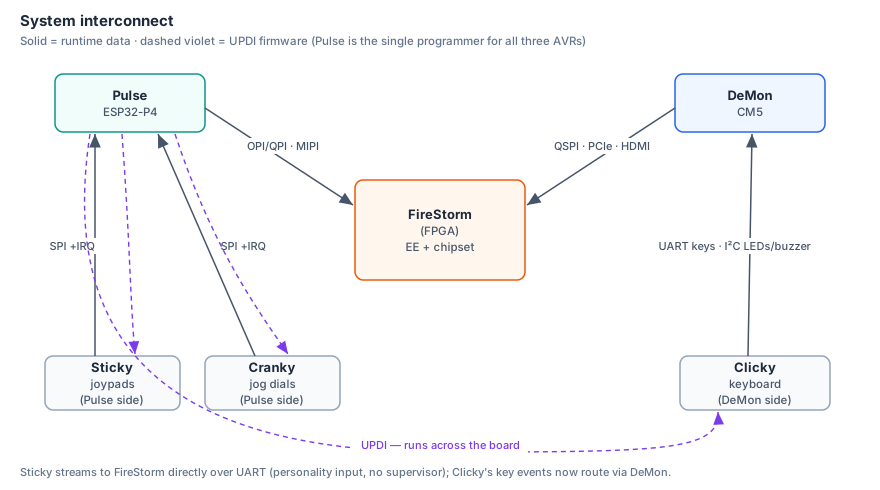
Complete System Overview
Pulling all capabilities together, the Ant64 is not a synthesizer with extras — it is a complete audio-visual instrument and MIDI hub.
┌──────────────────────────────────────────────────────────────────────────────┐
│                                 ANT64                                        │
│                                                                              │
│  ┌─────────────────────────────────────────────────────────────────────┐     │
│  │                  Application + OS compute                            │     │
│  │  ┌──────────────────────────┐   ┌───────────────────────────────┐   │     │
│  │  │  FireStorm EE (FPGA)     │   │  DeMon (CM5)                │   │     │
│  │  │  Bare metal · no OS      │   │  AntOS · Luau · DBFS          │   │     │
│  │  │  Music Workstation App   │◄─►│  Gossip · Shell · File mgmt   │   │     │
│  │  │  C++ · Dear ImGui        │   │  Hardware Mailbox IPC         │   │     │
│  │  └────────────┬─────────────┘   └───────────────────────────────┘   │     │
│  │               │ Register window — control plane                     │     │
│  │               │ MIPI 2-lane × 2 — supervisor UI feeds (DeMon, Pulse) │     │
│  └───────────────┼─────────────────────────────────────────────────────┘     │
│                  │                  ▲ SPI slave                              │
│  ┌───────────────▼──────────────────┴──────────────────────────────────┐     │
│  │                         FireStorm (FPGA)                            │     │
│  │    GoWin GW5AST-138                                                  │     │
│  │                                                                     │     │
│  │  FireStorm EE  ·  Audio DSP 128+ voices  ·  2D Rasterizer           │     │
│  │  Hard RISC-V debug core [GoWin 138k]                                │     │
│  │  VA · FM · Sample · Granular · Filters · BBD · Effects              │     │
│  │  Fixed-point · No float  ·  HDMI / VGA                                │     │
│  │  WM8960/WM8962 codec → speakers · phono · headphones · HDMI audio   │     │
│  │  Audio Expansion Header → clean line out + optical S/PDIF           │     │
│  │                                                                     │     │
│  │  36-bit SRAM bus (~4.5MB) · BSRAM (on-chip) · best-fit placement    │     │
│  │  DDR3 (72-bit, 4.5GB) — samples/wavetables/framebuffers               │     │
│  │  32MB HyperRAM (2 banks) — personality ROM/images                   │     │
│  └──┬──────────────────────────────────────────┬───────────────────────┘     │
│     │ OPI — register writes / control            │ JTAG (debug/program)      │
│     │ MIPI (2-lane D-PHY, 1.5 Gbps/lane) — UI overlay + bulk data        │          │
│  ┌──▼──────────────────────────────┐  ┌─────────▼──────────────────────┐     │
│  │        Pulse ESP32-P4             │  │        DeMon (CM5)            │     │
│  │  MIDI · Joypads · Jog dials     │  │  System supervisor             │     │
│  │  Audio sequencer · MIDI / AMY   │  │  JTAG → FireStorm EE + FireStorm     │     │
│  │  4× 3.5mm trigger/CV inputs     │  │                                │     │
│  │  USB MIDI host (host-only)      │  │  QSPI → FireStorm              │     │
│  │  DIN MIDI (Ant64C)              │  │  SPI slave ← FireStorm EE            │     │
│  │  8× RGB jog dials (WS2812B)     │  │  5 Mbit/s UART ↔ Pulse               │     │
│  │  5 Mbit/s UART ↔ DeMon                │  │  SPI master → Pulse            │     │
│  │  SPI ↔ DeMon (master + slave)   │  │  Boot · Watchdog · Debug       │     │
│  │                                 │  │  WiFi/BT (ESP-C5) · RTC        │     │
│  └─────────────────────────────────┘  └────────────────────────────────┘     │
│                                                                              │
│  OUTPUTS: 2× internal stereo speakers · Phono out · Headphones               │
│           Clean line out + Optical S/PDIF (audio expansion daughterboard)    │
│           HDMI / VGA · DIN MIDI (Ant64C) · USB MIDI                          │
│  INPUTS:  Stereo audio (phono) · DIN MIDI (Ant64C) · USB MIDI · Keyboard     │
└──────────────────────────────────────────────────────────────────────────────┘
How Does It Compare? Is There Anything Like It?
Short answer: No. Nothing like it exists or has existed.
The Ant64 occupies a category of one. To understand why, consider what you would need to buy to match its combined capabilities in 2026:
| Capability | Best dedicated hardware | Price |
|---|---|---|
| 128-voice VA + WT synth | Waldorf Kyra | ~€1,800 (discont.) |
| Full FM synthesis (6-op, DX7 compat) | Yamaha Montage M | ~€4,500 |
| Live sampling + S&S engine | Sequential Prophet X | ~€3,800 |
| Live granular input | Waldorf Quantum MK2 | ~€4,800 (discont.) |
| Multi-track hardware sequencer | Squarp Pyramid MK3 | ~€700 |
| DIN MIDI In/Out/Thru hub | iConnectivity mioXL | ~€400 |
| Video synthesizer / visualiser | Critter & Guitari EYESY | ~€500 |
| TB-303 acid patch with proper accent + overdrive | Roland TB-03 | ~€350 |
| Total | 8 separate devices | ~€16,850+ |
And that stack still wouldn't have:
- All three synthesis paradigms layerable per voice
- RGB performance UI on the synth controls
- DX7 sysex import
- Audio-reactive video tied directly to the synthesis engine
- An open, hackable FPGA DSP layer
- A unified OS (AntOS) tying everything together with a scripting language
The Closest Historical Precedents
Fairlight CMI (1979–85) — combined sampler + synthesis + sequencer + video display. Cost £20,000–£50,000. The Ant64 is architecturally more capable in synthesis depth and has video output where the Fairlight had only a CRT display.
Synclavier (1975–92) — FM + sampling + sequencer, professional studio standard. Cost $200,000+. The Ant64 has comparable synthesis capability in a hobby platform.
Edirol/Roland CG-8 Visual Synthesizer (2003) — combined MIDI-controlled audio and video synthesis. Discontinued. No audio synthesis — it was a video processor only. No current equivalent exists.
Conclusion: The Ant64 at full spec is the first hobbyist-accessible device to combine professional-grade polyphonic synthesis (all paradigms), a hardware sequencer, full MIDI connectivity, live sampling, and integrated video synthesis in a single open platform. The commercial equivalent does not exist in 2026.
Visual Editing System — Fairlight-Inspired
The Fairlight CMI's defining characteristic was not just its sound but its visual interface — a light pen on a green CRT that let you literally draw sounds, compose sequences on a grid, and sculpt waveforms by hand. In 1979–85 this cost £30,000. The Ant64 implements the same paradigm as a dedicated native C++ application — the Ant64 Music Workstation App — using Dear ImGui as the UI framework, rendered to the HDMI video output and navigated via the 8 jog dials plus mouse or stylus input.
This is a full standalone bare-metal C++ application on the FireStorm EE, using Dear ImGui as the UI framework, rendered to the HDMI video output via the FireStorm rasteriser, navigated via the 8 jog dials plus mouse or stylus. It communicates with FireStorm, Pulse, and DBFS over defined IPC interfaces. Think of it the way a DAW relates to an OS — it runs on the platform but is its own substantial piece of software with direct hardware access and no OS overhead.
The Fairlight's Pages — and Their Ant64 Equivalents
| Fairlight page | Function | Ant64 equivalent |
|---|---|---|
| Page 4 | 32 harmonic amplitude sliders | Page H — Harmonic Editor |
| Page 5 | Per-harmonic envelope profiles | Page H ENV view |
| Page 6 | Freehand waveform drawing | Page W — Waveform Drawing |
| Page 8 | Sample recording and display | Page S — Sample Editor |
| Page D | 3D spectral waterfall (STFT) | Page D — Spectral Waterfall (extended) |
| Page R | Graphical grid sequencer | Page R — Piano Roll Sequencer |
| (none) | Envelope ADSR visual editor | Page E — Envelope Editor |
| (none) | FM algorithm node graph | Page F — FM Algorithm Editor |
| (none) | Modulation matrix visual | Page M — Mod Matrix Editor |
| (none) | Phasor / DFT decomposition | Page A — Audio Analyser (new) |
| (none) | Live music coding editor | Page L — Live Coder (new) |
| (none) | MOD / tracker editor | Page K — MOD Editor (new) |
| (none) | SMPS / VGM editor | Page V — SMPS Editor (new) |
| (none) | Music generation | Page G — Music Generator (new) |
Input Devices for Visual Editing
The Fairlight used a light pen — a stylus held against the CRT that detected the electron beam position. The Ant64 equivalents:
| Input | Role |
|---|---|
| Mouse (USB, via DeMon) | Primary cursor control — point, click, drag to draw |
| 8 jog dials | Dial 1 = X cursor; Dial 2 = Y/amplitude; Dial 3–8 = context parameters; push = confirm/select |
| QWERTY keyboard (USB) | Command entry (Fairlight-style: type SAW, TRI, SIN) |
| Stylus tablet (USB, optional) | Pressure-sensitive drawing — stroke pressure → waveform amplitude |
| MIDI keyboard | Enter notes in sequencer grid by playing them live |
The jog-dial-as-cursor approach is particularly natural for waveform editing: Dial 1 steps through sample points, Dial 2 adjusts amplitude — fully navigable without a mouse if preferred. Exactly the tactile feel the Fairlight was going for.
Page W — Waveform Drawing (Fairlight Page 6)
Draw and sculpt a waveform cycle directly on screen. 256 points per cycle, amplitude range −128 to +127. Changes heard immediately — FireStorm updates within one frame.
Drawing modes:
- DRAW — freehand: drag cursor to paint amplitude continuously
- JOIN — each point joins the last with a straight line (Fairlight default)
- PLOT — set individual points without affecting neighbours
Macro waveforms — type or button-press fills current segment:
SAW · SQ n (square, pulse width n) · TRI · SIN · NOISE
Transform operations:
- INV — invert vertically (flip around zero)
- REV — reverse horizontally (mirror in time)
- SQZ — squeeze (compress amplitude toward zero — soften the wave)
- MRG — merge: interpolate all segments between two defined endpoints
- MIX — blend two waveforms at a user ratio (crossfade between timbres)
- CPY — copy segment to a range of segments
128-segment system — matching the Fairlight exactly:
- The full sound is divided into 128 time segments, each with its own waveform
- The sound evolves through all 128 as it plays — this is how you get organic, living timbres that change over time rather than a static waveform looping
- Draw segment 1 as a bright sawtooth, segment 64 as a sine, MRG between them: the sound smoothly morphs from harsh to pure over its duration
- This is the Fairlight's characteristic evolving pad / orchestral hit sound
Live preview — [PLAY] triggers the voice immediately on any keypress so you
hear your drawn waveform in context as you work.
Page H — Harmonic Editor (Fairlight Page 4/5)
Additive synthesis through visual harmonic control. 32 vertical sliders — one per harmonic partial — showing amplitude. Drag to sculpt the frequency spectrum directly.
Views:
- AMP — harmonic amplitudes (the fundamental timbral shape)
- PHASE — phase offset per partial (subtle textural effect)
- ENV — per-harmonic envelope decay rate (each partial fades at its own speed)
Per-harmonic envelopes are the Fairlight's secret for convincing acoustic sounds. High harmonics in a real piano decay faster than low ones. Draw steeper ENV curves for H8–H32 and flatter ones for H1–H4 — the result sounds like a real instrument's natural harmonic decay, not a filter envelope smearing everything together.
[→ PAGE W] converts the current harmonic profile to a waveform via IFFT — bridges
the additive synthesis view and the waveform drawing view.
Page S — Sample Editor (Fairlight Page 8/D)
Full visual waveform display for recorded samples. Scrollable, zoomable, with all standard sample editing operations controlled graphically.
Visual controls:
- Drag START, END, LOOP S, LOOP E markers along the waveform
- Shaded region shows the active loop with crossfade zone highlighted
- Zoom from full sample view down to individual sample cycles for precision loop setting
Operations:
- TRIM — remove audio outside markers · NORM — normalise to full scale
- REVERSE — flip in time · X-FADE — set loop crossfade length (0–100ms)
- RECORD — live waveform display as audio is captured — watch it draw itself in
All changes feed directly to FireStorm sample parameters. Loop crossfade length maps to the hardware crossfade DSP block in real time — no bounce/reload needed.
Page R — Graphical Sequencer (Fairlight Page R)
The piano roll. Click to place notes, drag to resize them, sweep to paint rhythms. The direct ancestor of every DAW piano roll in use today — the Ant64 has the original paradigm, hardware-native.
Grid editing:
- Click empty cell → place note · Drag right → extend length · Right-click → delete
- Hold and sweep across cells → paint multiple notes in one gesture
- MIDI keyboard input → notes appear at current step position in real time
Per-step detail (zoom in):
- Velocity shown as vertical fill within the cell
- Gate length shown as horizontal fill
- Probability shown as partial transparency (50% = 50% chance on each cycle)
- Parameter lock shown as a coloured dot (per-step timbre/filter/pitch override)
8 tracks, each independently configurable:
- Track type: melodic · drum · CC automation · 303 acid
- Track voice: any FireStorm voice, DIN MIDI channel, or USB MIDI channel
- Track step count: 1–256 independent per track (polyrhythm built-in; 64 is the Amiga ProTracker reference, longer patterns supported)
Song editor — patterns chain into a full arrangement: Patterns displayed as blocks in a timeline; drag to reorder, double-click to edit.
Page E — Envelope Editor
Visual multi-stage envelope editing. Drag breakpoints with mouse or navigate with Dial 1/2. All four envelopes per voice displayed simultaneously for comparison. ENV4 (8-stage loopable) shows all 8 breakpoints; drag to reshape complex LFO-like envelopes. Changes update FireStorm envelope parameters in real time.
Page F — FM Algorithm Editor
Visual node graph for FM operator routing. Each of the 8 operators is a box; modulation connections are arrows. Carriers (→ audio output) shown in green; modulators in amber.
Drag from one operator to another to create or destroy a modulation path. Click an operator to expand its parameters inline: frequency ratio, output level, envelope shape (mini-display), feedback amount.
Supports all 32 DX7 algorithms displayed as the original Yamaha diagrams, plus
completely free routing beyond anything DX7 offered — any operator can modulate any
other, including chains, stacks, and feedback loops. DX7 .syx import populates the
node graph automatically.
Page M — Modulation Matrix Editor
All 64 modulation slots displayed as a visual grid. Each active slot shown as a line: source on left, destination on right, line thickness proportional to modulation amount. Active modulators animate — thickness pulses with the modulator's live value so you can see every LFO and envelope moving in the display while the patch plays.
Page A — Audio Analyser (Phasor / DFT Decomposition)
Inspired by Sebastian Lague's Fourier transform visualisation. A single FFT frame of audio decomposed into individual rotating phasors — one circle per frequency component. Each circle's radius equals the component's amplitude; it rotates at that component's frequency. The tip of the final (outermost) phasor traces the reconstructed waveform in real time. This is the geometric intuition behind the Fourier transform made visible and interactive.
        ┌──────────────────────────────────────────────────────┐
        │  PAGE A — PHASOR DECOMPOSITION                       │
        │                                                      │
        │         ○──────────────────── fundamental            │
        │         │  ○──────────── 2nd harmonic                │
        │         │  │  ○──── 3rd harmonic                     │
        │         │  │  │  ● tip traces waveform               │
        │         │  │  │                                      │
        │  [amplitude rings rotating at each frequency]        │
        │                                                      │
        │  Right panel: reconstructed waveform (sum of all)    │
        │  Bottom: amplitude bars per harmonic (like Page H)   │
        └──────────────────────────────────────────────────────┘
Analysis engine (FireStorm EE):
- Cooley-Tukey FFT, 4096-point, Hann windowed
- At 44.1kHz: ~10.8Hz per bin — resolves individual harmonics of notes above ~20Hz
- Fundamental detection: autocorrelation or harmonic product spectrum
- Output: N amplitude + phase values for the detected harmonic series
Input sources (selectable):
- Loaded sample (from Page S)
- Live ADC input (mic or line in via WM8960/WM8962)
- Resample-own-output — analyse the live output of any FireStorm voice or the full mix
- Manual FFT on any memory buffer
Rendering (FireStorm rasteriser):
- Phasor circles: each drawn as an unfilled circle (radius = amplitude), endpoint dot
- Chain rendered sequentially — innermost (fundamental) first, tip of each feeds the next circle's centre
- Reconstructed waveform traced in a contrasting colour at the right
- Amplitude bars along the bottom mirror Page H (same data, different view)
- All rendered by FireStorm 2D rasteriser from a draw list built by the CPU — zero pixel work on the application processor
Key interaction:
- Jog dial 1: scrub through the input audio — phasors update per frame
- Jog dial 2: zoom into a frequency range
SENDcommand (or dedicated button): push current harmonic analysis directly to Page H — populates amplitude and phase sliders automaticallyFREEZEcommand: locks phasors at current frame for inspection
The resynthesis pipeline — closing the loop:
Live audio or sample
        ↓
    [FFT — Page A]
        ↓  SEND
    [Page H — edit amplitude, phase, per-harmonic envelope]
        ↓  IFFT
    [Page W — resulting waveform, editable further]
        ↓
    FireStorm wavetable playback (128–256 voices)
This is a genuine resynthesis workflow. The musician analyses a real-world sound, the Ant64 decomposes it to its harmonic content, they edit the harmonics by hand, and the result plays back as a synthesised voice. Nothing else in the current instrument market offers this as a first-class built-in workflow.
Page D — Spectral Analysis (Spectrogram, Waterfall, Spectrum)
Page D is the Ant64's full spectral analysis page. All four display modes draw from the same underlying Short-Time Fourier Transform (STFT) engine — they are different projections of identical data, switchable at any time without recomputing the analysis.
The spectrogram is the default and primary view: the most legible, the most useful for practical sound design, and the form used in professional audio analysis tools worldwide. The 3D waterfall is available as an alternate mode — a homage to the Fairlight CMI's iconic display, now running at 60fps with filled shading rather than the original's slow wireframe.
Mode 1 — Spectrogram (Default)
Time runs left to right, frequency runs bottom to top, amplitude is encoded as colour intensity. The entire life of a sound is visible at once as a 2D heat map. This is what audio engineers, researchers, and linguists actually use for analysis work.
  Freq │
  20k  │  ░░░░░░░░░░░░░░░░░░░░░░░░░░░░░░░░░░░░░░░░░░░░
  10k  │  ░░░░░░▓▓░░░░░░░░░░░░░░░░░░░░░░░░░░░░░░░░░░░░
   5k  │  ░░░░░░████░░░░░░░░░░░░░░░░▓░░░░░░░░░░░░░░░░░
   2k  │  ░░░░░░████▓░░░░░░░░░░░░░░░█░░░░░░░░░░░░░░░░░  ← formant
   1k  │  ░░░░░░████████▓▓░░░░░░░░░░█░░░░░░░░░░░░░░░░░
  500  │  ░░░░░████████████▓░░░░░░░░██▓░░░░░░░░░░░░░░░
  200  │  ░░░▓█████████████████▓▓░░░███████▓░░░░░░░░░░
  100  │  ░░░███████████████████████████████████▓░░░░░  ← fundamental
   20  │  ░░░░░░░░░░░░░░░░░░░░░░░░░░░░░░░░░░░░░░░░░░░░
       └──────────────────────────────────────────────→ Time
          ↑ attack                         ↑ tail off
Colour scale (cool → warm with amplitude):
  black → deep blue → cyan → green → yellow → orange → red → white
  silent                                                      loud
What becomes immediately visible:
| Feature | What you see |
|---|---|
| Attack transient | Bright vertical flash across all frequencies at note onset |
| Harmonic series | Horizontal bands at fundamental + partials, evenly spaced in log view |
| Inharmonicity | Slight stretching of partials — visible in piano, bells, metal |
| Formants | Broad bright horizontal bands — distinguish vowel sounds in voice |
| Vibrato / pitch drift | Horizontal bands that waver — out-of-tune recording visible immediately |
| Filter sweep | Bright energy moving up or down the frequency axis over time |
| Loop discontinuity | Smeared vertical burst at the loop point — find the click |
| Noise floor | Diffuse low-level colour across all frequencies |
| Room reflections | Faint echo of the attack transient arriving slightly later |
| Noise vs tone | Broadband noise = vertical smear; pure tone = thin horizontal line |
Practical uses:
- Sample editing: find exactly where to trim, where a loop click is, where the tail becomes pure noise
- Vocal analysis: see formant structure; tune DeMon SAM speech synth Throat/Mouth to match
- Filter design: watch the cutoff move in real time while turning a filter parameter
- Tuning: vibrato, drift, and intonation all visible without listening
- Patch comparison: load two samples, compare their spectrograms side by side
Mode 2 — 3D Waterfall (Fairlight Homage)
The Fairlight CMI's Page D — a 3D mountain-range display of the evolving spectrum. Frequency on X, amplitude on Y, time receding into Z. The Ant64 version runs at 60fps with filled, Gouraud-shaded polygons and the same cool-to-warm colour map as the spectrogram. The original Fairlight rendered a slow wireframe on hardware that was extraordinary for 1979 but would be a slideshow by modern standards.
        ┌──────────────────────────────────────────────────────┐
        │  MODE 2 — 3D WATERFALL                               │
        │                                                      │
        │  Z (time, past →)                                    │
        │   \                                                  │
        │    \  ████                                           │
        │     \ █  ████  █                                     │
        │      \█     █████  ██                                │
        │       ────────────────── X (frequency, low → high)   │
        │                Y = amplitude                         │
        │                                                      │
        │  Filled + Gouraud shaded · 60fps · amplitude → hue   │
        └──────────────────────────────────────────────────────┘
Best for: demonstrations, understanding the temporal shape of a sound intuitively, presentations, and the Fairlight CMI experience. Less practical than the spectrogram for detailed editing work — the 3D projection occludes information that the flat view makes explicit.
Jog dials 5 and 6 rotate the perspective (yaw and pitch) in real time.
Mode 3 — Live Spectrum (Single Frame)
A classic spectrum analyser bar display — frequency on X, amplitude on Y, for the current moment only. This is the mode you see on hi-fi equipment and DAW channel strips. Useful for checking a live mix, monitoring a voice's output character in real time, or watching a filter sweep without the time history of the spectrogram.
        ┌──────────────────────────────────────────────────────┐
        │  MODE 3 — LIVE SPECTRUM                              │
        │                                                      │
        │  dB                                                  │
        │   0  │         ██                                    │
        │ -12  │    ██  ████ █                                 │
        │ -24  │   ████ ████ ███ █                             │
        │ -36  │  ██████████ ████ ██  █                        │
        │ -48  │ ████████████████████████ ███                  │
        │       └──────────────────────────────── Freq →       │
        │  Peak hold · RMS overlay · dB scale switchable       │
        └──────────────────────────────────────────────────────┘
Features: peak hold (decaying dots above each bar), RMS overlay as a smooth curve, linear or logarithmic frequency axis, dB or linear amplitude scale. Updates at the full frame rate of the STFT hop — effectively real time.
Mode 4 — Phasor View (Link to Page A)
A live single-frame phasor decomposition — the same display as Page A but embedded in
Page D for quick access without leaving the spectral analysis context. Press PAGE A
to jump to the full Page A view for detailed interaction.
STFT Engine Parameters
Shared across all four modes.
The STFT Pipeline — Step by Step
The spectrogram is built by running a succession of overlapping FFT frames across the audio and stacking the results. Each step in the chain has a specific role:
  Audio stream (PCM, 44.1kHz)
          │
          │  Step 1 — SEGMENT
          │  Slice the audio into overlapping frames.
          │  Each frame is FFT_SIZE samples long.
          │  Each successive frame is offset by HOP_SIZE samples.
          │
          ├── frame 0:  samples    0 →  4095
          ├── frame 1:  samples  512 →  4607   (offset by hop = 512)
          ├── frame 2:  samples 1024 →  5119
          ├── frame 3:  samples 1536 →  5631
          │   ...
          │   overlap = FFT_SIZE − HOP_SIZE = 4096 − 512 = 3584 samples
          │   overlap ratio = 3584 / 4096 = 87.5%
          │
          │  Step 2 — WINDOW
          │  Multiply each frame sample-by-sample by the window function.
          │  Tapers the frame smoothly to zero at both edges.
          │  Eliminates the sharp discontinuity the FFT would otherwise see.
          │
          │      w[n] = 0.5 × (1 − cos(2π·n / (N−1)))   ← Hann window
          │
          │  Amplitude
          │    1.0 │        ╭─────────────╮
          │        │      ╭╯               ╰╮
          │    0.5 │    ╭╯                   ╰╮
          │        │  ╭╯                       ╰╮
          │    0.0 │╭╯                           ╰╮
          │        └───────────────────────────────  sample index 0 → N
          │
          │  Step 3 — FFT
          │  Cooley-Tukey FFT on the windowed frame.
          │  Output: N/2 complex bins, each representing one frequency component.
          │  Extract magnitude: |bin| = √(re² + im²)
          │  Extract phase:     φ     = atan2(im, re)   (used by Page A)
          │
          │  Step 4 — LOG / dB CONVERSION
          │  Convert linear magnitude to decibels:
          │
          │      dB[k] = 20 × log₁₀(magnitude[k] + ε)
          │
          │  ε is a small floor value (~10⁻¹⁰) to avoid log(0).
          │  Result: −96dB (silence / noise floor) to 0dB (full scale).
          │
          │  Step 5 — NORMALISE
          │  Map the dB range to 0.0 – 1.0:
          │
          │      t[k] = clamp((dB[k] − dB_floor) / (dB_ceil − dB_floor), 0, 1)
          │
          │  dB_floor and dB_ceil are user configurable (default: −96 to 0).
          │
          │  Step 6 — COLOUR LUT LOOKUP
          │  Use t[k] as an index into a 256-entry RGB colour lookup table.
          │  The LUT lives in FireStorm BRAM (256 × 3 bytes = 768 bytes).
          │  Swapping colour maps = writing a new LUT to BRAM — zero render cost.
          │
          │      pixel colour = LUT[round(t[k] × 255)]
          │
          └── Repeat for every frame → stack of colourised rows → spectrogram
The 87.5% overlap ratio sounds high but is correct for a Hann window. Because the window tapers to zero at the edges, samples near the frame boundaries are heavily attenuated. A 75–87.5% overlap ensures every audio sample falls near the centre of at least one frame where it carries full weight. Without sufficient overlap, faint events between frames can disappear entirely from the display.
Windowing — Spectral Leakage and Its Cure
The FFT assumes the analysis window is a fragment of an infinitely repeating signal. If the audio does not start and end at exactly the same value at the frame edges — which almost never happens with real-world sound — the FFT sees a sharp discontinuity. That discontinuity has energy at every frequency: a pure 440Hz tone smears energy into 441Hz, 450Hz, 600Hz and beyond. This is spectral leakage — energy appearing in bins it has no business being in, obscuring faint harmonics near strong ones.
Multiplying by a window function that tapers smoothly to zero at both edges eliminates the discontinuity. The Ant64 offers four window choices, selectable per analysis session:
| Window | Characteristics | Best for |
|---|---|---|
| Hann | Raised cosine, 2 terms. Good frequency resolution, good leakage suppression. The practical default for almost all audio work. | General purpose — synths, instruments, voice |
| Blackman-Harris | 4-term cosine. Very high leakage suppression (~92dB side-lobe rejection). Wider spectral peaks — less frequency precision, but faint harmonics near strong ones become visible. | Complex tonal sounds — distinguishing close harmonics |
| Flat-top | Optimised for amplitude accuracy, not frequency resolution. Very wide peaks, very accurate peak amplitude measurement. | Calibration — measuring the precise level of a specific harmonic |
| Rectangular | No windowing — maximum time resolution, maximum leakage. Every sample weighted equally. | Transient / percussion analysis — when timing matters more than frequency accuracy |
The Hann formula for reference (N = FFT size, n = sample index 0..N−1):
w[n] = 0.5 × (1 − cos(2πn / (N−1)))Colour Maps — Remapping Greyscale to Colour
Once each FFT bin magnitude is normalised to 0.0–1.0, it is mapped through a colour lookup table stored in FireStorm BRAM. The choice of colour map significantly affects what is visible — a naive greyscale misses quiet features; a poorly chosen colour scale can create false structure that looks like real signal.
Four maps are available, each suited to different tasks:
| Map | Colours | Character | Best for |
|---|---|---|---|
| Viridis | Dark purple → blue → teal → green → yellow → bright yellow | Perceptually uniform — equal steps in magnitude appear as equal steps in perceived brightness. Colourblind-safe. Readable printed in greyscale. | Default. General analysis, publication, colourblind users |
| Inferno | Black → deep red → orange → yellow → white | Slightly better quiet-end contrast than Viridis. Dramatic, high dynamic range feel. | Sounds with a lot of detail in the noise floor |
| Classic hot | Black → red → orange → yellow → white | Traditional audio analyser look. Familiar to DAW and spectrum analyser users. | Users coming from a DAW background |
| Green phosphor | Black → dark green → bright green → white | The Fairlight CMI aesthetic. Monochrome but with identity. | Mode 2 (3D Waterfall) — the authentic Fairlight look |
The LUT is 256 × 3 bytes = 768 bytes of BRAM — negligible. Switching maps at runtime is a single BRAM write from the CPU; the FireStorm rasteriser sees the new table immediately on the next frame with no pipeline stall.
Parameters Reference
| Parameter | Value | Notes |
|---|---|---|
| FFT size | 2048 or 4096 pt | User selectable — frequency vs. time resolution trade-off |
| Hop size | 512 samples | New frame every ~11.6ms at 44.1kHz; 87.5% overlap with 4096-pt FFT |
| Window | Hann (default) / Blackman-Harris / Flat-top / Rectangular | See window table above |
| Frequency resolution | ~10.8Hz/bin (4096pt) · ~21.5Hz/bin (2048pt) | Resolves harmonics of notes above ~20Hz at 4096pt |
| History depth | 128–1024 frames | 1.5 to 11.8 seconds at 44.1kHz / 512-hop |
| Colour map | Viridis (default) / Inferno / Classic hot / Green phosphor | LUT in FireStorm BRAM — zero-cost swap |
| dB range | −96dB to 0dB | Configurable floor and ceiling |
| Amplitude → colour | linear mag → log (dB) → normalise → LUT index | Full pipeline described above |
Frequency resolution trade-off:
  4096-point FFT:  fine frequency resolution (~10.8Hz/bin)   coarser time (~93ms/frame)
  2048-point FFT:  coarser frequency (~21.5Hz/bin)            finer time  (~46ms/frame)
For tonal sounds (synths, pitched instruments): use 4096. For percussive sounds (drums, transients): use 2048 — attack timing matters more than harmonic detail. The Rectangular window pairs naturally with 2048 for maximum transient precision.
Input Sources
All four modes share the same input selection:
| Source | Description |
|---|---|
| Loaded sample | Analysis run over entire sample offline — full history available |
| Live ADC | Mic or line in via WM8960/WM8962 — continuous real-time scrolling display |
| Resample-own-output | Any FireStorm voice or the full mix — watch synthesis live |
| Memory buffer | Any PCM buffer held in DBFS — for analysis of intermediate results |
Key Interactions
| Control | Action |
|---|---|
| Jog dial 1 | Time scrub / scroll speed |
| Jog dial 2 | Frequency zoom — focus on a harmonic region |
| Jog dial 3 | History depth / waterfall length |
| Jog dial 4 | Amplitude range / dB floor |
| Jog dial 5 | Perspective yaw (Mode 2 only) |
| Jog dial 6 | Perspective tilt / pitch (Mode 2 only) |
1 / 2 / 3 / 4 |
Switch display mode |
LOG / LIN |
Toggle log or linear frequency axis |
PLAY |
Scrub loaded sample — all modes scroll in sync |
MARK |
Place time cursor — use with Page S to jump to that sample point |
SEND |
Push selected frame's spectrum to Page A and Page H |
FREEZE |
Lock display at current frame for inspection |
Relationship to Other Pages
Page D shows the time evolution of the spectrum — the whole life of the sound. Page A shows a single moment — the geometric decomposition of one frozen frame. Page H exposes the harmonic content as editable sliders, fed by analysis from either. Page S shares the same time cursor — marks placed in Page D jump to the exact sample position in the waveform editor, making it easy to find a click or a loop problem and fix it without switching mental context.
  Page D (time cursor MARK)  ──────────→  Page S (jump to sample position)
  Page D (SEND one frame)    ──────────→  Page A (phasor view of that frame)
  Page D (SEND one frame)    ──────────→  Page H (harmonic sliders populated)
  Page A (SEND)              ──────────→  Page H (same path, from phasor view)
  Page H (IFFT)              ──────────→  Page W (resulting waveform)
  Page W                     ──────────→  FireStorm wavetable engine
Spectral Drawing — Painting Sound Directly onto the Spectrogram
Page D's spectrogram is not read-only. The drawing tools work directly on the frequency domain canvas — painting magnitude values per bin per frame. The ISTFT engine reconstructs audio from whatever is drawn, in real time. The spectrogram becomes a two-dimensional instrument: frequency is one axis, time is the other, and brightness is amplitude.
The Drawing Tools
| Tool | Behaviour | Sonic result |
|---|---|---|
| Pencil | Sets magnitude at cursor — brush size = frequency bandwidth | Pure tone or narrow band |
| Line | Sweep between two points — straight or curved | Glissando, pitch sweep |
| Fill | Flood fill a frequency region | Noise band — bandwidth = region height |
| Spray | Random magnitude scatter in a region | Textured, granular noise |
| Eraser | Sets bins to silence | Remove unwanted content |
| Clone | Copy a time-frequency region, paste elsewhere | Repeat a motif, delay effect |
| Mirror | Reflect a region horizontally or vertically | Symmetric spectral structures |
What You Draw — What You Hear
| Drawing | Sound |
|---|---|
| Horizontal line at fixed frequency | Sustained pure tone at that pitch |
| Diagonal line rising left to right | Glissando — smooth upward pitch sweep |
| Stack of horizontal lines at harmonic intervals | Pitched timbre — more lines = richer |
| Broad soft horizontal band | Filtered noise — bandwidth = band height |
| Formant blobs at ~500Hz, ~1500Hz, ~2500Hz | Vowel "ah" — move bands to change vowel |
| Short vertical smear | Click, transient, attack |
| Bright isolated dot | Short blip or percussive hit |
| Anything | Something worth hearing |
Phase Synthesis
Drawing provides magnitudes — phase must be synthesised. Three strategies:
| Mode | Method | Character |
|---|---|---|
| Coherent (default) | Phase advances per bin by 2π × k × hop / N each frame |
Clean, smooth tones — best for melodic drawing |
| Random | Independent random phase per bin per frame | Natural-sounding textures, noise, complex surfaces |
| Zero | All phases set to zero | Symmetric signal, can sound buzzy — useful for waveform design |
NOISE toggle switches between Coherent and Random. Coherent for pitched lines, Random
for textured fills — the two most common drawing scenarios.
ISTFT Reconstruction
The reverse of the analysis pipeline — drawn magnitudes reconstructed to PCM:
  Drawn spectrogram (magnitude per bin per frame)
          │
          │  Phase synthesis (coherent / random / zero)
          │  Combine magnitude + phase → complex FFT bins
          │
          ↓
  IFFT per frame → time-domain segment (N samples)
          │
          │  Multiply by synthesis Hann window
          │  (same window used in analysis — ensures perfect reconstruction
          │   when hop and window are matched)
          │
          ↓
  Overlap-add with hop size
  (successive frames summed at their offset positions)
          │
          ↓
  Continuous PCM audio stream → FireStorm output
Overlap-add with matched analysis and synthesis windows gives perfect reconstruction — a drawing that exactly reproduces the original spectrogram will produce audio indistinguishable from the original. Simplified drawings produce simplified audio. The quality of the reconstruction is entirely determined by what was drawn.
Playback is live — drawing and listening happen simultaneously. As the musician paints, the audio updates within one hop period (~11.6ms). The canvas is a live instrument.
Spectral Tracing — Simplifying Real Sounds
The reference layer places the original sound's spectrogram underneath the drawing canvas at reduced opacity, like tracing paper over a photograph. The musician draws on top — tracing the components they want, ignoring those they do not. Playback reconstructs only what was drawn.
  ┌─────────────────────────────────────────────────────────┐
  │  LAYER 0 — Reference (read-only, ghost)                 │
  │  Original sound spectrogram                             │
  │  50–70% opacity — visible but not dominant              │
  │  Plays back only when A/B mode held                     │
  ├─────────────────────────────────────────────────────────┤
  │  LAYER 1 — Drawing (editable, full opacity)             │
  │  User-drawn spectrogram — starts empty                  │
  │  This is what the ISTFT reconstructs and plays          │
  └─────────────────────────────────────────────────────────┘
Ghost opacity is controlled by jog dial 8. Hold AB to temporarily play the reference
layer for direct comparison. The ear judges the tracing quality faster than any meter.
What Tracing Reveals
The process of tracing is itself an education in acoustics. Working from coarse to fine:
  Pass 1 — Fundamental only
  A single horizontal line at the pitch of the note.
  Plays back as a pure sine wave. How much identity survives?
  Usually: recognisably the right pitch but no timbre.

  Pass 2 — Harmonics
  Add lines at 2×, 3×, 4× the fundamental.
  Match brightness to the original. Timbre begins to emerge.
  Three or four harmonics recovers much of the character.

  Pass 3 — Formants (for voice and acoustic instruments)
  Draw broad soft bands at the formant frequencies.
  For voice — ~500Hz, ~1500Hz, ~2500Hz for "ah".
  The vowel identity appears. Move the bands: the vowel changes.

  Pass 4 — Transients
  Short vertical smears at note attack points.
  Articulation and pluck/bow character return.

  Pass 5 — Noise (optional)
  Spray tool for breath, rosin, room, string noise.
  The difference between clinical and organic.
  Your choice whether to include it.
Each pass is a separate sub-layer, independently toggleable. Mute the noise layer alone to hear the clean tone underneath. Solo the formants to hear just the vowel character. The sub-layers are a spectral mixing desk — each drawn element is a channel.
What Tracing Achieves
Manual psychoacoustic compression. You decide which frequency content the ear actually needs. Often far less than the original recording contains. MP3 does this algorithmically; here the musician decides, with their ears as the judge. The result is frequently more musical than algorithmic compression because the choices are deliberate.
Clean noise reduction. Rather than subtracting an estimated noise floor (which leaves artefacts), draw only the signal content and leave the noise unpainted. It simply does not exist in the reconstruction.
Source separation by hand. Two instruments overlapping in a recording have different harmonic series. Trace one, ignore the other. Imperfect but often effective for melodic material where the fundamental lines are distinct.
Understanding a sound's identity. The tracing process reveals which components are perceptually essential. A violin traced to just four harmonics still sounds like a violin. Remove the transient smear and it loses its bow attack. Remove the noise layer and it loses its rosin. Each element's contribution becomes viscerally clear.
Spectral Drawing as Synthesis Source
Every synthesis engine on the Ant64 accepts sources derived from a spectrogram drawing. The drawing is a universal source editor — the physicist's view of sound made directly manipulable, with all three synthesis paradigms reachable from a single canvas.
Path 1 → Additive Synthesis / Wavetable (Page H / Page W)
The drawn horizontal lines are additive synthesis components. Each line is a sine oscillator at a given frequency with a magnitude that varies over time. The SEND command extracts the harmonic content from the drawing and populates Page H directly — amplitude sliders, phase values, and per-harmonic envelopes all filled from the drawing. IFFT converts to a waveform cycle in Page W. FireStorm plays it with 128 polyphonic voices.
What tracing adds that pure synthesis cannot: the relative amplitudes and formant positions were derived from a real-world sound. The acoustic physics of the original instrument constrain and guide the synthesis. The result starts in a space that already sounds plausible rather than requiring the musician to discover it from scratch.
Path 2 → Sample Engine (PCM)
Run the ISTFT over the full time extent of the drawing — not just one cycle, the entire canvas. The result is a PCM audio buffer. Load it directly into the sample engine as a new source. It plays back with the full sample engine feature set: pitch tracking, loop points, velocity layers, multi-sample key zones.
This is the right path for sounds that cannot be reduced to a repeating cycle:
- A traced vowel transition ("ah" → "ee") — formant bands move over time
- A traced drum hit — transient smear and tail as a single gesture
- A traced environmental texture — wind, breath, room, rain
- A drawn melodic phrase — time-varying pitch and amplitude by hand
The drawn version is always cleaner than the original: noise not drawn is not present. Bleed from other instruments not traced simply does not exist in the reconstruction. The sample engine then plays this cleaned, simplified source with full polyphony.
Path 3 → FM Synthesis (Page F)
The most analytical path. When the drawing contains a harmonic series — a fundamental and its partials — the frequency ratios between the drawn lines define an FM operator configuration:
  Traced harmonics:       100Hz  200Hz  300Hz  400Hz  500Hz
  Ratio to fundamental:    1:1    2:1    3:1    4:1    5:1
  FM operator ratios:     C=1   M=2    M=3    M=4    M=5
  Modulation indices:     derived from relative amplitudes of each partial
The system cannot fully auto-generate FM patches from complex drawings — the magnitude-to-index relationship is not straightforwardly invertible for arbitrary spectra. But it analyses the drawing and proposes a starting patch: detected ratios, suggested modulation indices, recommended algorithm. The musician opens Page F and refines from a meaningful starting point rather than a blank operator graph.
Inharmonic sounds are where this is most powerful. A bell's partials are slightly stretched — visible in the spectrogram as non-integer spacing. The analysis tells the musician immediately that a non-integer FM ratio is needed, and approximately what it should be. Metallic textures, physical models, and acoustic percussion all reveal their FM structure in the drawing.
The Unified Source Creation Pipeline
  Real-world sound / live input / own output
           │
           ▼
  Page D — load as reference (ghost layer, Layer 0)
           │
           ▼
  Draw / trace on Layer 1 — simplified, essential, intentional
           │
           │  Play back drawing during tracing — live ISTFT
           │  A/B against reference — ear judges quality
           │  Sub-layers: harmonics / formants / transients / noise
           │
           ├──── PATH 1 ──────────────────────────────────────────────┐
           │     SEND to Page H (harmonic sliders populated)          │
           │     Edit amplitude, phase, per-harmonic envelope         │
           │     IFFT → Page W (waveform cycle)                       │
           │     → FireStorm additive / wavetable engine              │
           │     → 128 polyphonic voices                              │
           │                                                          │
           ├──── PATH 2 ──────────────────────────────────────────────┤
           │     ISTFT full time extent → PCM buffer                  │
           │     → Sample engine (256 voices)                         │
           │     → Loop points, velocity layers, key zones            │
           │     → Cleaner than original — noise not drawn = absent   │
           │                                                          │
           ├──── PATH 3 ──────────────────────────────────────────────┤
           │     Harmonic ratio analysis → FM patch proposal          │
           │     → Page F (operator graph, suggested ratios + indices)│
           │     → Refine by ear                                      │
           │     → FM engine (128 voices)                             │
           │     → Especially powerful for inharmonic / metallic      │
           │                                                          │
           └──── PATH 4 ──────────────────────────────────────────────┘
                 ISTFT single cycle → Page W wavetable
                 → VA oscillator (wavetable mode)
                 → Nonlinear ladder filter + SVF
                 → BBD chorus · VCA envelope
                 → 128 polyphonic voices
                 → Drawing is raw material — filter/envelope/chorus
                   reshape it dynamically on every note
Path 4 → Analog / VA Engine (Wavetable Oscillator Mode)
The VA engine accepts any wavetable as its oscillator source — including one derived from a spectrogram drawing. This is distinct from the other three paths because the drawing is not the final sound: it is the input to an ongoing analog signal chain. The filter, envelope, chorus, and saturation all act on it dynamically, every note, in real time.
  Drawn / traced wavetable (from Page W via IFFT, or direct from Page D)
          │
          ▼
  VA oscillator — wavetable mode
  (cycles through the waveform at the played pitch, with BLEP anti-aliasing)
          │
          ▼
  Nonlinear ladder filter
  ← cutoff envelope (ADSR) · resonance · keyboard tracking · velocity mod
  ← self-oscillation available at high resonance
          │
          ▼
  SVF — parallel or series with ladder
  ← independent cutoff · character: LP / BP / HP / notch
          │
          ▼
  BBD chorus
  ← rate · depth · stereo spread · bucket-brigade clock rate
          │
          ▼
  VCA + amplifier envelope
          │
          ▼
  128 polyphonic voices
The filter does not know or care where the waveform came from. It processes whatever spectral content the wavetable contains with full analog nonlinearity — the tanh saturation in the ladder stages, the self-oscillation at high resonance, the phase relationships of the BBD delay line. These interactions are not predictable from the drawing alone; they emerge from the physics of the emulated circuit.
What this produces that other paths cannot:
A drawn wavetable through the VA chain is dynamically reshaped with every note. The filter sweeps, envelopes open and close, the chorus introduces time-varying modulation. The source is fixed; the sound is alive. The other three paths (additive, sample, FM) play back the drawn content more or less directly. Path 4 treats it as raw material.
Example combinations:
| Drawn source | VA treatment | Result |
|---|---|---|
| Traced violin harmonics | Moog ladder filter sweep | Violin-Moog hybrid — filter strips partials as cutoff closes, as it would a saw but with violin harmonic spacing |
| Drawn vowel "ah" formants | Ladder resonance at formant frequency + slow filter LFO | Talking filter — vowel character modulates with the resonance peak sweeping through it |
| Traced bell (inharmonic partials) | BBD chorus at slow rate | Metallic shimmer — chorus detune beats against the inharmonic partials, impossible to program conventionally |
| 303 extras (accent-RC + mismatched-ladder) on a traced bass clarinet wavetable | Diode ladder + accent RC | Acid character acting on clarinet harmonics — the resonant squeal at frequencies the original 303 never had. One of the new combinations the patch + extras pool model makes possible |
| M-86 hoover envelope shape + traced choir vowel | Detuned oscillators + filter snap | Hoover-vowel hybrid — the hoover envelope on vowel spectral content |
| Prime-numbered harmonics only (drawn) | Self-oscillating ladder + slow LFO | Unpredictable beating between the sparse harmonic series and the filter's own resonant frequency |
Wavetable scanning:
If the drawing spans multiple frames in time, the VA engine can scan through them — the oscillator advances through the wavetable as a function of note length, velocity, an LFO, or an envelope. A drawing that transitions from "ah" to "ee" over 2 seconds becomes a vowel-morphing oscillator source, with the filter adding its own movement on top. This is wavetable synthesis in the classical Waldorf/PPG sense, with the wavetable itself authored from a spectrogram drawing rather than pre-baked ROM.
Updating the unified pipeline:
Path 4 sits alongside Path 1 — both use Page W as the wavetable source. The difference is the destination: Path 1 feeds directly to the FireStorm additive engine; Path 4 routes through the full VA signal chain first.
  Draw / trace on Page D
           │
           └──── PATH 4 ──────────────────────────────────────────────┐
                 ISTFT single cycle → Page W wavetable                │
                 → VA oscillator (wavetable mode)                     │
                 → Nonlinear ladder filter + SVF                      │
                 → BBD chorus                                         │
                 → VCA envelope                                       │
                 → 128 polyphonic voices                              │
                 → Dynamic — filter, envelope, chorus reshape the     │
                   source on every note, in real time                 │
The key distinction across all four paths:
| Path | Engine | Source is... | Sound is... |
|---|---|---|---|
| 1 — Additive / WT | FireStorm wavetable | The final timbre | Static per cycle, dynamic via modulation matrix |
| 2 — Sample | PCM playback | The complete sound, full duration | As drawn — cleaned, simplified original |
| 3 — FM | Operator synthesis | A starting patch approximation | Dynamically generated from operator interaction |
| 4 — VA | Oscillator → analog chain | Raw spectral material | Continuously reshaped by filter, envelope, chorus |
Sounds That Have Never Existed
Because the drawing is unconstrained by physical acoustics, the musician can create sources impossible in the real world:
- The formant structure of a human vowel with the harmonic spacing of a bell
- The transient of a snare drum with the sustained body of a cello
- A voice that speaks in perfect harmonic series (every partial exactly integer)
- A piano with no inharmonicity — perfectly locked partials
- A sound with energy only at prime-numbered harmonics
- A choir vowel that morphs continuously from "ah" to "ee" to "oo" over 4 seconds
These are not available from any physical instrument, any sample library, or any conventional synthesis workflow. They exist only in the frequency domain, and the spectrogram canvas is the place to create them.
Gossip Network — Sharing Drawn Sources
Sources created by spectral drawing are compact:
| Source type | Typical size |
|---|---|
| Page H harmonic patch (64 harmonics, full envelopes) | ~4KB |
| Page W wavetable (256 samples, 16-bit) | 512 bytes |
| FM patch (8 operators, full parameters) | ~1KB |
| VA patch (wavetable + filter + envelope + chorus params) | ~2KB |
| PCM sample (4 seconds, 44.1kHz, 16-bit mono) | ~353KB |
All are shareable over the Ant64 gossip network to any other Ant64 on the same mesh. A musician on one machine traces a sound, creates a patch, shares it — another musician receives it, modifies the drawing, sends a variation back. Spectral tracing becomes a collaborative instrument design workflow across machines.
The Full Analysis-to-Synthesis Pipeline
 ┌──────────────────────────────────────────────────────────────────────┐
 │                        INPUT SOURCES                                 │
 │  Live ADC mic/line · Loaded sample · Resample-own-output             │
 │  Import image as sound (PNG pixel brightness → FFT magnitudes)       │
 └──────────────────────────┬───────────────────────────────────────────┘
                            │
            ┌───────────────▼─────────────────┐
            │   FFT / STFT ENGINE             │
            │   FireStorm EE              │
            │   Cooley-Tukey · 4096pt         │
            │   Hann / BH / Flat-top / Rect   │
            │   512-sample hop · 87.5% overlap│
            └───┬─────────────────────┬───────┘
                │                     │
   ┌────────────▼──────┐  ┌───────────▼───────────────────────────────┐
   │  PAGE A           │  │  PAGE D                                   │
   │  Phasor view      │  │  Mode 1: Spectrogram (default)            │
   │  Single frame     │  │  Mode 2: 3D Waterfall (Fairlight homage)  │
   │  Phase-aware      │  │  Mode 3: Live Spectrum (bar graph)        │
   │  Rotating circles │  │  Mode 4: Phasor (links Page A)            │
   │                   │  │                                           │
   │                   │  │  DRAWING TOOLS — canvas is live:          │
   │                   │  │  Layer 0: reference ghost (original)      │
   │                   │  │  Layer 1: drawing (plays back via ISTFT)  │
   │                   │  │  Sub-layers: harmonics / formants /       │
   │                   │  │             transients / noise            │
   └────────┬──────────┘  └──────────┬──────────────┬───────────┬────┬──────────┘
            │  SEND                  │ SEND         │ ISTFT     │ FM │ ISTFT
            │              (1 frame) │ to H+A       │ full time │ ↓  │ 1 cycle
            └──────────┬─────────────┘              │           │    │
                       │                            │           │    │
          ┌────────────▼────────────┐               │           │    │
          │  PAGE H                 │               │           │    │
          │  Harmonic Editor        │               │           │    │
          │  Amplitude · Phase      │               │           │    │
          │  Per-harmonic envelopes │               │           │    │
          └────────────┬────────────┘               │           │    │
                       │  IFFT                      │           │    │
          ┌────────────▼────────────┐               │           │    │
          │  PAGE W                 ├───────────────┼───────────┼────┘
          │  Waveform Drawing       │               │           │
          │  Fine sculpt post-IFFT  │               │           │
          └──────┬─────────────┬────┘               │           │
                 │             │                    │           │
                 │ (additive)  │ (VA wavetable)     │           │
          ┌──────▼──────┐  ┌───▼─────────────────┐  │           │
          │  FireStorm  │  │  VA ENGINE          │  │           │
          │  Additive / │  │  Wavetable osc      │  │           │
          │  Wavetable  │  │  Ladder filter      │  │           │
          │  128 voices │  │  SVF · BBD chorus   │  │           │
          └─────────────┘  │  VCA envelope       │  │           │
                           │  128 voices         │  │           │
                           └─────────────────────┘  │           │
                                          ┌─────────▼─────┐   ┌─▼──────────┐
                                          │  Sample Engine│   │  PAGE F    │
                                          │  PCM buffer   │   │  FM Graph  │
                                          │  256 voices   │   │  128 voices│
                                          │  Loop · Vel.  │   │  Inharmon- │
                                          └───────────────┘   │  ic ready  │
                                                              └────────────┘
This is a complete draw → play → refine → synthesise loop. A musician can take any sound from the real world, trace its essential components, discard what is not needed, and export the result to any of the four synthesis engines on the Ant64 — all without leaving the workstation app. Or they can draw from nothing, creating sounds constrained only by imagination rather than physical acoustics. The VA path in particular treats the drawing as raw material rather than a finished sound — handing it to the filter, chorus, and envelope to reshape dynamically on every note.
Application Architecture
FireStorm is the ImGui rendering backend for the workstation app.
The FireStorm EE builds the Dear ImGui draw list each frame — vertices, indices, and draw commands — and DMAs it to FireStorm, which rasterises it into the framebuffer in hardware. The CPU does zero pixel work. FireStorm's audio DSP and 2D rasteriser run on orthogonal FPGA resources and rarely contend for memory — hot data is split across BSRAM, the SRAM bus, and the wide 72-bit DDR3 by best fit. Full rendering architecture, rasteriser pipeline, and 3D two-pass LOD system are documented in the Display Architecture reference.
Why this matters for the music app: The FireStorm EE runs pure C++ application logic — patch management, sequencer state, UI event handling, DBFS I/O — with no OS overhead. The full FireStorm EE is available for application work. FireStorm handles all rendering in parallel with audio DSP.
FireStorm Internal Hard RISC-V Core
The GoWin GW5AST-138 FPGA contains a built-in hard RISC-V processor core — silicon on the die, not synthesized from LUTs. It is used for internal FireStorm hardware debugging.
What "hard" means: A soft RISC-V core implemented in LUTs would consume thousands of LUT4 resources — fabric that would otherwise be available for audio DSP voices or rasterizer logic. The hard core costs zero LUTs. It is free silicon, already there.
What it does on the Ant64:
The hard RISC-V runs independently of all other FireStorm activity, monitoring internal state and providing a debug window into the FPGA's live operation:
- Voice status monitoring — which FireStorm voices are active, envelope states, DSP pipeline occupancy
- Performance counters — audio DSP cycle budgets, rasterizer triangle throughput, memory bus utilisation on BSRAM, SRAM, DDR3
- Error detection — underruns, overflows, FIFO stalls, OPI protocol errors
- Register inspection — read/write any FireStorm register from inside the FPGA without going via the external OPI bus
- Debug stream output — sends status packets to DeMon over a dedicated internal channel; DeMon forwards them to AntOS on DeMon for display
- Assertion checking — configurable internal assertions that halt or flag specific voice states, timing violations, or data integrity issues during development
Why this matters for development:
Debugging an FPGA design traditionally means either adding logic analyser probes externally (slow, invasive) or instantiating an internal debug core like Xilinx's ILA (consumes LUTs). The hard RISC-V gives a third option: a resident debug processor that has full visibility into FireStorm's internals at silicon speed, consuming no programmable fabric, and communicating with the outside world through DeMon's existing JTAG and UART infrastructure.
It also has a role in production use — monitoring audio DSP health in real time and surfacing meaningful diagnostics to AntOS rather than opaque hardware failures.
Future FPGA: GoWin 7 Series (11nm)
By the time the Ant64 reaches production release, the GoWin 7 series at 11nm may be available. If so, the implications are significant:
What 11nm → 22nm means in practice:
- Roughly 2× the logic density for the same die area — a 138k-equivalent chip could shrink to half the size, or a same-size chip could offer ~250–300k LUTs
- Lower power consumption at equivalent clock speeds — important for a device with internal speakers and a passive or modest cooling solution
- Higher maximum clock speeds — the audio DSP pipeline and rasterizer could run faster, giving more margin for complex voice algorithms
- Potentially lower cost — smaller die at advanced node typically reduces per-chip cost once yields mature
What this means for the Ant64 architecture:
The FireStorm voice engine is designed to be node-agnostic — the fixed-point DSP pipeline, the OPI/MIPI interfaces, the memory controllers, are all defined functionally. Porting to a GoWin 7 series FPGA would be a re-synthesis and re-timing exercise, not a redesign. The same HDL runs on both.
If a GoWin 7 device with 200k+ LUTs at $26 or less becomes available, the Ant64 could realistically push beyond 128 voices without any architectural changes — simply more resources available for time-multiplexed DSP pipeline slots.
Current position: The design is proceeding on GoWin 138k (22nm, $26/chip confirmed). GoWin 7 series availability will be evaluated at the time. The architecture is designed to benefit from it without depending on it.
AntOS Debug Server / Client — Remote Ant64 Debugging
AntOS running on DeMon (the CM5) includes a built-in debug server and client. This means one Ant64 can debug another Ant64 over the network — no external probe, no USB cable, no debug pod required.
Ant64 A                              Ant64 B
─────────────────                    ──────────────────
AntOS on DeMon                       AntOS on DeMon
  dbg client                 WiFi      dbg server
  (developer machine)  ◄──────────►  (target machine)
       │                                    │
  AntOS shell                         exposes:
  - inspect memory                    - FireStorm EE memory
  - read registers                    - DeMon registers
  - set breakpoints                   - FireStorm state
  - stream logs                       - Pulse state
  - upload code                       - AntOS internals
  - control execution                 - log streams
What the debug server exposes on the target Ant64:
- FireStorm EE memory inspection — read/write any address in the FireStorm EE's address space, including FireStorm register map, shared DRAM regions, ImGui draw list buffers, voice parameter tables
- AntOS internals — scripting VM state, DBFS contents, gossip subsystem, active scripts and their stack traces
- DeMon passthrough — the dbg server can forward commands to DeMon, which in turn uses its JTAG to access FireStorm and the FireStorm EE debug ports. Full chip debug from a remote AntOS shell.
- FireStorm state (via DeMon JTAG) — voice registers, DSP pipeline state, hard RISC-V debug stream
- Pulse state (via DeMon SPI) — sequencer patterns, MIDI state, jog dial positions, LED buffer
- Live log streaming — all subsystem logs forwarded in real time to the client's AntOS terminal
Transport:
The debug server uses a standard TCP/IP socket connection — not gossip. Gossip is the right tool for P2P discovery and broadcast (patch sharing, presence, chat), but for a debug session you want a direct TCP connection: reliable, ordered, low latency, compatible with standard tooling, and no relay overhead.
- Connect by IP address or hostname over WiFi (ESP-C5 on DeMon) or Ethernet (Ant64C)
- Standard BSD socket API on both client and server — straightforward to implement in AntOS's network layer
- Gossip can be used for peer discovery — finding which Ant64s on the network have the debug server active — but the actual debug session runs over TCP directly
- Ant64C's Ethernet port gives a dedicated wired channel independent of WiFi, useful for high-bandwidth log streaming or memory dump operations
Security:
The debug server requires explicit activation in AntOS — it is off by default. Once enabled, it can be locked to specific peer addresses (by Ant64 identity from the gossip subsystem) so only a trusted machine can connect.
Practical workflow:
# On target Ant64B — enable debug server
> dbg server start

# On developer Ant64A — connect and inspect
> dbg connect ant64b.local
[connected to Ant64B]
dbg> memory read 0x08000000 64     # read FireStorm voice registers
dbg> log stream firestorm          # live FireStorm audio DSP log
dbg> script traceback            # AntOS script stack on target
dbg> demon jtag firestorm regs     # dump FireStorm registers via DeMon
Why this matters:
A developer with two Ant64s can sit at one machine running the music app and debug the other machine's AntOS scripts, FireStorm voice state, or Pulse sequencer live — without touching the target device, without interrupting its audio output, and without any external hardware. This is a significantly better development experience than most embedded platforms offer even with dedicated debug hardware.
It also means the Ant64 development community can help each other debug remotely — with permission, a community member can connect to another's Ant64 to help diagnose a FireStorm audio issue or an AntOS script problem.
ImGui draw list format — what the FireStorm EE sends to FireStorm each frame:
// ImDrawData structure (simplified):
ImDrawList {
    ImVector<ImDrawCmd>   CmdBuffer;   // draw commands
    ImVector<ImDrawIdx>   IdxBuffer;   // index buffer (uint16)
    ImVector<ImDrawVert>  VtxBuffer;   // vertex buffer
}

struct ImDrawVert {
    float    x, y;      // position
    float    u, v;      // texture coords (for font atlas)
    uint32_t col;       // RGBA colour
};

struct ImDrawCmd {
    uint32_t ElemCount;     // number of indices for this draw call
    ImTextureID TextureId;  // font atlas or null
    ImVec4 ClipRect;        // scissor rectangle
};
Every ImGui primitive — windows, buttons, waveform curves, piano roll notes, FM routing lines — is ultimately triangles in this format. FireStorm receives the packed vertex/index buffers via DMA and rasterises them in hardware. The full rasteriser pipeline is documented in the Display Architecture reference.
Audio Memory
The full system memory map is in the Memory Architecture reference; this section covers where audio data sits in the shared pool alongside graphics.
FireStorm draws on three kinds of memory, and audio and graphics each place their working data in whichever fits the job best — there are no per-function dedicated buses.
| Memory | Width / speed | Typical role |
|---|---|---|
| BSRAM (on-chip) | 380 MHz, single-cycle, ~765 KB | Hottest data: LUTs, per-voice state, sprite line buffers, draw-list staging |
| SRAM bus (external) | 36-bit, ~200 MHz, ~4.5 MB | Fast deterministic working sets; also carries the EE's wide-mode code |
| DDR3 (external) | 72-bit, DDR3-800, 7.2 GB/s, 4 GB | Bulk: sample libraries, wavetables, large framebuffers, scratch |
There is a single 36-bit SRAM bus. It is a shared resource: the EE fetches its wide-mode code from it, and the blitter, rasteriser, and audio DSP can place data there too when SRAM is the best fit. The 72-bit DDR3 (7.2 GB/s) carries the bulk audio and graphics load, and on-chip BSRAM absorbs the hottest single-cycle accesses. An arbiter shares the SRAM and DDR3 buses; the wide DDR3 plus the BSRAM scratchpad give enough aggregate bandwidth that real-time audio and a 60 fps rasteriser coexist comfortably.
Choosing where data lives
The rule is simply best memory fit for the job:
- BSRAM — single-cycle hot data: the audio DSP's lookup tables (FM sine 1024×, filter tanh 4096×, BLEP), per-voice envelope/LFO state, the rasteriser's sprite line buffers and draw-list staging. No external bus traffic at all.
- SRAM bus — fast deterministic working sets that outgrow BSRAM but want predictable latency: an active framebuffer, hot sample windows, short delay lines. (On the EE side the same bus also carries wide-mode code and data, no Harvard restriction — see the Memory Architecture reference for how code and chipset data are arbitrated.)
- DDR3 — everything bulk: long audio samples (piano multisamples, orchestras), wavetable banks, FM / sysex patch archives, large or high-resolution framebuffers, DBFS working buffers, MIPI staging, VJ clip storage. At up to 4.5 GB this is effectively unlimited for any musical purpose — a full multisample piano library might be 500 MB; a complete DX7 library is a few MB.
Audio sample precision
The audio word width follows the memory it lives in — 36-bit on the SRAM bus, 32-bit in standard configurations, 64-bit-packed in DDR3.
36-bit words (all bits data, no parity):
S4.31: ±15 full scale, 31 bits fractional, ~186 dB internal dynamic range- 4 integer bits = 7 bits of headroom when summing 128 voices — the mix bus cannot clip internally under any musical input
- FM phase accumulators: sub-cent accuracy across the full keyboard range
32-bit words:
S1.31: ±1 full scale, 31 bits fractional, same ~186 dB dynamic range- 1 integer bit with careful per-voice gain staging; still far beyond any commercial synth's internal precision — in practice indistinguishable in output quality
The long delay memory — BBD chorus (2048 samples), reverb FDN lines (8 × up to 4096), waveguide and granular buffers — sums to ~13.8 MB at 128 voices × 25 ms stereo, which exceeds both BSRAM and the SRAM bus, so the delay lines live in DDR3, with their hot taps and the small single-cycle tables held in BSRAM.
Audio and graphics run in parallel
Audio and graphics remain functionally parallel — the audio DSP and the rasteriser are independent hardware blocks on independent fabric, in different clock domains (audio clock vs pixel clock) with different access patterns (streaming + random LUT vs sequential framebuffer). What they share is memory, not logic: where both touch the same bus the arbiter interleaves them, and BSRAM plus the wide 72-bit DDR3 provide enough aggregate bandwidth for both to run in real time. An earlier design gave each a fully dedicated SRAM bus; consolidating to one SRAM bus plus a wider (72-bit) DDR3 trades guaranteed isolation for flexible best-fit placement with ample headroom.
Tier summary:
| Feature | Ant64C (Creative) | Ant64 (Power) | Ant64S (Starter) |
|---|---|---|---|
| FPGA | GoWin 138k | GoWin 138k | GoWin 138k |
| CPU | FireStorm EE, 4.5 GB DDR3 | FireStorm EE, 2.25 GB DDR3 | FireStorm EE, 1.125 GB DDR3 |
| FireStorm cores | 1 (multicore-ready) | 1 (multicore-ready) | 1 (multicore-ready) |
| FireStorm instruction width | 36-bit | 36-bit | 36-bit |
| FireStorm registers | 64 GPR + 64 FPR (wide) · 32+32 (narrow) | 64+64 (wide) · 32+32 (narrow) | 64+64 (wide) · 32+32 (narrow) |
| FPGA memory | 4.5GB | 2.25GB (→4.5GB) | 1.125GB (→4.5GB) |
| SRAM bus | 36-bit, ~4.5 MB | 36-bit, ~4.5 MB | 36-bit, ~4.5 MB |
| DDR3 | 72-bit, 4.5 GB | 72-bit, 2.25 GB (→4.5 GB) | 72-bit, 1.125 GB (→4.5 GB) |
| BSRAM (on-chip) | ~765 KB | ~765 KB | ~765 KB |
| Audio precision | S4.31 (36-bit) | S4.31 (36-bit) | S4.31 (36-bit) |
| Framebuffer format | RGB12 (3px/word) | RGB12 (3px/word) | RGB12 (3px/word) |
| Memory model | Best-fit across BSRAM / SRAM / DDR3 | Best-fit across BSRAM / SRAM / DDR3 | Best-fit across BSRAM / SRAM / DDR3 |
| Supervisors | Pulse + DeMon | Pulse + DeMon | Pulse + DeMon |
| DIN MIDI In/Out/Thru | ✔ | — | — |
| USB MIDI | ✔ | ✔ | ✔ |
| Optical digital audio | ✔ (FireStorm) | — | — |
| Ethernet | ✔ | — | — |
| WiFi | 2.4 + 5GHz | 2.4 + 5GHz | 2.4 + 5GHz |
| Display outputs | HDMI / VGA | HDMI / VGA | HDMI / VGA |
Ant64S (Starter) Memory Architecture
The Ant64S uses the same GoWin GW5AST-138 FPGA and the same memory architecture as the Ant64 — a 36-bit wide-mode SRAM bus (~4.5 MB), a 72-bit DDR3 controller (1.125 GB, user-upgradable to 4.5 GB), two 16 MB HyperRAM banks (32 MB total, the second on its own private bus), and ~765 KB of on-chip BSRAM. There is no separate reduced-memory design. The Ant64S ships 1.125 GB DDR3 versus the Ant64's 2.25 GB and the Ant64C's 4.5 GB; Ethernet is included on all three models, while DIN MIDI and optical audio remain Studio I/O features.
FireStorm on the Ant64S is the same single RV64GC core (multicore-ready), running both narrow and wide mode — the full 36-bit instruction width, the 64 GPR + 64 FPR wide register file, dual-issue, and all wide-mode-only extensions, exactly as on the larger models.
Ant64S is not a cut-down synthesiser. The audio engine, synthesis paradigms, voice architecture, FPGA fabric, and instruction set are all identical to the Ant64. The differences are the reduced peripheral set and the smaller shipped DDR3 (1.125 GB vs the Ant64's 2.25 GB, user-upgradable via the SODIMM) — not synthesis or compute, which are identical.
Font atlas — stored in FPGA BRAM (on-chip) as a pre-rendered 1bpp texture. FireStorm samples it in a single clock cycle without touching the framebuffer memory at all.
Performance envelope (rasterizer): At 720p/60fps, FireStorm has ~16.7ms per frame. A complex ImGui music editor frame with 15,000 triangles × 50 cycles @ 100MHz = 7.5ms rasterization. The 1.35MB draw list + framebuffer transfers take ~1ms at fast SRAM / DDR3 speeds. Total: ~8.5ms, leaving 8ms headroom. 1080p/60fps is achievable with a faster FPGA clock.
Trigger / CV Inputs — 4× 3.5mm TS Jacks
Four trigger/CV input ports on the jog dial controller (the Rotary satellite MCU, an ATtiny series AVR connected to Pulse via I2C). The jog dial controller runs at 5V natively, making 5V-compatible inputs straightforward.
Connector: 3.5mm TS mono jack — industry standard. Compatible with:
- Eurorack gate/trigger (0–10V)
- Teenage Engineering sync cables
- Roland/Korg sync
- Drum machine trigger outputs
- Footswitches
- Any CV gate source made in the last 40 years
Per-port pinout:
| Pin | Signal |
|---|---|
| Tip | Input signal |
| Sleeve | GND |
| (separate pin on PCB) | 5V out — powers passive sensors, LEDs, contact closures |
Protection circuit per input — NPN transistor buffer:
External signal (0–12V supported)
    │
   [R1 10kΩ] ── NPN base (2N3904 / BC547, ~3p each)
                    │              │
                Collector      Emitter ── GND
                    │
               [R2 10kΩ] ── 5V
                    │
ATtiny GPIO ── [100nF cap to GND]- R1 limits base current — safe at 0–12V input (Eurorack 10V gate: 1mA, well within ratings)
- Transistor saturates on high input → GPIO pulled LOW (inverted in firmware)
- MCU GPIO only ever sees 0 or 5V — fully isolated from external voltage
- Below ~0.6V threshold → transistor off → GPIO HIGH — excellent noise immunity
- 100nF cap provides hardware debounce for footswitches
The ATtiny's ADC mode (not just digital) gives:
- Configurable threshold detection in firmware
- Rough velocity from trigger slope (crossing speed)
- Input 3 or 4 can optionally act as 0–5V CV input for pitch/filter/parameter modulation, not just gates — configurable per port in AntOS
BOM per port: 2 resistors + 1 transistor + 1 capacitor + 1 jack = ~£0.15 Total for 4 ports: ~£0.60 additional component cost
Firmware routing (configurable in AntOS per port):
| Function | Description |
|---|---|
| Sidechain trigger | Duck specified voices on trigger — kick pumping effect |
| Secondary sidechain | Independent sidechain for snare gating, etc. |
| External clock / sync | Replace internal BPM — lock to drum machine, Eurorack |
| Note trigger | Trigger a specific voice or sequencer step |
| Punch-in effect | Activate KO II-style effect on trigger |
| Scene commit | Trigger a scene advance — hands-free live performance |
| Record arm | Footswitch to arm/disarm sampling without touching the machine |
| CV gate | 0–5V modulation → any FireStorm parameter via mod matrix |
Default suggested mapping:
- Input 1 → Sidechain A (kick)
- Input 2 → Sidechain B (snare / clap)
- Input 3 → External clock sync
- Input 4 → Footswitch / record arm
All remappable in AntOS.
Workstation App — IPC & UI Conventions
IPC — CPU ↔ Pulse:
- Jog dial events: Pulse sends encoder events to FireStorm EE via mailbox
- MIDI events: Pulse forwards to FireStorm EE for sequencer and UI feedback
- LED state: FireStorm EE writes to Pulse LED buffer (RGB for jog dials)
IPC — FireStorm EE ↔ DeMon (AntOS):
- Hardware mailbox registers: memory-mapped, interrupt-driven, non-blocking
- App → AntOS: DBFS load/save requests, sample load, MIDI route config
- AntOS → App: patch data ready, jog dial events, MIDI events, system events
Consistent UI conventions (all pages):
- Dial 1/2 = cursor X/Y navigation without mouse
- Dial 3–8 = context-sensitive parameter adjustment for current selection
- Any dial push = confirm / select / toggle
- Mouse primary for freehand drawing (waveform, harmonic sliders)
- MIDI keyboard = note input in Page R piano roll
Retro aesthetic option:
Green-on-black phosphor rendering mode, selectable per page. Implemented as an ImGui
style override — background #001400, foreground #00FF41, custom draw list colours.
Not a gimmick: the Fairlight's visual identity is inseparable from its cultural impact,
and having it as an option is a genuine homage. The music app ships with both a modern
colour theme and the classic phosphor theme.
Competitive Comparison and Cost Analysis
What Compares to the Ant64?
The honest answer is: nothing currently in production does. The Ant64 occupies a category that has no living occupant. To understand why, it helps to look at what each existing product does well, then see how many of them you would need to buy to match the Ant64's combined capability.
The Closest Competitors — and Their Gaps
Waldorf Kyra (FPGA, 128 voices, VA+WT)
The closest thing in voice count and FPGA architecture. Discontinued August 2023. Was the only other FPGA-based synthesizer with 128+ voices at production scale.
What it had: 128 voices, 8-part multitimbral, excellent VA sound, solid build. What it lacked: No FM, no sampling, no computer, no video, no speech synthesis, no DIN MIDI (desktop module only), poor software support that ultimately killed it, no open platform. Retail was ~€1,600–2,000 and is now gone.
Waldorf Quantum MK2 (hybrid, 16 voices)
The previous gold standard for synthesis depth per voice. Discontinued April 2025.
What it had: Excellent hybrid architecture, granular sampling, wavetable, live audio input, polyphonic aftertouch. What it lacked: Only 16 voices, no FM, no video, no computer, no DIN MIDI, closed platform, ~€4,800.
Sequential Prophet X (hybrid, 16 voices, ~€3,800)
Best-in-class sample+synthesis combination, excellent analog filters.
What it had: 150GB sample library, analog filters per voice, solid build quality. What it lacked: No live audio input (USB only for samples), 16 voices, no FM, no video, no computer, no speech synthesis, no open platform.
Access Virus TI2 (digital VA, 80 voices, ~€3,000)
The long-reigning high-polyphony VA synthesizer. Discontinued but still used widely.
What it had: 80 voices, excellent VA engine, solid FM-like features. What it lacked: No sampling, no video, no computer, no speech synthesis, closed.
Fairlight CMI (historical, 1979–1985)
The only machine that historically combined sampling, synthesis, sequencing, and visual editing in a single system with a comparable philosophy.
What it had: Everything the Ant64 draws inspiration from — visual waveform drawing, graphical sequencer (Page R), sampling, synthesis, the light pen interface. What it cost: £20,000–50,000 at launch (equivalent to £150,000–400,000 today). What it lacked vs Ant64: FM synthesis, 128+ voice polyphony, MIDI (early models), optical audio, retro speech synth, RGB control surface, open hackable platform.
The Stack You Would Need to Match Ant64C
| Ant64C capability | Closest equivalent | Price (2026) |
|---|---|---|
| 128-voice VA+WT synth | Waldorf Kyra (discontinued) | ~€1,600 used |
| Full FM synthesis (6-op+) | Yamaha Montage M / Modx+ | ~€2,000+ |
| Live sampling + S&S engine | Sequential Prophet X | ~€3,800 |
| Granular synthesis | Waldorf Quantum MK2 (discont.) | ~€3,500 used |
| DIN MIDI In/Out/Thru | iConnectivity mioXL hub | ~€400 |
| Multi-track hardware sequencer | Squarp Pyramid MK3 | ~€700 |
| TB-303 acid patch with proper accent + overdrive | Roland TB-03 | ~€350 |
| Video synthesizer / visualiser | Critter & Guitari EYESY | ~€500 |
| Fairlight-style visual editor | Nothing available | — |
| Retro speech synthesizer | Nothing available | — |
| Home computer (AntOS, coding) | Raspberry Pi 400 | ~€70 |
| Internal stereo speakers | External monitors | ~€100 |
| Optical audio out | External DAC | ~€100 |
| Total | 10+ separate devices | ~€13,000+ |
And that stack still doesn't give you: all synthesis engines layerable per voice, the RGB jog dial performance surface, DX7 sysex import, Fairlight-style waveform drawing, the open FPGA bitstream, the FireStorm EE custom execution engine, or the unified AntOS operating system tying everything together.
The Waldorf Kyra Is the Most Direct Point of Comparison
The Kyra was ~€1,600 at clearance for a 128-voice FPGA synth with no computer, no FM, no sampling, no video, no speech synthesis, and no active development. It was discontinued because it never fulfilled its potential — the FPGA was capable of far more than Waldorf ever shipped.
The Ant64 targets everything the Kyra had plus everything it never got plus things nobody has attempted in a single product. It is also open — the FPGA bitstream, the FireStorm EE ISA, AntOS — none of it is locked down. The community can add synthesis engines. The Kyra community could only petition Waldorf for updates and wait.
Why No One Has Done This Before
The combination that makes the Ant64 unique has been technically possible for several years but has not been commercially attempted because:
-
Commercial synth companies fear cannibalising existing product lines — a truly open, hackable synthesizer that does everything undermines upsell.
-
FPGA expertise is rare in music hardware companies — most synth makers use DSP chips or CPUs, not FPGAs. GoWin making competitive 138k FPGAs at accessible prices is relatively recent.
-
The home computer + synthesizer combination was last attempted in the 1980s (C64, Atari ST, Amiga) and the paradigm was abandoned as PCs and DAWs took over. Nobody has attempted to revive it with modern silicon until now.
-
Video + audio integration in a single instrument has simply never been productised for musicians. LZX makes video synths for visual artists. Synth companies make audio synths for musicians. Nobody built the bridge.